
Business Online Summit Ad Banner
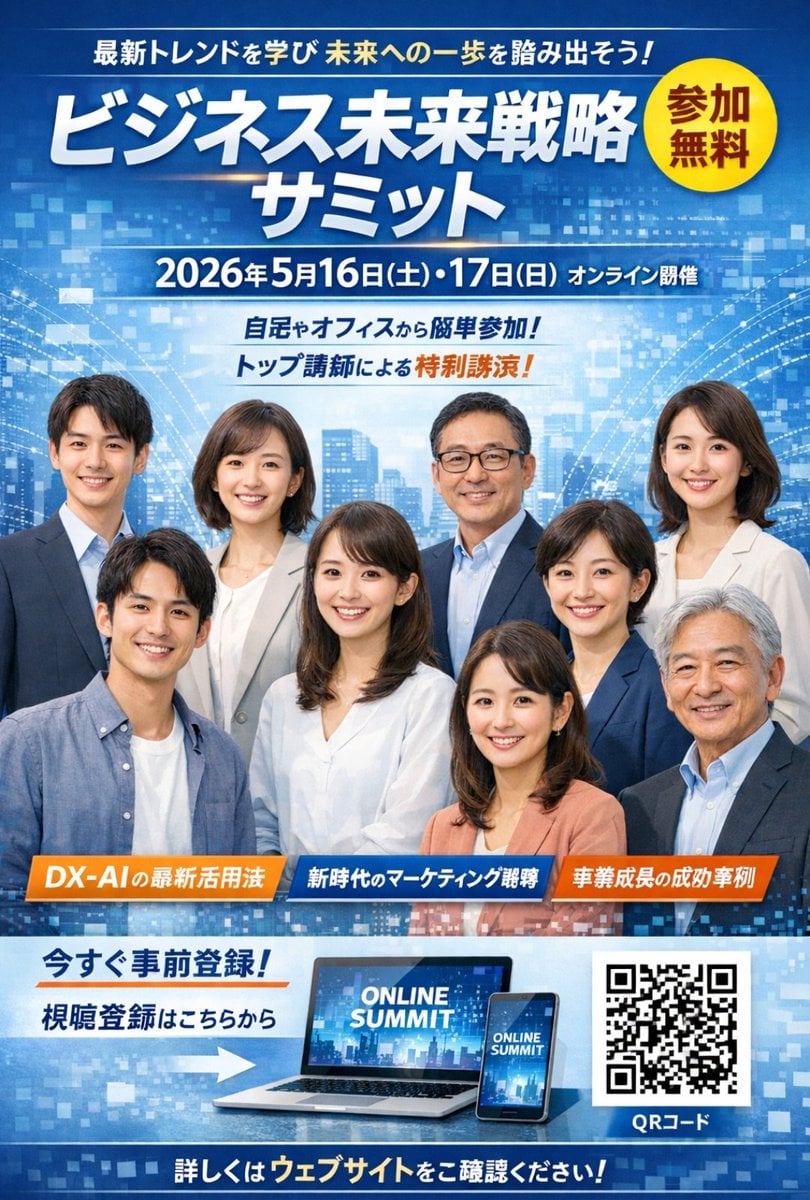
Generates a professional Japanese advertisement banner for an online business summit featuring a group portrait, event details, and registration CTA.
- Prompt included
- Model and format preset
- Free template
The prompt behind this image
Copy the exact prompt behind Business Online Summit Ad Banner, or open it in the studio and make it yours.
- Type
- business event advertisement banner
- Background
- abstract blue digital grid with glowing nodes and a faint modern cityscape silhouette
- Layout › Header › Catchphrase Top
- 最新トレンドを学び 未来への一歩を踏み出そう!
- Layout › Header › Main Title
- {argument name="main title" default="ビジネス未来戦略 サミット"}
- Layout › Header › Badge › Shape
- yellow circle
- Layout › Header › Badge › Text
- 参加 無料
- Layout › Header › Badge › Position
- top right
- Layout › Header › Date And Location
- {argument name="event date" default="2026年5月16日(土)・17日(日) オンライン開催"}
- Layout › Header › Sub Catchphrases
- 自宅やオフィスから簡単参加!, トップ講師による特別講演!
- Layout › Centerpiece › Description
- group portrait of smiling Japanese business professionals in smart casual and formal corporate attire
- Layout › Centerpiece › Count
- 9
- Layout › Topic Banners › Count
- 3
- Layout › Topic Banners › Style
- horizontal rectangular ribbons
- Layout › Topic Banners › Labels
- {argument name="topic 1" default="DX-AIの最新活用法"}, {argument name="topic 2" default="新時代のマーケティング戦略"}, {argument name="topic 3" default="事業成長の成功事例"}
- Layout › Footer › Call To Action › Text Lines
- 今すぐ事前登録!, 視聴登録はこちらから
- Layout › Footer › Call To Action › Icon
- right-pointing arrow
- Layout › Footer › Devices › Count
- 2
- Layout › Footer › Devices › Items
- laptop displaying 'ONLINE SUMMIT', smartphone displaying 'ONLINE SUMMIT'
- Layout › Footer › Qr Code › Count
- 1
- Layout › Footer › Qr Code › Label
- QRコード
- Layout › Footer › Bottom Bar
- 詳しくはウェブサイトをご確認ください!
Raw JSON
{
  "type": "business event advertisement banner",
  "background": "abstract blue digital grid with glowing nodes and a faint modern cityscape silhouette",
  "layout": {
    "header": {
      "catchphrase_top": "最新トレンドを学び 未来への一歩を踏み出そう!",
      "main_title": "{argument name=\"main title\" default=\"ビジネス未来戦略 サミット\"}",
      "badge": {
        "shape": "yellow circle",
        "text": "参加 無料",
        "position": "top right"
      },
      "date_and_location": "{argument name=\"event date\" default=\"2026年5月16日(土)・17日(日) オンライン開催\"}",
      "sub_catchphrases": [
        "自宅やオフィスから簡単参加!",
        "トップ講師による特別講演!"
      ]
    },
    "centerpiece": {
      "description": "group portrait of smiling Japanese business professionals in smart casual and formal corporate attire",
      "count": 9
    },
    "topic_banners": {
      "count": 3,
      "style": "horizontal rectangular ribbons",
      "labels": [
        "{argument name=\"topic 1\" default=\"DX-AIの最新活用法\"}",
        "{argument name=\"topic 2\" default=\"新時代のマーケティング戦略\"}",
        "{argument name=\"topic 3\" default=\"事業成長の成功事例\"}"
      ]
    },
    "footer": {
      "call_to_action": {
        "text_lines": [
          "今すぐ事前登録!",
          "視聴登録はこちらから"
        ],
        "icon": "right-pointing arrow"
      },
      "devices": {
        "count": 2,
        "items": [
          "laptop displaying 'ONLINE SUMMIT'",
          "smartphone displaying 'ONLINE SUMMIT'"
        ]
      },
      "qr_code": {
        "count": 1,
        "label": "QRコード"
      },
      "bottom_bar": "詳しくはウェブサイトをご確認ください!"
    }
  }
}How to use Business Online Summit Ad Banner in 3 steps
- 1Upload ImagePNG, JPG or paste
Add your photo
Upload the photo the template builds on. The prompt, model and format are already set.
- 2…a portrait of your subject in softgolden-hour light, 85mm…
Personalize
Edit the subject and creative details for your destination.
- 3Generate
Generate
Press Generate — your image is created in PicX Studio, so you can compare it with the original and refine one variable at a time.
More like this
Templates with the same subject, style or setup. Open one to see its prompt.
2x2 Grid of Online School Banner Ads

Coffee Boba Product Poster
Bird's-Eye View Mountain Summit Portrait

Surreal Light Bulb Business Meeting
Futuristic AI Summit Poster
Felt GPT Image 2 Apple Design Banner
13enBus iPhone Launch Banner

ChatGPT Bonus Banner Screenshot

Felt Craft Apple Design UI Banner

Flashy AI Appearance Consulting Sales Banner
Monochrome Cat Businessman Manga Page
Excel VBA Community Promo Banner
Make it yours
Business Online Summit Ad Banner works as-is. These are the safest ways to change it without losing the look.
Swap the setting
Keep the rest of the prompt and replace the location block. The current setting is “abstract blue digital grid with glowing nodes and a faint modern cityscape silho”.
Change one field
Copy a single group, rewrite it, and generate again so you can see what that field is doing.
Keep the frame, change the subject
Hold the composition and light of Business Online Summit Ad Banner, then swap wardrobe, props or the person for a new take.
| If the result… | Why | Fix |
|---|---|---|
| The result drifts from the preview | Too many fields changed at once. | Reuse Business Online Summit Ad Banner as-is first, then change one group — subject, light, or setting. |
| GPT Image 2 ignores part of the JSON | Some models flatten or skip nested keys. | Keep the same values and paste them as a short paragraph instead. |
More GPT Image 2 templates
Other prompts made for GPT Image 2.

Six VTuber Japanese Logo Sheet

Realistic Portrait of Woman and Deer

The Vista Modular Condo Poster

AI Model Routing Comparison Infographic

2.5D Anime Art Board

Isometric Productivity Desk Scene

New York Double Exposure Poster

Four-Panel AI Landscape Comparison

Japanese Tatami Lifestyle Magazine Cover

NESCAFÉ Coffee Map Poster
More image prompts
Fresh picks from across the catalog.
Carbon Fiber Typography

Luxury Car Golden Hour Shoot
High-Fidelity Mirror Selfie Prompt with Identity Locking
Custom Anime Vending Machine Design
Rain-Soaked Anonymous Cowboy

Cozy Bedroom Plush Portrait
Smoke Memory Portrait

Cinematic Action Scene: Explosion Behind High-Speed Car

Luxury Dream Home Real Estate Flyer
HSP3 Manga Introduction Comic
Browse template categories
Business Online Summit Ad Banner questions
How do I use the Business Online Summit Ad Banner template?
Add your photo if the template asks for one, edit the prompt if you like — the template's model and format are already selected — and press Generate. Your version opens in PicX Studio.
Can I customize the Business Online Summit Ad Banner template?
Yes. You can change the subject, setting, lighting, mood, format, and available model controls before creating your image.
Is the Business Online Summit Ad Banner template free?
Opening and editing this template is free. Generating uses credits, shown on the Generate button when you are signed in.
Which AI model should I use?
Start with GPT Image 2, which is the model associated with this template. You can compare another compatible model for a different finish.
Looking for something else? Browse all templates.

Your photo, any look
Thousands of ready templates for every top image and video model, from one credit balance.