How do I use the Holographic Fashion Brand Poster template?
Choose the primary action to open PicX Studio with the available template settings. Review the model and format, personalize the creative direction, and generate when ready.
A cinematic luxury fashion poster prompt for creating a glamorous Instagram-style AI influencer brand scene above the clouds. (free to use) — Free AI image template on PicX Studio.
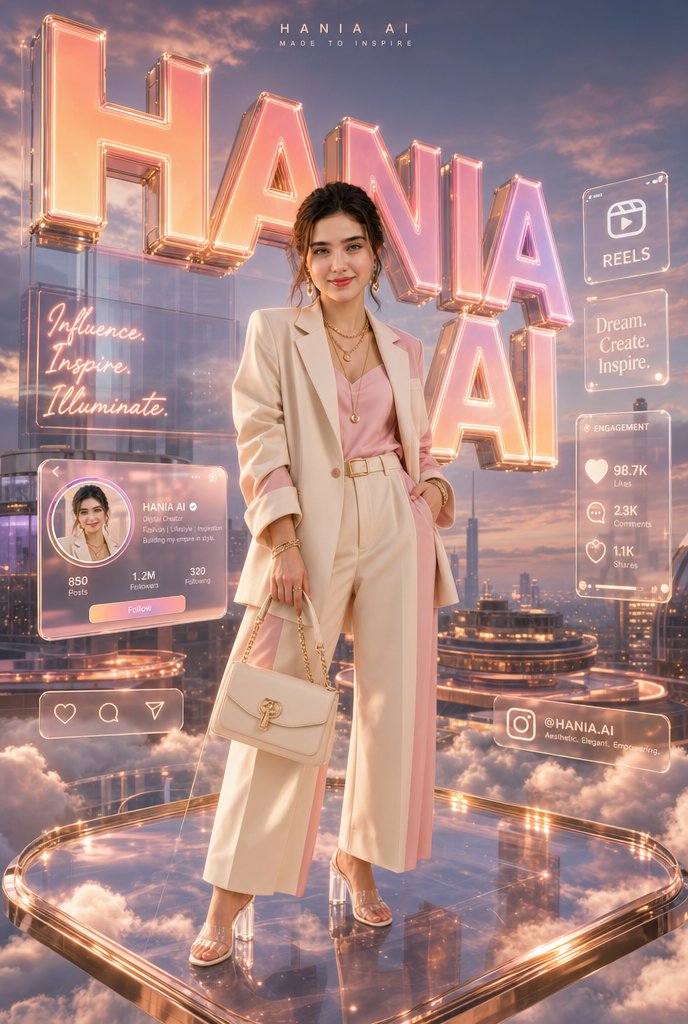
Goal: Create a premium Instagram-inspired cinematic fashion poster featuring {argument name="character name" default="HANIA AI"}, a glamorous young woman standing confidently on a floating transparent glass platform above soft clouds at golden hour, surrounded by glowing social-media holograms and monumental typography. Canvas: Vertical 2:3 poster, high-fashion editorial composition, full-body subject centered slightly lower than the huge background letters. Warm peach, champagne, blush pink, rose-gold, and violet-blue sunset palette. Ultra-polished, glossy, cinematic lighting with lens bloom and reflections. Main subject: A stylish young woman with softly styled wavy brown hair, wearing an elegant cream-white oversized blazer, pale pink satin/camisole top, high-waisted cream wide-leg trousers, layered gold necklaces, bracelets, and transparent high-heel sandals. She holds a small structured cream handbag with a gold chain and gold clasp. Pose is confident and relaxed, one hand in pocket, one hand holding the bag, looking toward camera. Environment: Futuristic luxury city skyline above the clouds, viewed from a rooftop-height fantasy perspective. The subject stands on exactly 1 rounded-square floating glass platform with glowing rose-gold illuminated edges, glossy reflections, and clouds visible underneath. Background sky is sunset with dramatic soft clouds and warm rim light. Typography installation: Behind the subject, create exactly 2 massive glossy translucent neon typography layers spelling {argument name="brand name" default="HANIA AI"}: the dominant oversized word “HANIA” across the upper background and a second huge stacked “AI” behind the subject on the right. Letters are 3D glass/acrylic, peach-pink illuminated from within, with rose-gold metallic outlines, bolts, and bright edge highlights. Top text: Add a small centered header near the top reading “HANIA AI” with spaced letters, and a smaller tagline beneath reading {argument name="tagline" default="MADE TO INSPIRE"}. Holographic interface elements: Include exactly 7 translucent glass UI panels/icons around the subject, all with soft glowing peach-white outlines: 1) left vertical neon quote panel reading “Influence. Inspire. Illuminate.” in handwritten script; 2) lower-left Instagram profile card with circular avatar, name “HANIA AI”, bio-style microtext, stats “850 Posts”, “1.2M Followers”, “320 Following”, and a pink-orange “Follow” button; 3) bottom-left rounded navigation bar with exactly 3 icons: heart, search, and paper-plane/send; 4) upper-right square Reels panel with a reels icon and the word “REELS”; 5) mid-right quote panel reading “Dream. Create. Inspire.”; 6) right engagement panel titled “ENGAGEMENT” listing exactly 3 metrics: heart “98.7K Likes”, comment “2.3K Comments”, share “1.1K Shares”; 7) bottom-right handle card with an Instagram icon, “@HANIA.AI”, and the small phrase “Aesthetic. Elegant. Empowering.” Style: Premium luxury social-media campaign, cinematic photorealism mixed with glossy holographic UI design, Instagram creator-brand aesthetic, soft bloom, atmospheric depth, reflective glass, rose-gold highlights, elegant fashion-magazine finish. Constraints: Keep all visible text crisp and legible, do not add extra UI panels beyond the exact 7 listed, do not add additional people, keep the platform floating above clouds, and maintain a polished aspirational fashion-poster mood.
Use Holographic Fashion Brand Poster to plan an AI image around gpt-image-2 generation, themes such as en and gpt-image-2. Match the preview's composition first, then personalize the subject, setting, and mood for your own project.
Use the primary action to load the template settings in PicX Studio.
Adjust the subject and creative details for your destination.
Create the image, compare the result with the preview, and refine one variable at a time.
A continuous mix — similar concepts first, woven with same-model prompts and fresh picks from the catalog.
Choose the primary action to open PicX Studio with the available template settings. Review the model and format, personalize the creative direction, and generate when ready.
Yes. You can change the subject, setting, lighting, mood, format, and available model controls before creating your image.
This template is free to open and customize. Generation usage is shown in PicX Studio before you create.
Start with gpt-image-2, which is the model associated with this template. You can compare another compatible model for a different finish.
Follow a topic to a crawlable collection of related PicX Studio templates.
39,157 public templates available. Verified via the PicX Studio public templates API; refreshed hourly.
A continuous mix — similar concepts first, woven with same-model prompts and fresh picks from the catalog.