How do I use the Rainy Jungle Man and Gorilla Portrait template?
Choose the primary action to open PicX Studio with the available template settings. Review the model and format, personalize the creative direction, and generate when ready.
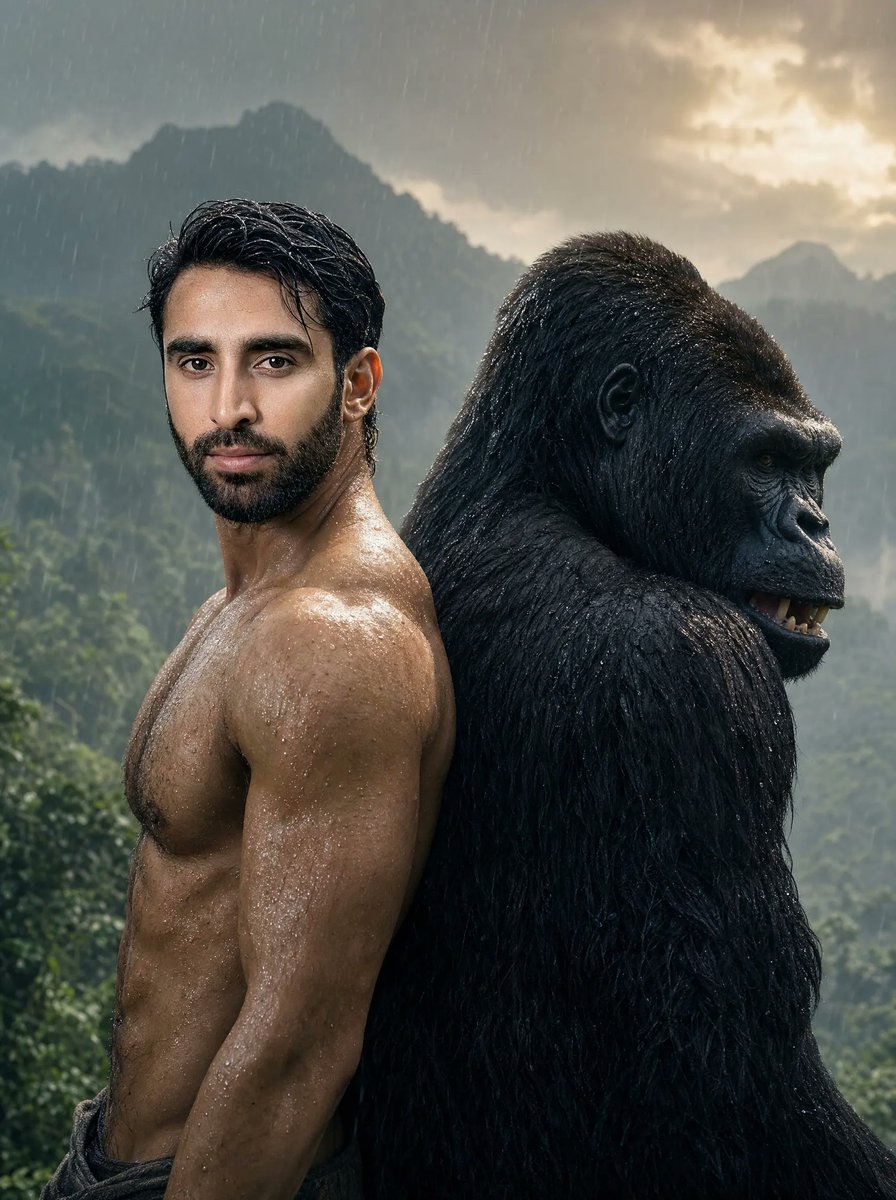
A cinematic photorealistic portrait of a muscular shirtless man and a massive gorilla standing back-to-back in a stormy jungle landscape. (free to use) — Free AI image template on PicX Studio.
Create a cinematic ultra-realistic vertical portrait of {argument name="character description" default="a muscular shirtless man with wet black slicked-back hair and a trimmed beard, his face intentionally hidden by a flat opaque brown rectangular censor block"} standing back-to-back with {argument name="animal companion" default="a massive silverback gorilla with wet black fur, shown in right-facing profile with a small dark blurred censor block over its mouth"}. The man is on the left in a three-quarter side pose, cropped from the hips up, with defined chest, shoulders, abs, and arms covered in rain droplets; he wears dark low-waisted pants and has a serious powerful posture. The gorilla is on the right, taller and broader, its shoulder and head pressed close behind the man, with detailed wet fur, visible ear, brow ridge, nostril, and intense eye. Set them in a lush jungle valley during heavy rain, with misty green mountains in the background and a dramatic cloudy sky glowing with warm sunlight near the upper right. Use {argument name="lighting style" default="moody golden-hour backlight with cool storm shadows"}, high contrast, shallow depth of field, photoreal skin texture, glossy water highlights, atmospheric haze, and a gritty adventure-movie poster look. The composition should be vertical 3:4, subjects filling most of the frame, no text, no logos, no extra people or animals.
Use Rainy Jungle Man and Gorilla Portrait to plan an AI image around gpt-image-2 generation, themes such as en and gpt-image-2. Match the preview's composition first, then personalize the subject, setting, and mood for your own project.
Use the primary action to load the template settings in PicX Studio.
Adjust the subject and creative details for your destination.
Create the image, compare the result with the preview, and refine one variable at a time.
A continuous mix — similar concepts first, woven with same-model prompts and fresh picks from the catalog.
Choose the primary action to open PicX Studio with the available template settings. Review the model and format, personalize the creative direction, and generate when ready.
Yes. You can change the subject, setting, lighting, mood, format, and available model controls before creating your image.
This template is free to open and customize. Generation usage is shown in PicX Studio before you create.
Start with gpt-image-2, which is the model associated with this template. You can compare another compatible model for a different finish.
Follow a topic to a crawlable collection of related PicX Studio templates.
39,157 public templates available. Verified via the PicX Studio public templates API; refreshed hourly.
A continuous mix — similar concepts first, woven with same-model prompts and fresh picks from the catalog.