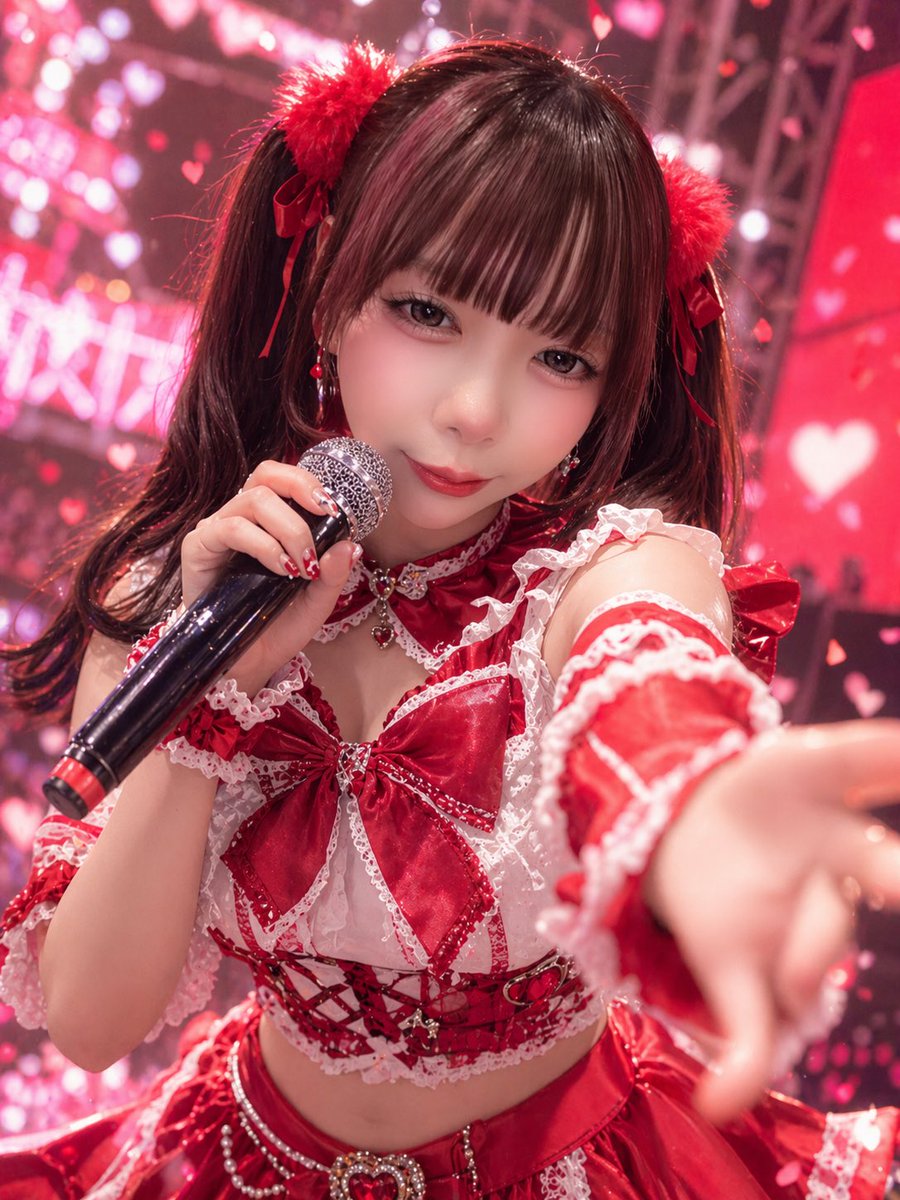
How do I use the Red Idol Concert Close-Up template?
Choose the primary action to open PicX Studio with the available template settings. Review the model and format, personalize the creative direction, and generate when ready.
This prompt generates a photorealistic close-up of a J-pop-style idol performing on stage, ideal for concert posters, fan art concepts, and glamorous music-event visuals. (free to use) — Free AI image template on PicX Studio.
A dynamic close-up concert photo of a {argument name="idol performer" default="young female J-pop idol"} on stage, shot from the audience perspective with a shallow depth of field. She is leaning toward the camera and reaching one hand forward in the foreground, creating dramatic foreshortening, while holding a black handheld microphone with a red accent ring in her other hand near her mouth. She wears a highly detailed red-and-white frilly idol costume: twin-tail dark brown hair with straight bangs, 2 fluffy red pom-pom hair accessories tied with ribbon bows, dangling red earrings, a red choker with lace and a small heart jewel, a cropped lace-trimmed top with 1 oversized satin bow at the chest, off-shoulder frilled sleeves, a corset-style midriff section with red ribbon lacing and small metallic charms, and a layered satin skirt with sparkling bead chains and 1 heart-shaped jeweled ornament at the waist. Her manicure is glossy red with cute white decorative nail art. The lighting is vivid pink and crimson stage lighting, with a glamorous live-idol atmosphere. The background is filled with soft bokeh, LED screens, rigging, and numerous glowing heart shapes and floating heart confetti, creating a dreamy romantic concert scene. Use a photorealistic style with crisp fabric texture, shiny satin highlights, lace detail, concert ambience, slight motion energy, and an overall {argument name="color theme" default="red and pink"} palette. Include a subtle sense of excitement and fan-service stage charisma, like a promotional live-performance shot for a {argument name="theme" default="cute romantic idol concert"}.
Use Red Idol Concert Close-Up to plan an AI image around gpt-image-2 generation, themes such as en and gpt-image-2. Match the preview's composition first, then personalize the subject, setting, and mood for your own project.
Use the primary action to load the template settings in PicX Studio.
Adjust the subject and creative details for your destination.
Create the image, compare the result with the preview, and refine one variable at a time.
A continuous mix — similar concepts first, woven with same-model prompts and fresh picks from the catalog.
Choose the primary action to open PicX Studio with the available template settings. Review the model and format, personalize the creative direction, and generate when ready.
Yes. You can change the subject, setting, lighting, mood, format, and available model controls before creating your image.
This template is free to open and customize. Generation usage is shown in PicX Studio before you create.
Start with gpt-image-2, which is the model associated with this template. You can compare another compatible model for a different finish.
Follow a topic to a crawlable collection of related PicX Studio templates.
39,157 public templates available. Verified via the PicX Studio public templates API; refreshed hourly.
A continuous mix — similar concepts first, woven with same-model prompts and fresh picks from the catalog.