How do I use the Pachinko Auntie LINE Sticker Sheet template?
Choose the primary action to open PicX Studio with the available template settings. Review the model and format, personalize the creative direction, and generate when ready.
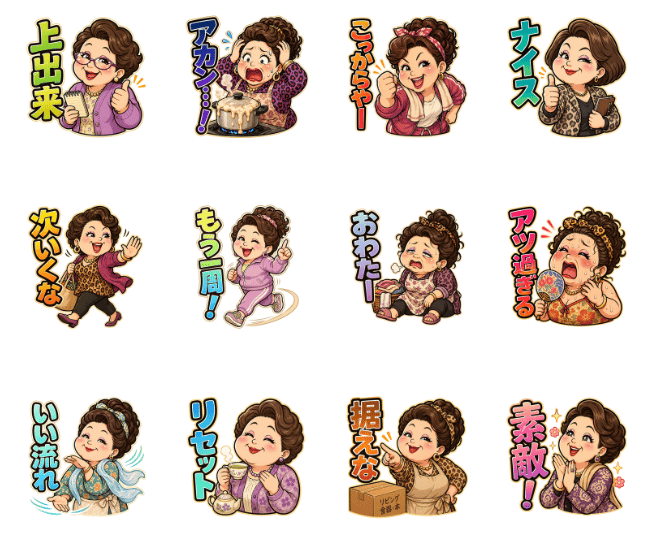
Generates a 12-piece Japanese chat sticker sheet featuring a lively faceless auntie character with pachinko-themed reaction phrases. (free to use) — Free AI image template on PicX Studio.

{"type":"LINE sticker sheet / emoji pack concept art","style":"cute exaggerated Japanese manga sticker style, thick dark outlines, bright colors, soft shading, transparent-feeling white background, compact square sticker compositions with large vertical Japanese catchphrases, energetic motion marks, designed for chat reactions","subject":{"character":"a cheerful middle-aged Japanese woman / auntie character with glamorous curly brown hair, fashionable patterned clothing, big expressive body language, intentionally blank or softly blurred face area for a customizable face-photo sticker template","theme":"friends chatting while playing pachinko or slots together, casual supportive reactions and playful gambling-session messages"},"layout":{"format":"single preview sheet on a plain white background","grid":"12 separate sticker illustrations arranged in 3 rows and 4 columns with generous spacing","sticker count":12,"stickers":[{"position":"row 1 column 1","label":"上出来","description":"woman in a purple jacket clenching both fists in celebration, yellow-green text"},{"position":"row 1 column 2","label":"アカン…!","description":"woman despairing over a small round table or drum-like object, sweat marks, blue text"},{"position":"row 1 column 3","label":"こりゃー","description":"woman in red clothing giving a thumbs-up with a startled or impressed pose, orange text"},{"position":"row 1 column 4","label":"ナイス","description":"woman in leopard-print fashion giving a confident thumbs-up, teal text"},{"position":"row 2 column 1","label":"次いくな","description":"woman walking away in a magenta coat with one hand raised, orange text"},{"position":"row 2 column 2","label":"もう一周!","description":"woman in a pink tracksuit enthusiastically running or spinning forward, yellow and blue text"},{"position":"row 2 column 3","label":"おわたー","description":"woman sitting on the floor looking exhausted or defeated, blue text"},{"position":"row 2 column 4","label":"アツ過ぎる","description":"woman fanning herself amid intense excitement with red-orange heat marks, pink and orange text"},{"position":"row 3 column 1","label":"いい流れ","description":"woman in a flowing blue patterned kimono-like outfit with water or wind swirls, aqua text"},{"position":"row 3 column 2","label":"リセット","description":"woman calmly holding tea or small items, reset reaction, blue text"},{"position":"row 3 column 3","label":"据えな","description":"woman pointing beside a cardboard box labeled like a pachinko-slot item, orange text"},{"position":"row 3 column 4","label":"素敵!","description":"woman clasping hands in admiration with sparkles, pink text"}]},"text treatment":"large hand-drawn Japanese lettering beside each character, vertical or stacked, thick black outline with colorful fills, readable at sticker size","rendering":"high-resolution clean digital illustration, no photo-realism, no background scenery, each sticker isolated like a LINE stamp preview","customization":{"character name":"{argument name=\"character name\" default=\"Pachinko Auntie\"}","hair color":"{argument name=\"hair color\" default=\"warm brown\"}","outfit style":"{argument name=\"outfit style\" default=\"flashy leopard-print and colorful auntie fashion\"}","sticker theme":"{argument name=\"sticker theme\" default=\"pachinko session chat reactions\"}","face treatment":"{argument name=\"face treatment\" default=\"blank blurred square face placeholder\"}"}}
Use Pachinko Auntie LINE Sticker Sheet to plan an AI image around gpt-image-2 generation, themes such as en and gpt-image-2. Match the preview's composition first, then personalize the subject, setting, and mood for your own project.
Use the primary action to load the template settings in PicX Studio.
Adjust the subject and creative details for your destination.
Create the image, compare the result with the preview, and refine one variable at a time.
A continuous mix — similar concepts first, woven with same-model prompts and fresh picks from the catalog.
Choose the primary action to open PicX Studio with the available template settings. Review the model and format, personalize the creative direction, and generate when ready.
Yes. You can change the subject, setting, lighting, mood, format, and available model controls before creating your image.
This template is free to open and customize. Generation usage is shown in PicX Studio before you create.
Start with gpt-image-2, which is the model associated with this template. You can compare another compatible model for a different finish.
A continuous mix — similar concepts first, woven with same-model prompts and fresh picks from the catalog.
Follow a topic to a crawlable collection of related PicX Studio templates.
36,410 public templates available. Verified via the PicX Studio public templates API; refreshed hourly.