How do I use the Monochrome Magical Heart Wand template?
Choose the primary action to open PicX Studio with the available template settings. Review the model and format, personalize the creative direction, and generate when ready.
This prompt generates a clean front-view studio render of a heart-themed magical wand, useful for toy concept art, 3D sculpt previews, or fantasy prop design. Change the subject, setting, or lighting one variable at a time.
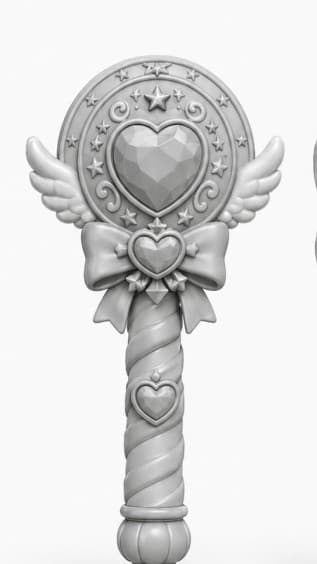
A centered studio render of a magical girl wand or scepter designed like a toy collectible, shown front-facing against a plain light gray background. The wand is monochrome matte white to light gray clay-render style with soft even lighting and gentle shadows, emphasizing sculpted form rather than color. The top has a large circular medallion with a faceted heart-shaped gem in the center, surrounded by an ornate ring featuring exactly 1 large five-pointed star at the top center, 8 small five-pointed stars around the ring, and 4 curling decorative swirl motifs. Small symmetrical angel wings extend left and right from the lower sides of the circular head. Beneath the medallion is a large bow with a small heart-shaped jewel at its center and two ribbon tails hanging down. The handle is long and cylindrical with a spiral twist pattern, with exactly 1 additional heart emblem mounted near the upper part of the grip, and it ends in a rounded bulb-like pommel with vertical grooves. The overall silhouette is cute, symmetrical, elegant, fantasy-inspired, and suitable for a clean product concept render or 3D model showcase.
Choose the primary action to open PicX Studio with the available template settings. Review the model and format, personalize the creative direction, and generate when ready.
Yes. You can change the subject, setting, lighting, mood, format, and available model controls before creating your image.
This template is free to open and customize. Generation usage is shown in PicX Studio before you create.
Start with GPT Image 2, which is the model associated with this template. You can compare another compatible model for a different finish.
© 2026 PicX Studio. All rights reserved.

Follow a topic to a crawlable collection of related PicX Studio templates.
43,474 public templates available. Verified via the PicX Studio public templates API; refreshed hourly.









![Minimalist Flat Vector Travel Poster — Premium minimalist flat-vector travel poster for {argument name="city name" default="[CITY_NAME]"}, 3:4 vertical format.](https://cms-assets.youmind.com/media/1787917359711_3ug846_HQX205cbMAA6F6S-300x400.jpg)