- type
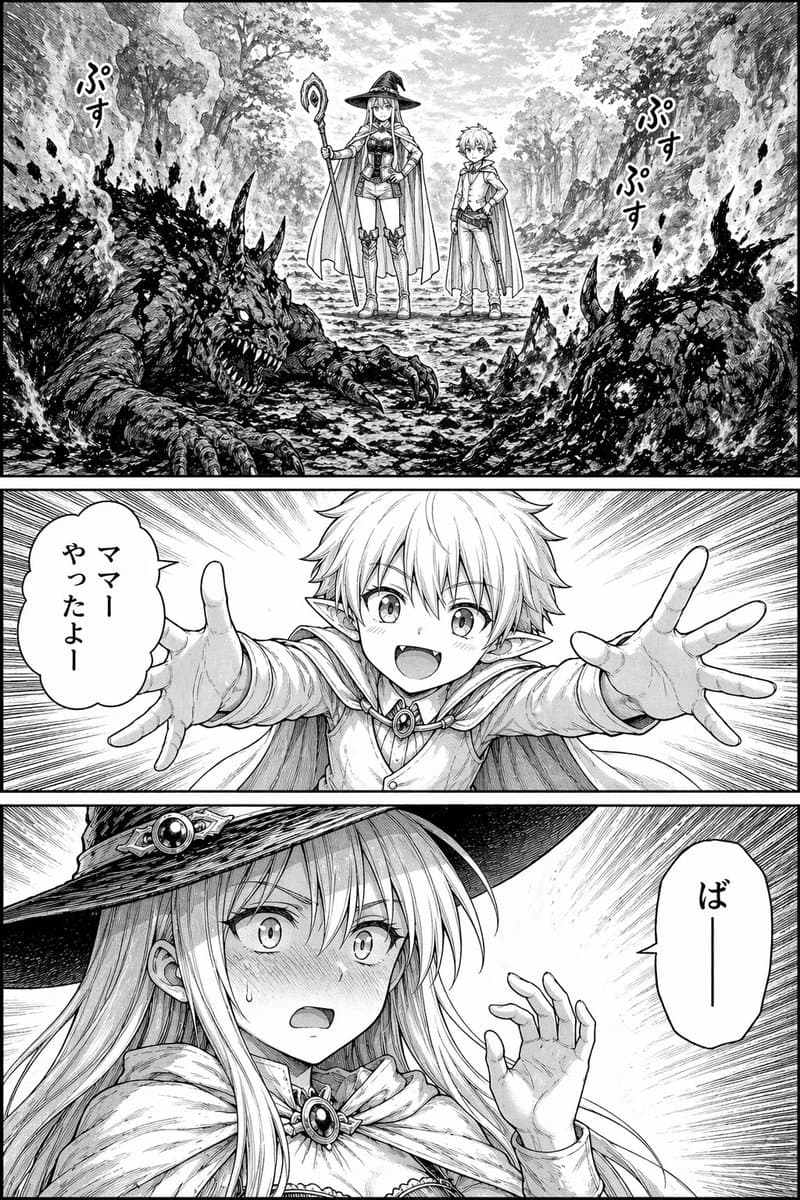
- black-and-white fantasy manga page
- medium
- detailed inked manga line art with screentone shading
- color
- monochrome grayscale
- reading
- Japanese manga page
- mood
- comic misunderstanding with dramatic fantasy tension
- page count
- 1
- panel count
- 3
- position
- top wide panel
- description
- A forest road framed by tall trees and rocky banks. Two huge monster corpses lie in the foreground left and right, both charred and still smoking, with blackened cracked hides, horns, claws, exposed teeth, and ash-like texture. Between them in the midground stand 2 adventurers: a young witch and a small elf boy. The witch is a slim young woman with long straight light hair, a wide-brim pointed witch hat, a staff topped with an oval ornament, a short fantasy outfit with corset-like bodice, shorts, thigh-high boots, gloves, and a cape. The boy is short and childlike with messy light hair, pointed elf ears, a tunic fastened at the chest, trousers, boots, and a short cape. Both face forward as if they have just defeated the monsters. There are 3 visible Japanese sound-effect texts: one on the left reading "ぷす", and two on the right reading "ぷす" and "ぷす" to indicate smoke sizzling from the corpses.
- position
- middle horizontal panel
- description
- A dramatic close-up of the elf boy rushing forward toward the viewer with both arms fully outstretched for a hug, hands open and large in perspective. His face is centered but obscured by a rectangular gray censorship block. Motion lines radiate from behind him. On the left is 1 vertical Japanese speech bubble reading "ママー やったよー".
- position
- bottom horizontal panel
- description
- A close-up reaction shot of the witch from the chest up, turned slightly to the side, blushing intensely with wide shocked eyes, parted lips, and one hand raised awkwardly near her face. Her long hair spills from under the hat, and her cloak is clasped with a jeweled brooch. The background is filled with speed lines. On the right is 1 vertical Japanese speech bubble reading "ばー".
- borders
- clean manga gutters and black panel borders
- role
- witch
- gender
- female
- age appearance
- young adult
- color
- light
- style
- long straight hair with bangs
- outfit
- wide-brim pointed witch hat, staff, cape with brooch clasp, fitted fantasy top, shorts, thigh-high boots
- expression in page
- confused, embarrassed, flustered
- role
- elf boy
- gender
- male
- age appearance
- child
- race
- elf
- color
- light
- style
- short tousled hair
- features
- pointed ears
- outfit
- cape, long-sleeve tunic with chest clasp, pants, boots
- expression in page
- excited and affectionate
- count
- 2
- description
- two giant dragon-like or demonic beast corpses, burned and smoking on both sides of the path
- composition notes
- Use strong perspective in the middle panel, dense crosshatching and textured blacks on the monster bodies, airy forest detail in the top panel, and expressive manga speed lines in the lower 2 panels. Keep the page in polished fantasy manga style suitable for a serialized comic.










![Minimalist Flat Vector Travel Poster — Premium minimalist flat-vector travel poster for {argument name="city name" default="[CITY_NAME]"}, 3:4 vertical format.](https://cms-assets.youmind.com/media/1787917359711_3ug846_HQX205cbMAA6F6S-300x400.jpg)





























![Ink-Wash Style Presentation Slides — Title: {argument name="标题" default="在此输入幻灯片标题"}
Key Points:
- [要点 1:简洁的描述]
- [要点 2:核心数据或事实]
- [要点 3:关键结论]
Visual Elements](https://cms-assets.youmind.com/media/1778402613979_an5gcr_HH2JphkXIAAo_qZ.jpg)




![Infographic Image with Technical Annotation Overlay — Create an infographic image of {argument name="object" default="[OBJECT]"}, combining a realistic ph…](https://pbs.twimg.com/media/G_uRZiDaYAAnq5o.jpg)