How do I use the Ultra-Tall Rocket Launch template?
Choose the primary action to open PicX Studio with the available template settings. Review the model and format, personalize the creative direction, and generate when ready.
A photorealistic ultra-vertical rocket launch scene for testing extreme portrait compositions and cinematic aerospace visuals. Change the subject, setting, or lighting one variable at a time.
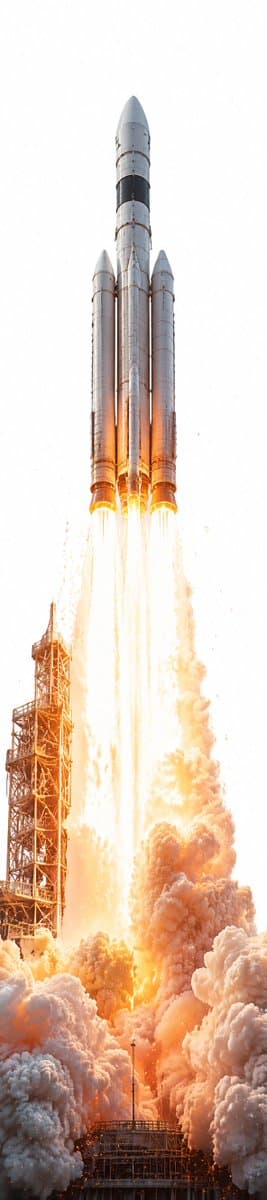
Create an ultra-tall vertical photorealistic image, about 1:4 aspect ratio, showing {argument name="rocket name" default="a massive silver heavy-lift rocket"} launching straight upward from a launch pad. Center the rocket perfectly against a nearly pure white overexposed sky, with the nose cone near the top and the base near the lower middle. The vehicle should have exactly 3 visible cylindrical rocket bodies: 1 taller central core and 2 slightly shorter side boosters, all metallic silver with dark black bands and subtle panel seams. Show exactly 4 bright engine flames beneath the rocket, forming long vertical white-hot orange exhaust streams. At the lower left, include one tall rust-orange steel launch tower with lattice scaffolding, partially engulfed by light and smoke. The bottom third of the frame should be filled with enormous rolling clouds of dense launch smoke and dust in white, gray, peach, and orange, lit intensely by the engines. Use dramatic high-key lighting, extreme brightness, realistic heat haze, sparks, debris specks, and a cinematic space-launch photography style. Keep the composition minimal and vertically stretched, emphasizing the rocket’s height and the towering plume; no text, no logos, no people, no borders.
Choose the primary action to open PicX Studio with the available template settings. Review the model and format, personalize the creative direction, and generate when ready.
Yes. You can change the subject, setting, lighting, mood, format, and available model controls before creating your image.
This template is free to open and customize. Generation usage is shown in PicX Studio before you create.
Start with GPT Image 2, which is the model associated with this template. You can compare another compatible model for a different finish.
© 2026 PicX Studio. All rights reserved.

Follow a topic to a crawlable collection of related PicX Studio templates.
43,474 public templates available. Verified via the PicX Studio public templates API; refreshed hourly.







![Tall Grass Overhead Portrait — Tall Grass Portrait
{argument name="subject" default="[SUBJECT]"}, lying in tall grass, shot from directly above, the grass bend](https://cms-assets.youmind.com/media/1785055062701_arm8d9_HOC6uPcasAAP0gl-300x398.jpg)





![Cinematic Portrait in Dry Tall Grass — [인물] {argument name="인물" default="인물 참조 이미지 1, 이미지 2"}, 누드금지
[인물의 포즈 및 표정]
{argument name="포즈 및 표정" default="거칠고 높은 마른](https://cms-assets.youmind.com/media/1780130289312_k367t5_HJXKk3lbkAAEPdb.jpg)
![Advanced Technical Space Rocket Poster — 为{argument name="火箭名称" default="[Space火箭]"}创建一张高级技术信息图海报,海报中央需包含一个巨大的全车身剖面图,所有主要部件都清晰可见,周围每个模块的详细分解图也需呈现:发动机、电池、悬架、电机、驱](https://cms-assets.youmind.com/media/1777280779310_famh1b_HG1RfVPbYAApCGE.jpg)



![Minimalist Flat Vector Travel Poster — Premium minimalist flat-vector travel poster for {argument name="city name" default="[CITY_NAME]"}, 3:4 vertical format.](https://cms-assets.youmind.com/media/1787917359711_3ug846_HQX205cbMAA6F6S-300x400.jpg)



















![VTuber Streaming Screen Generation with Customizable Character and Theme — [キャラクター設定部分]
・キャラクターの外見: {argument name="キャラクターの外見" default="茶色の髪、短いツインテール、赤い瞳、少し尖った歯](https://pbs.twimg.com/media/G-CgooobcAMqVHM.jpg)

![Stone-Carved Statue Prompt for Nano Banana Pro — A tiny stone-carved statue of {argument name="姓名" default="[NAME]"}, with chisel marks and uneven surfaces, sit](https://pbs.twimg.com/media/G-guzz1asAAzWAC.jpg)






![Architectural Illustrator Presentation Board Template — An expert architectural illustrator's presentation board for a [{argument name="style" default="STYLE"}]](https://pbs.twimg.com/media/G8u2qO1XEAAswB4.jpg)