Kawaii RPG Character Profile Sheet
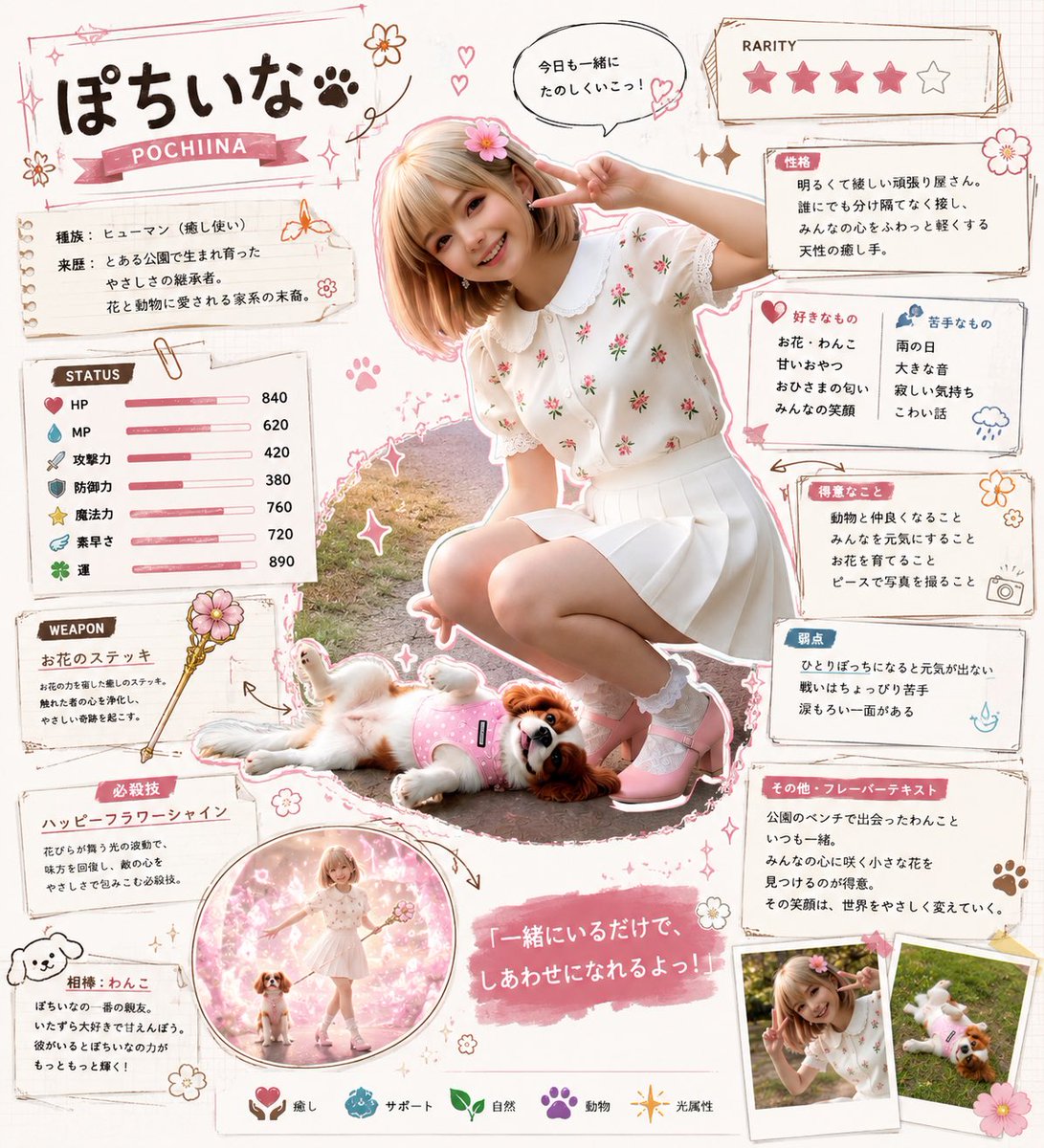
Goal: Create a cute Japanese game-character profile sheet for {argument name="character name" default="ぽちいな"}, based purely on an original character concept: a cheerful young girl with a small pet dog companion, designed like a collectible RPG character card mixed with a scrapbook character-setting sheet.
Canvas: Square 1:1 composition on a warm off-white paper background, soft pastel pink and brown ink, hand-drawn scrapbook style, stickers, washi-tape frames, doodled flowers, hearts, paw prints, sparkles, arrows, paper clips, and torn-note panels. Use a bright, friendly, kawaii fantasy-game aesthetic.
Main layout: Place the full-body main character photo-cutout style figure in the center-right, outlined with a white sticker border and pink shadow. She is crouching, smiling toward the viewer, making a peace sign near her face, wearing a white short-sleeved embroidered blouse with small red flowers, a white pleated skirt, white socks, pink shoes, short light-blonde bob hair, and a pink flower hair accessory. Her companion dog lies at her feet in the lower center, a small white-and-brown spaniel-like dog wearing a pink harness or outfit. Keep the face area simplified or softly obscured if needed, but preserve the pose and cute atmosphere.
Title area: At top left, large hand-drawn Japanese title text 「ぽちいな」 with a paw-print mark, and a pink ribbon underneath reading “POCHIINA”. Add small flowers, stars, hearts, and a thin sketchy rectangular title frame.
Profile panels and text: Use exactly 12 distinct information panels around the central figure. 1) A species/origin note panel at upper left with Japanese labels for species and origin, describing her as a human who uses healing magic and a girl born from a flower-and-animal-loving family. 2) A STATUS panel on the left with exactly 7 stat rows and horizontal pink bars: HP 840, MP 620, Attack 420, Defense 380, Magic 760, Agility 720, Luck 890, each with a small icon. 3) A WEAPON panel below it showing a magical flower staff, labeled 「お花のステッキ」, with a small staff illustration. 4) A special move panel labeled 「必殺技」 describing “Happy Flower Shine,” a healing flower-light attack. 5) A companion panel at bottom left labeled 「相棒:わんこ」 describing the dog companion. 6) A circular inset illustration near the bottom center showing the girl standing with the dog in a pink magical flower field. 7) A speech bubble near the character’s head containing 「今日も一緒にたのしくいこっ!」. 8) A rarity card at the top right labeled “RARITY” with exactly 5 stars: four filled pink stars and one empty gray star. 9) A personality panel labeled 「性格」 with four short lines describing kindness, brightness, compassion, and healing aura. 10) A likes/dislikes panel with two columns: likes marked by a heart icon and dislikes marked by a blue cloud/rain icon. 11) A favorite-things panel labeled 「得意なこと」 listing four things such as healing injured people, cheering everyone up, nurturing flowers, and photographing with a peace sign. 12) A weakness and flavor-text area on the right, split into small note boxes labeled 「弱点」 and 「その他・フレーバーテキスト」, describing loneliness, over-kindness, public performance nervousness, always being with the dog, finding small flowers, and gently transforming the world with her smile.
Bottom details: Add a pink brush-stroke quote banner near the lower center reading 「一緒にいるだけで、しあわせになれるよっ!」. Along the bottom edge place exactly 5 small attribute icons with labels: healing, support, nature, animal, and light. At the bottom right place exactly 2 small Polaroid-style photo cards, one showing the girl posing and one showing the dog lying down, with tape and a pink flower decoration.
Visual style: Soft natural lighting, pastel pink highlights, sketchy brown outlines, delicate hand-lettered Japanese text, scrapbook collage, sticker borders, cozy magical-girl RPG profile-sheet design. Keep the image information-dense but readable, with all panels balanced around the central cutout.
Constraints: Use Japanese text for visible labels and quotes as specified; use English only for “POCHIINA,” “STATUS,” “WEAPON,” and “RARITY.” Maintain exactly 7 status rows, 5 rarity stars, 5 bottom attribute icons, 2 Polaroid cards, and 12 information panels. Do not add extra characters beyond the girl and her one dog companion.













![Minimalist Flat Vector Travel Poster — Premium minimalist flat-vector travel poster for {argument name="city name" default="[CITY_NAME]"}, 3:4 vertical format.](https://cms-assets.youmind.com/media/1787917359711_3ug846_HQX205cbMAA6F6S-300x400.jpg)