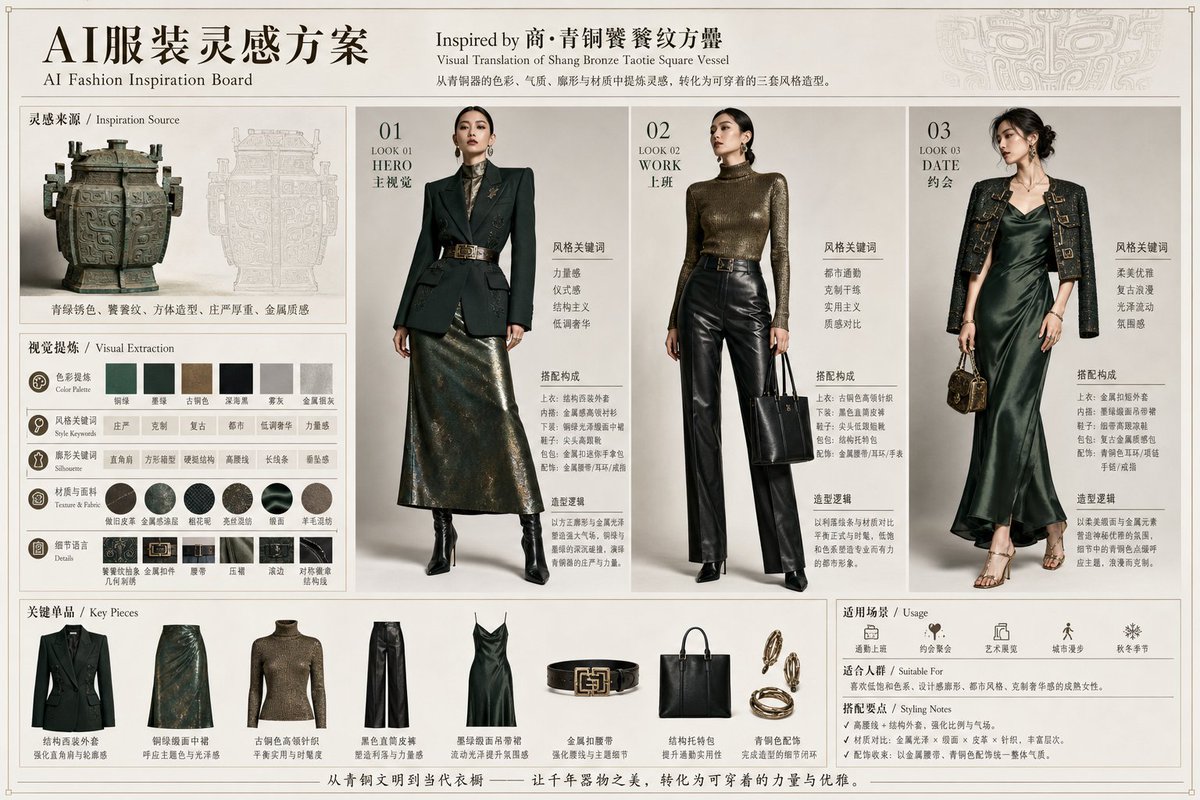
Bronze Vessel Fashion Inspiration Board
{"type":"luxury editorial AI fashion inspiration board","format":"single wide landscape presentation sheet, museum-catalog meets high-fashion styling board","language":"Chinese with small English subtitles","theme":"Create a refined fashion concept board inspired by {argument name="inspiration artifact" default="商・青铜饕餮纹方罍"}, translating an ancient Chinese bronze vessel into modern wearable outfits with a premium national-style aesthetic.","overall_style":"warm ivory paper background, thin bronze border lines, elegant serif typography, subtle ink-gray ornamental pattern in the top right, clean grid layout, luxury magazine art direction, realistic product photography and full-body fashion-model renders, muted antique bronze and dark jade palette","header":{"main_title":"AI服装灵感方案","subtitle":"AI Fashion Inspiration Board","center_title":"Inspired by 商・青铜饕餮纹方罍","center_subtitle":"Visual Translation of Shang Bronze Taotie Square Vessel","description":"从青铜器的色彩、气质、廓形与材质中提炼灵感,转化为可穿着的三套风格造型。"},"layout":{"sections":[{"title":"灵感来源 / Inspiration Source","position":"upper left","count":2,"items":["large photo of a square Shang bronze ritual vessel with handles and dark green patina","pale line-art tracing of the same vessel behind it"],"caption":"青绿锈色、饕餮纹、方体造型、庄严厚重、金属质感"},{"title":"视觉提炼 / Visual Extraction","position":"middle left","count":5,"items":[{"label":"色彩提炼 Color Palette","count":6,"swatches":["bronze green","deep jade green","ancient bronze brown","dark ink black","warm gray","metallic patina gray"]},{"label":"风格关键词 Style Keywords","count":6,"keywords":["严肃","克制","复古","都市","低调奢华","力量感"]},{"label":"廓形关键词 Silhouette","count":6,"keywords":["直角肩","方形框架","硬挺结构","高腰线","长线条","垂坠感"]},{"label":"纹理与面料 Texture & Fabric","count":6,"items":["bronze patina texture","dark green jacquard","fine black leather","distressed metallic sheen","satin gloss","wool blend"]},{"label":"细节语言 Details","count":6,"items":["taotie-inspired pattern","square metal buckle","belt","embossed surface","flowing hem","architectural shoulder line"]}]},{"title":"Look 01 HERO 主视觉","position":"center left","count":1,"model":"full-body female model, face softly blurred, upright confident pose","outfit":"dark green structured double-breasted blazer with sharp shoulders, black high-neck inner layer, wide ornate metallic belt, long bronze-green jacquard midi skirt, black pointed ankle boots","style_keywords":["力量感","仪式感","结构主义","低调奢华"],"styling_components_count":5,"styling_components":["structured dark green blazer","black high-neck base layer","bronze square-buckle belt","metallic jacquard midi skirt","black pointed ankle boots"],"design_logic":"Use strong shoulders, bronze patina color, and ceremonial proportions to echo the vessel's solemn geometry."},{"title":"Look 02 WORK 上班","position":"center","count":1,"model":"full-body female model, face softly blurred, minimal professional pose holding a black tote","outfit":"antique-gold metallic turtleneck knit top, high-waisted black leather straight-leg trousers, black belt with square bronze buckle, black structured tote bag, black heeled boots","style_keywords":["都市通勤","克制干练","实用主义","质感对比"],"styling_components_count":5,"styling_components":["metallic bronze turtleneck knit","black leather straight trousers","square-buckle belt","structured black tote","black pointed heeled boots"],"design_logic":"Contrast glossy leather and aged metal texture for a wearable office interpretation of bronze materiality."},{"title":"Look 03 DATE 约会","position":"right","count":1,"model":"full-body female model, face softly blurred, elegant evening pose with small handbag","outfit":"deep jade satin slip dress, cropped black embellished jacket with bronze embroidery and square hardware, delicate heeled sandals, small dark gold mini handbag, layered gold jewelry","style_keywords":["柔美优雅","复古浪漫","光泽流动","氛围感"],"styling_components_count":5,"styling_components":["jade satin slip dress","cropped embroidered jacket","strappy heeled sandals","small metallic handbag","gold earrings and bangles"],"design_logic":"Transform heavy bronze motifs into a softer date look using satin shine, jade green color, and ornate metallic details."},{"title":"关键单品 / Key Pieces","position":"bottom left and center","count":8,"items":["dark green structured blazer","bronze-green jacquard midi skirt","antique-gold metallic turtleneck knit","black leather straight-leg trousers","deep jade satin slip dress","black belt with square bronze buckle","structured black tote bag","gold jewelry set with earrings, bracelet, and ring"]},{"title":"适用场景 / Usage","position":"bottom right","count":5,"items":["通勤上班","约会聚会","艺术展览","城市漫步","秋冬季节"]},{"title":"适合人群 / Suitable For","position":"bottom right below usage","count":1,"items":["喜欢低调和色彩、设计感廓形、都市风格、克制奢华质感的成熟女性"]},{"title":"搭配要点 / Styling Notes","position":"bottom right","count":3,"items":["高腰线与结构外套强化身形比例与气场","材质对比:金属光泽、皮革、织纹、缎面形成层次","配饰呼应:以金属腰带、青铜色饰物统一整体气质"]}],"footer_slogan":"从青铜文明到当代衣橱 —— 让千年器物之美,转化为可穿着的力量与优雅。"},"visual_requirements":"Render the board as a realistic high-resolution flat presentation page, not a collage screenshot. Use precise alignment, thin dividers, museum-style captions, editorial lighting, and premium fashion lookbook photography. The three outfit looks must be distinct and numbered 01, 02, 03. Include all visible section titles and exactly counted items as specified. Keep the faces softly anonymized or blurred as in fashion concept mockups.","customization":{"artifact":"{argument name="inspiration artifact" default="商・青铜饕餮纹方罍"}","main_title":"{argument name="main title" default="AI服装灵感方案"}","color_palette":"{argument name="primary color palette" default="dark jade green, antique bronze, black leather, warm ivory"}","fashion_mood":"{argument name="fashion mood" default="low-key luxury, solemn, structured, modern Chinese style"}"}}


![Japan Travel Brochure Poster — Create a vertical vintage travel-brochure infographic poster titled “[COUNTRY/DESTINATION]: [TAGLINE]”, using a warm parchment-pa](/_next/image?url=https%3A%2F%2Fcdn.picxstudio.com%2Fuploads%2Fp0_982bf820-bb34-4c43-8a6d-42d799d7282b.jpg&w=828&q=100)





![Vintage Travel Posters by Nano Banana 2 — Vintage illustrated travel poster of [COUNTRY], aged parchment background texture, ornate gold baroque decorative bord](/_next/image?url=https%3A%2F%2Fcdn.picxstudio.com%2Fuploads%2Fvintage_poster_54cea1be-2a96-40ae-bb2d-1fa2cdcbccc6.jpg&w=828&q=100)





![Minimalist Flat Vector Travel Poster — Premium minimalist flat-vector travel poster for {argument name="city name" default="[CITY_NAME]"}, 3:4 vertical format.](https://cms-assets.youmind.com/media/1787917359711_3ug846_HQX205cbMAA6F6S-300x400.jpg)