How do I use the Chinese Brushstroke Shanghai Poster template?
Choose the primary action to open PicX Studio with the available template settings. Review the model and format, personalize the creative direction, and generate when ready.
This prompt generates an elegant city tourism poster where a calligraphy brushstroke becomes a sculpted landmark diorama, ideal for cultural promotion and travel branding. Change the subject, setting, or lighting one variable at a time.
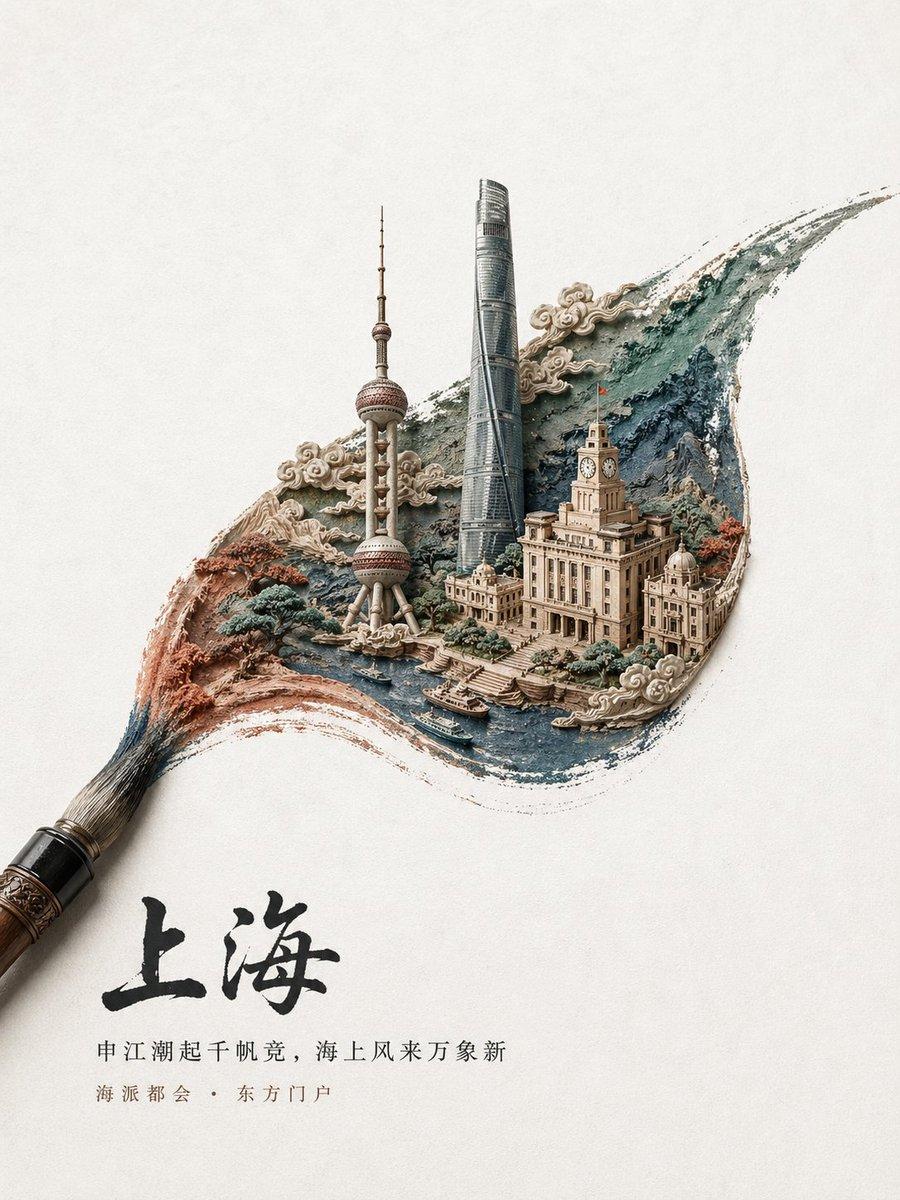
A refined Chinese city-promotion poster on a warm off-white textured paper background, with a large traditional calligraphy brush entering from the lower left corner and sweeping upward to create a single dramatic brushstroke that transforms into a miniature sculpted cityscape. The brushstroke should look like layered ink, watercolor, and carved relief combined, with flowing edges and a dynamic curved shape like a cresting wave. Inside the brushstroke, depict {argument name="city name" default="Shanghai"} as an elegant miniature diorama in a Chinese artistic fusion style: the Oriental Pearl Tower, Shanghai Tower, and the historic Bund clock building rendered as highly detailed architectural models rising from the painted stroke. Add a winding blue river in the foreground with 2 small boats, terraced embankments, stylized traditional cloud motifs curling around the buildings, and textured rocky forms and autumn-toned trees integrated into the composition. Use a palette of muted teal blue, stone beige, soft gray, rust red, and ink black. The overall style should blend Chinese ink painting, paper sculpture, bas-relief miniature architecture, and premium tourism poster design, with precise craftsmanship, soft studio lighting, subtle shadows, lots of negative space, and a calm luxurious editorial feel. Place large black Chinese calligraphy near the lower left reading {argument name="main title text" default="上海"}, and beneath it add 2 lines of smaller Chinese promotional text: {argument name="tagline line 1" default="申江潮起千帆竞,海上风来万象新"} and {argument name="tagline line 2" default="海派都会・东方门户"}. Vertical composition, centered artwork with generous margins, ultra-clean layout, high detail, premium travel campaign aesthetic.
Choose the primary action to open PicX Studio with the available template settings. Review the model and format, personalize the creative direction, and generate when ready.
Yes. You can change the subject, setting, lighting, mood, format, and available model controls before creating your image.
This template is free to open and customize. Generation usage is shown in PicX Studio before you create.
Start with GPT Image 2, which is the model associated with this template. You can compare another compatible model for a different finish.
© 2026 PicX Studio. All rights reserved.

Follow a topic to a crawlable collection of related PicX Studio templates.
43,474 public templates available. Verified via the PicX Studio public templates API; refreshed hourly.

![Japan Travel Brochure Poster — Create a vertical vintage travel-brochure infographic poster titled “[COUNTRY/DESTINATION]: [TAGLINE]”, using a warm parchment-pa](/_next/image?url=https%3A%2F%2Fcdn.picxstudio.com%2Fuploads%2Fp0_982bf820-bb34-4c43-8a6d-42d799d7282b.jpg&w=828&q=100)




![clean-minimalist-player-editorial-poster — A professional sports graphic design poster of [Player Name], designed in a clean, modern, and minimalist editorial s](/_next/image?url=https%3A%2F%2Fcdn.picxstudio.com%2Fuploads%2Fmeigen_5524a0a10196_94b81982-ef58-45e9-8d49-9b017a7f26cb.jpg&w=828&q=100)
![campaign-smoke-national-symbols-world-cup — A hyper-realistic cinematic campaign poster for [Country]. Thick [Color One] and [Color Two] smoke e…](/_next/image?url=https%3A%2F%2Fcdn.picxstudio.com%2Fuploads%2Fmeigen_ce5bae0e0712_50be07ac-9537-419b-9c47-694fe49ef3d8.jpg&w=828&q=100)
![Cartoon TV Show Poster Pack — A bold Cartoon Network-style promotional poster for [SHOW], featuring the main characters in a flat 2D illustrated style with thic](/_next/image?url=https%3A%2F%2Fcdn.picxstudio.com%2Fuploads%2Fimg0_107064d3-b797-488a-a32e-d75dea9d3b4c.jpg&w=828&q=100)
![vertical-football-star-campaign-poster — Create a vertical 9:16 high-resolution football star campaign poster.
Player: [Player Name]
Player concept: [football](/_next/image?url=https%3A%2F%2Fcdn.picxstudio.com%2Fuploads%2Fmeigen_996a192156cb_45d1d198-bb81-4272-be3f-df0eda9f0a74.jpg&w=828&q=100)














![Minimalist Flat Vector Travel Poster — Premium minimalist flat-vector travel poster for {argument name="city name" default="[CITY_NAME]"}, 3:4 vertical format.](https://cms-assets.youmind.com/media/1787917359711_3ug846_HQX205cbMAA6F6S-300x400.jpg)



















![Technical 3D Exploded View — Render_Target = ( 3D_Accurate_Exploded_View_Of_{argument name="product" default="[product]"} * 1.3 ) + ( Minimal__Extremely_Accurat](https://cms-assets.youmind.com/media/1778143877927_g4o0em_HHd186zWAAEloZt.jpg)






![Instructional Martial Arts Movement Sheet — [STYLE]
Monochrome grayscale illustration, 3D-rendered character, clean instructional reference sheet, white backgro](https://cms-assets.youmind.com/media/1777453122687_n8byxf_HG-sP7Lb0AEmlWA.jpg)