How do I use the Chinese City Brushstroke Poster template?
Choose the primary action to open PicX Studio with the available template settings. Review the model and format, personalize the creative direction, and generate when ready.
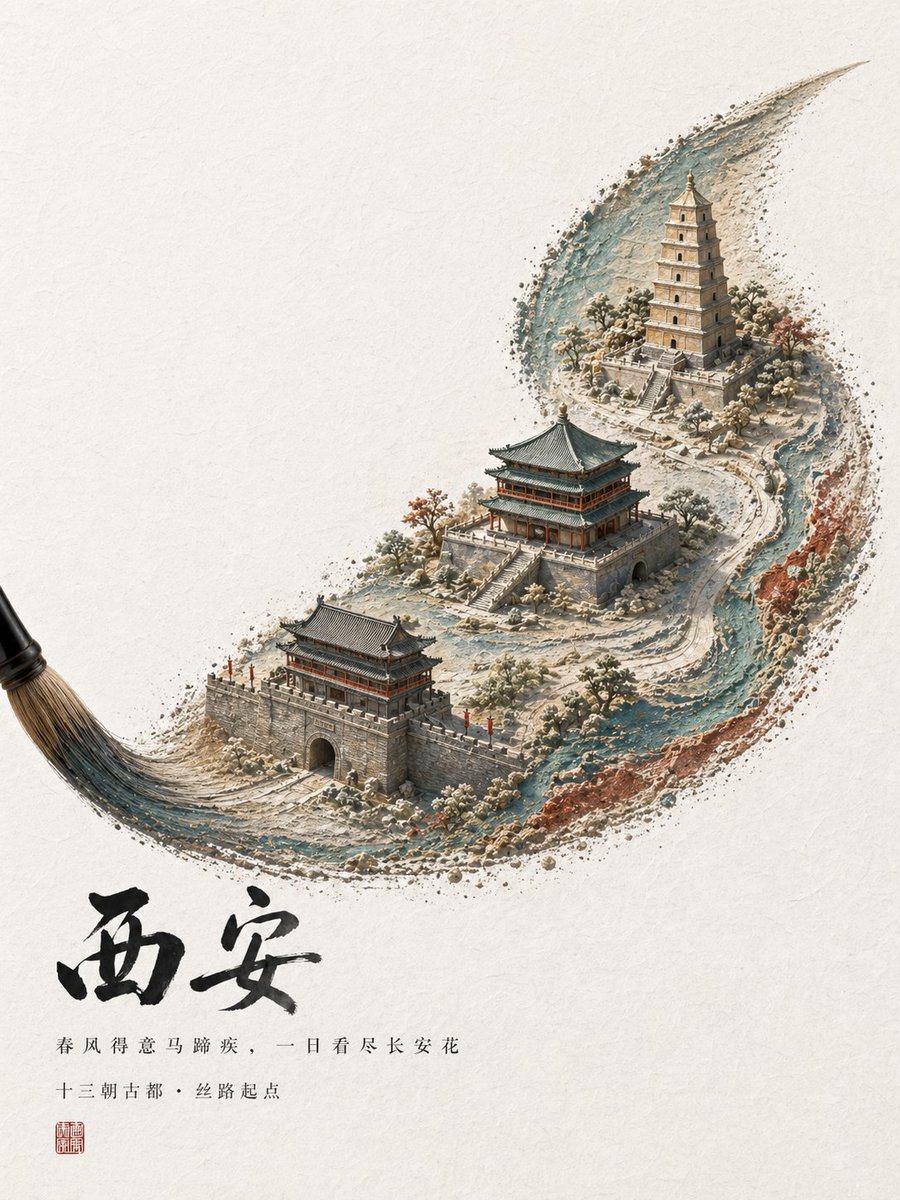
This prompt generates an elegant Chinese tourism poster where a calligraphy brushstroke forms a miniature ancient cityscape, ideal for city branding and cultural promotion. Change the subject, setting, or lighting one variable at a time.
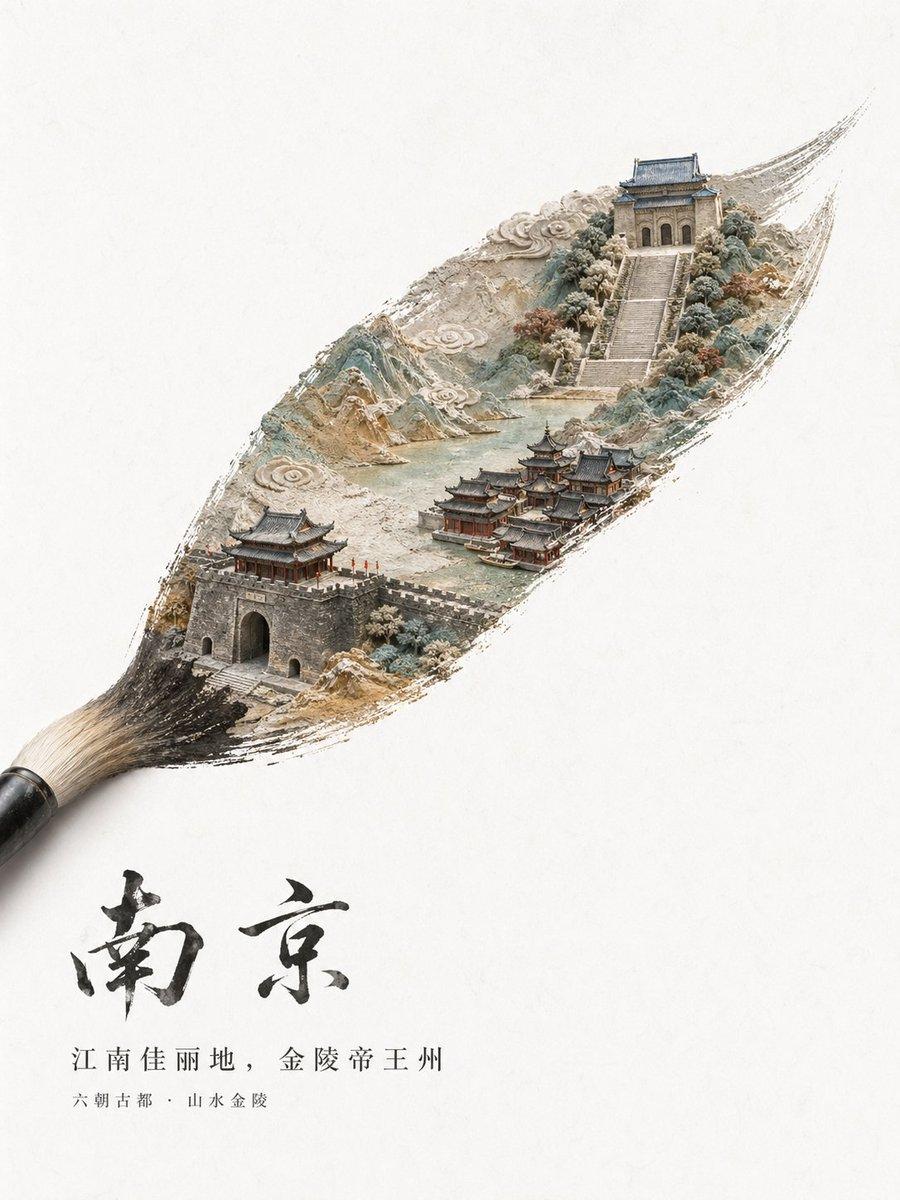
A minimalist high-end Chinese city tourism poster on an off-white textured paper background with vast negative space. A traditional calligraphy brush enters from the lower left corner, and its single sweeping brushstroke transforms into a detailed miniature landscape of {argument name="city name" default="南京"}. Inside the elongated ink-brush shape, create a delicate diorama-like ancient Chinese city scene with layered mountains, stylized swirling clouds, pale green water, stone walls, and classical architecture. In the lower left of the brushstroke, show 1 fortified city gate with gray brick walls and a traditional roof, with tiny red flags along the battlements. In the lower middle-right, show a compact cluster of 6 traditional waterside buildings with dark tiled roofs and red wooden structures. In the upper right, show 1 grand stairway rising through trees to 1 monumental ancient gate tower with blue-gray roof tiles. Use a refined palette of ink black, stone gray, muted teal, pale jade, beige, and soft earthy reds, with a handcrafted blend of ink wash painting, paper sculpture relief, and ultra-detailed miniature model aesthetics. The brushstroke edges should look dry-brushed and organic, as if the city is painted into existence. Place large expressive black Chinese calligraphy below the brushstroke reading {argument name="main calligraphy" default="南京"}. Beneath it, add 2 lines of smaller printed Chinese text: first line {argument name="tagline text" default="江南佳丽地,金陵帝王州"}, second line {argument name="subtitle text" default="六朝古都·山水金陵"}. Overall composition should feel poetic, elegant, premium, cultural, and suitable for a luxury city branding or tourism promotion poster.
Choose the primary action to open PicX Studio with the available template settings. Review the model and format, personalize the creative direction, and generate when ready.
Yes. You can change the subject, setting, lighting, mood, format, and available model controls before creating your image.
This template is free to open and customize. Generation usage is shown in PicX Studio before you create.
Start with GPT Image 2, which is the model associated with this template. You can compare another compatible model for a different finish.
© 2026 PicX Studio. All rights reserved.

Follow a topic to a crawlable collection of related PicX Studio templates.
43,474 public templates available. Verified via the PicX Studio public templates API; refreshed hourly.

![Japan Travel Brochure Poster — Create a vertical vintage travel-brochure infographic poster titled “[COUNTRY/DESTINATION]: [TAGLINE]”, using a warm parchment-pa](/_next/image?url=https%3A%2F%2Fcdn.picxstudio.com%2Fuploads%2Fp0_982bf820-bb34-4c43-8a6d-42d799d7282b.jpg&w=828&q=100)
![Cartoon TV Show Poster Pack — A bold Cartoon Network-style promotional poster for [SHOW], featuring the main characters in a flat 2D illustrated style with thic](/_next/image?url=https%3A%2F%2Fcdn.picxstudio.com%2Fuploads%2Fimg0_107064d3-b797-488a-a32e-d75dea9d3b4c.jpg&w=828&q=100)


![clean-minimalist-player-editorial-poster — A professional sports graphic design poster of [Player Name], designed in a clean, modern, and minimalist editorial s](/_next/image?url=https%3A%2F%2Fcdn.picxstudio.com%2Fuploads%2Fmeigen_5524a0a10196_94b81982-ef58-45e9-8d49-9b017a7f26cb.jpg&w=828&q=100)
![campaign-smoke-national-symbols-world-cup — A hyper-realistic cinematic campaign poster for [Country]. Thick [Color One] and [Color Two] smoke e…](/_next/image?url=https%3A%2F%2Fcdn.picxstudio.com%2Fuploads%2Fmeigen_ce5bae0e0712_50be07ac-9537-419b-9c47-694fe49ef3d8.jpg&w=828&q=100)



![vertical-football-star-campaign-poster — Create a vertical 9:16 high-resolution football star campaign poster.
Player: [Player Name]
Player concept: [football](/_next/image?url=https%3A%2F%2Fcdn.picxstudio.com%2Fuploads%2Fmeigen_996a192156cb_45d1d198-bb81-4272-be3f-df0eda9f0a74.jpg&w=828&q=100)








![Vintage Lithograph Retro World Cup Poster — A vintage lithograph poster of a [Subject], printed with textured [Color One] and [Color Two] inks,…](/_next/image?url=https%3A%2F%2Fcdn.picxstudio.com%2Fuploads%2Fmeigen_fa8d27d0258f_0e65c622-b45f-4228-99dd-3fe01ad8ffbf.jpg&w=828&q=100)


![Minimalist Flat Vector Travel Poster — Premium minimalist flat-vector travel poster for {argument name="city name" default="[CITY_NAME]"}, 3:4 vertical format.](https://cms-assets.youmind.com/media/1787917359711_3ug846_HQX205cbMAA6F6S-300x400.jpg)
































![Blade of Light Chiaroscuro Portrait — {
"prompt": "A dynamic portrait of a [{argument name="subject" default="man"}] against a deep [{ar…](https://pbs.twimg.com/media/G-rwde6XAAACkAl.jpg)