How do I use the Man with Smiley Mask Portrait template?
Choose the primary action to open PicX Studio with the available template settings. Review the model and format, personalize the creative direction, and generate when ready.
A medium close-up portrait of a bearded man holding a weathered yellow smiley face mask.
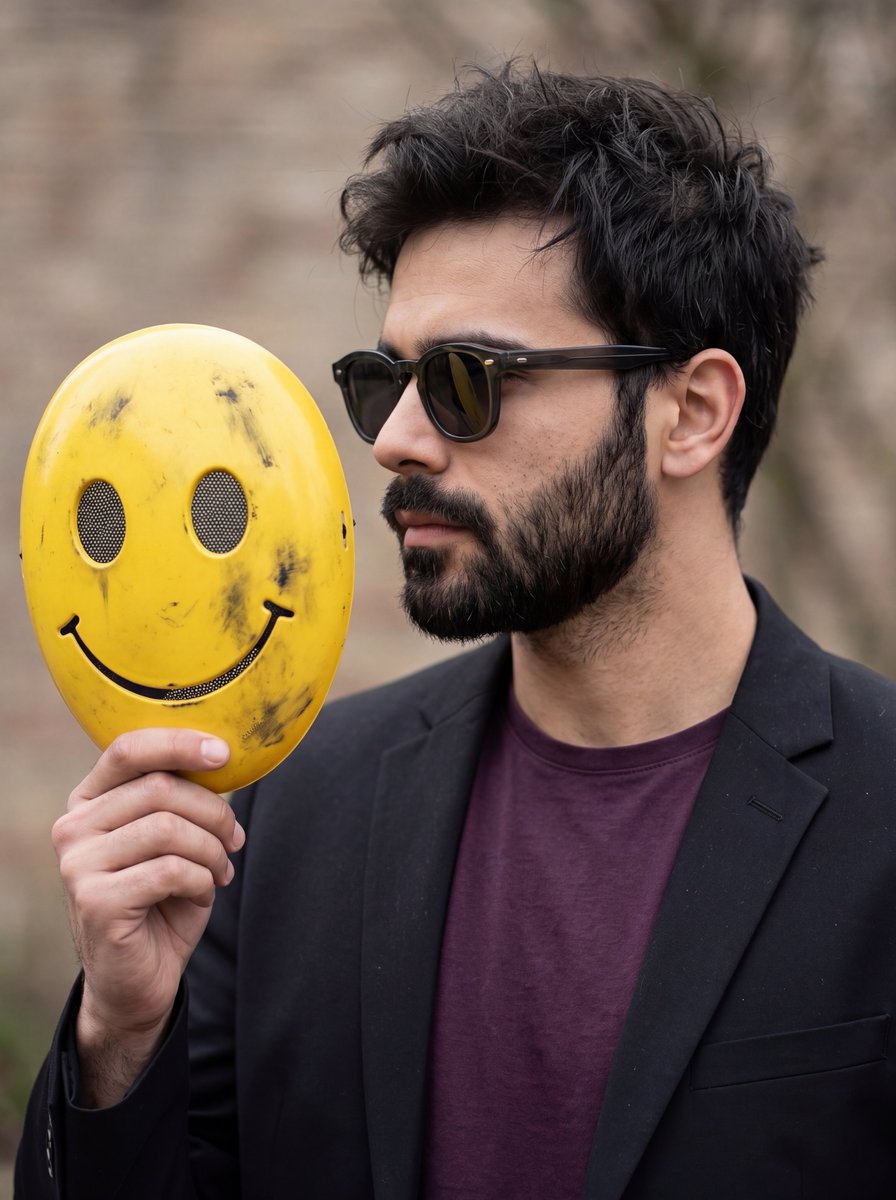
A medium close-up, eye-level portrait of a {argument name="subject" default="man"} shown in a three-quarter profile facing right, holding a {argument name="accessory" default="distinctive accessory"}. He has dark messy hair, paired with a dense, sharply groomed full beard. He is wearing thick-rimmed, dark acetate sunglasses, a {argument name="outfit" default="tailored matte black blazer"}, and a deep plum-colored crewneck t-shirt. In his left hand, he holds up an oval, bright yellow mask featuring a simple black smiley face line, circular eye holes backed with black mesh, and realistic, weathered dark scuff marks across the surface. The lighting is soft and natural, emphasizing the textures of his hair and the contours of his profile against a smoothly blurred, neutral-toned outdoor background.
Choose the primary action to open PicX Studio with the available template settings. Review the model and format, personalize the creative direction, and generate when ready.
Yes. You can change the subject, setting, lighting, mood, format, and available model controls before creating your image.
This template is free to open and customize. Generation usage is shown in PicX Studio before you create.
Start with Nano Banana 2, which is the model associated with this template. You can compare another compatible model for a different finish.
© 2026 PicX Studio. All rights reserved.

Follow a topic to a crawlable collection of related PicX Studio templates.