How do I use the Vintage Store Shopping Scene template?
Choose the primary action to open PicX Studio with the available template settings. Review the model and format, personalize the creative direction, and generate when ready.
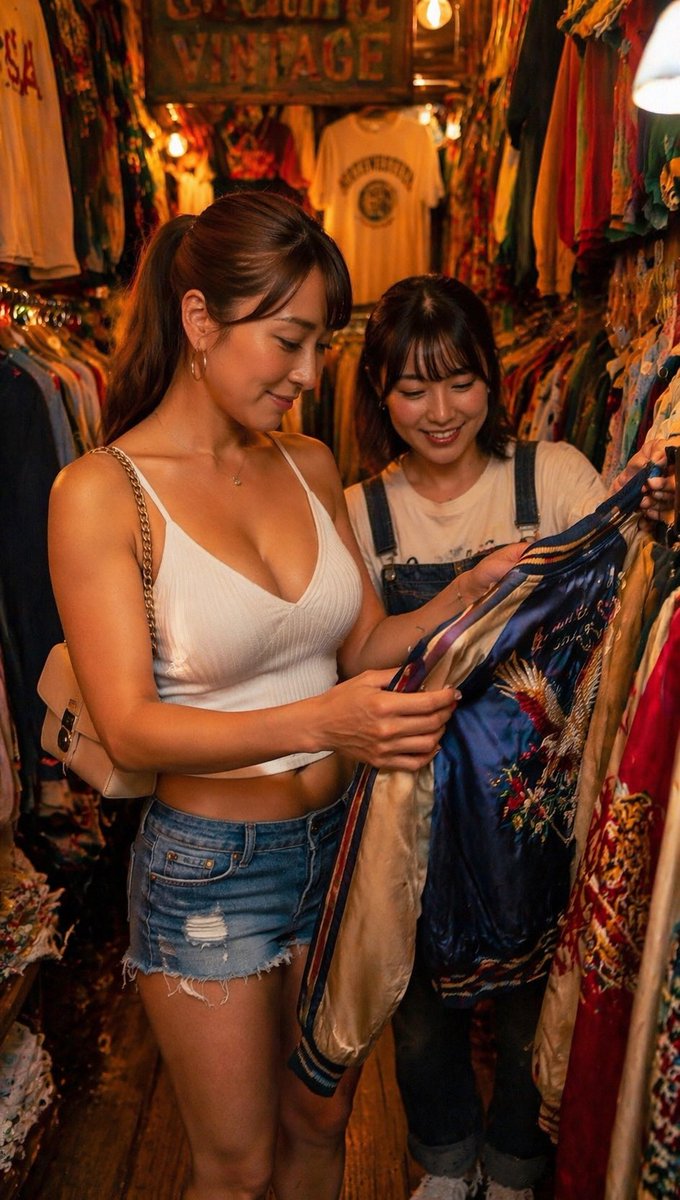
A photorealistic lifestyle image of two women shopping in a densely packed vintage clothing store. (free to use) — Free AI image template on PicX Studio.
A photorealistic, candid shot of two young Asian women shopping inside a tightly packed {argument name="setting" default="vintage clothing store"}. The woman in the foreground has brown hair in a ponytail and is wearing a {argument name="foreground outfit" default="white ribbed crop top and distressed denim shorts"} with a beige shoulder bag. She is holding up and examining a {argument name="item being examined" default="blue satin souvenir jacket with intricate embroidery"}. Beside her, the second woman has dark hair with bangs, wears {argument name="background outfit" default="a white t-shirt and denim overalls"}, and is smiling warmly at the jacket. The store is filled with dense racks of colorful vintage clothes under warm, atmospheric lighting, with a wooden sign reading "VINTAGE" visible in the background. Shallow depth of field focuses on the women and the jacket.
Use Vintage Store Shopping Scene to plan an AI image around gpt-image-2 generation, themes such as en and gpt-image-2. Match the preview's composition first, then personalize the subject, setting, and mood for your own project.
Use the primary action to load the template settings in PicX Studio.
Adjust the subject and creative details for your destination.
Create the image, compare the result with the preview, and refine one variable at a time.
A continuous mix — similar concepts first, woven with same-model prompts and fresh picks from the catalog.
Choose the primary action to open PicX Studio with the available template settings. Review the model and format, personalize the creative direction, and generate when ready.
Yes. You can change the subject, setting, lighting, mood, format, and available model controls before creating your image.
This template is free to open and customize. Generation usage is shown in PicX Studio before you create.
Start with gpt-image-2, which is the model associated with this template. You can compare another compatible model for a different finish.
Follow a topic to a crawlable collection of related PicX Studio templates.
39,157 public templates available. Verified via the PicX Studio public templates API; refreshed hourly.
A continuous mix — similar concepts first, woven with same-model prompts and fresh picks from the catalog.