How do I use the Retro Tech CEO with Superhero Cats template?
Choose the primary action to open PicX Studio with the available template settings. Review the model and format, personalize the creative direction, and generate when ready.
Generates a cinematic portrait of a tech leader surrounded by superhero-themed cats in a nostalgic 1990s rooftop setting with detailed props. Change the subject, setting, or lighting one variable at a time.
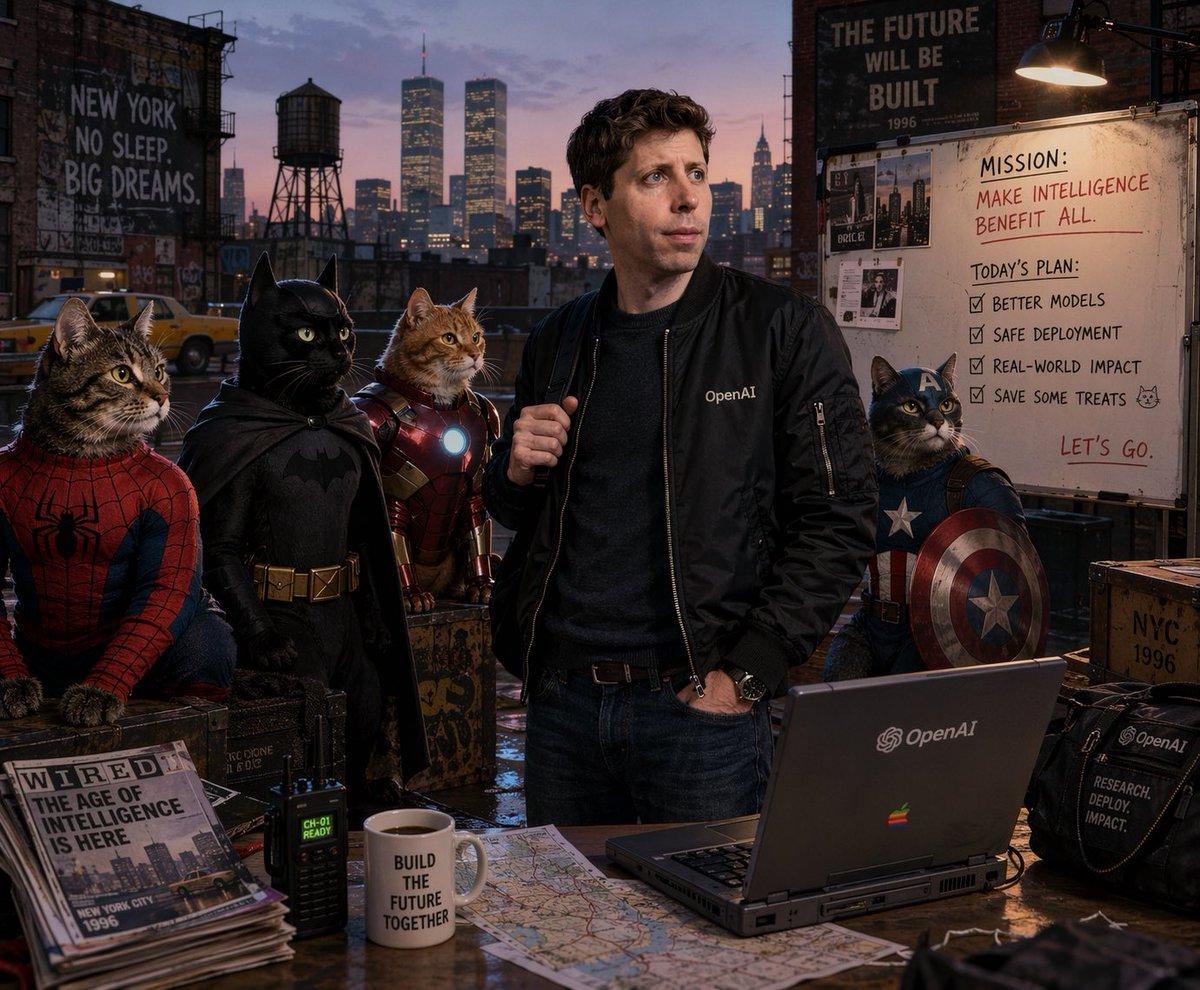
A cinematic, photorealistic portrait of {argument name="main subject" default="Sam Altman"} on a gritty rooftop at dusk, wearing a black bomber jacket with an {argument name="company logo" default="OpenAI"} logo. He is flanked by exactly 4 cats in superhero costumes: a tabby Spider-Man, a black Batman, an orange Iron Man with a glowing reactor, and a tabby Captain America with a shield. The background shows a {argument name="city skyline" default="1996 New York City skyline featuring the Twin Towers"}. A whiteboard reads "MISSION: {argument name="whiteboard mission" default="MAKE INTELLIGENCE BENEFIT ALL."}" and lists exactly 4 checked items: "BETTER MODELS", "SAFE DEPLOYMENT", "REAL-WORLD IMPACT", and "SAVE SOME TREATS". A foreground wooden desk holds a retro 1990s laptop with the company logo, a mug reading "BUILD THE FUTURE TOGETHER", a walkie-talkie, and a WIRED magazine titled "{argument name="magazine headline" default="THE AGE OF INTELLIGENCE IS HERE"}". Painted wall signs read "NEW YORK NO SLEEP. BIG DREAMS." and "THE FUTURE WILL BE BUILT 1996".
Choose the primary action to open PicX Studio with the available template settings. Review the model and format, personalize the creative direction, and generate when ready.
Yes. You can change the subject, setting, lighting, mood, format, and available model controls before creating your image.
This template is free to open and customize. Generation usage is shown in PicX Studio before you create.
Start with GPT Image 2, which is the model associated with this template. You can compare another compatible model for a different finish.
© 2026 PicX Studio. All rights reserved.

Follow a topic to a crawlable collection of related PicX Studio templates.
43,474 public templates available. Verified via the PicX Studio public templates API; refreshed hourly.










![Minimalist Flat Vector Travel Poster — Premium minimalist flat-vector travel poster for {argument name="city name" default="[CITY_NAME]"}, 3:4 vertical format.](https://cms-assets.youmind.com/media/1787917359711_3ug846_HQX205cbMAA6F6S-300x400.jpg)



































![Technical Infographic Cutaway Prompt — Create a high-resolution professional infographic of [{argument name="object name" default="OBJECT NAME"}].
Display the o](https://pbs.twimg.com/media/HCTasgRa4AAh2YG.jpg)