Pink Magical Girl Character Sheet
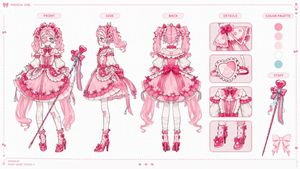
Goal: Create a polished 16:9 anime magical girl character design sheet for {argument name="character name" default="an original magical girl"}, presented like a professional Japanese game/anime production model sheet.
Canvas: Wide horizontal 16:9 layout, clean white background with an extremely subtle pale grid. Add a thin pink dotted border around the entire sheet, tiny decorative hearts and bows along the edges, and a delicate pink production-design aesthetic.
Layout: Arrange exactly 5 main vertical sections from left to right: 1) FRONT full-body character view, 2) SIDE full-body character view, 3) BACK full-body character view, 4) DETAILS column with close-up panels, 5) COLOR PALETTE and STAFF reference column. Put rounded pink capsule labels above the main sections reading “FRONT”, “SIDE”, “BACK”, “DETAILS”, and “COLOR PALETTE”. Add a small top-left header with a bow icon and the text “MAGICAL GIRL”. Add a tiny bottom-left credit reading “DESIGN BY PINKY HEART STUDIO ♥”.
Character details: Design a cute pink magical girl with very long curly twin tails, bright blue eyes, frilly bangs, heart and bow hair accessories, and an elaborate sweet-lolita magical outfit. Her costume should be primarily {argument name="main costume color" default="bubblegum pink"} with white lace, darker hot-pink accents, small heart motifs, ribbons, ruffles, layered skirts, corset details, puff sleeves, white stockings, pink high-heeled boots, and dangling bead charms. She carries a slender magical staff with a heart-shaped top, bows, ribbons, and blue bead tassels. The overall silhouette is frilly, ornate, feminine, and candy-like.
Main character views: Include exactly 3 full-body views of the same character: FRONT view on the left, SIDE view in the center-left, and BACK view in the center. The front view should show her holding the magical staff diagonally across the body, with the full skirt, long twin tails, boots, and accessories visible. The side view should show the profile of the hair volume, staff held upright beside her, and layered dress shape. The back view should emphasize the large rear bow, twin-tail curls, back corset/lace construction, skirt layers, and dangling ribbons.
Details column: Include exactly 4 rounded rectangular close-up panels stacked vertically. Panel 1: close-up of a shoulder cape or sleeve bow with lace, hearts, and trim. Panel 2: close-up of a heart-shaped pendant or compact with ruffled edging and a small strap. Panel 3: close-up of the bodice with puff sleeves, corset buttons, lace trim, and central bow. Panel 4: close-up of both pink boots with bows, dotted stocking details, high heels, and ankle frills.
Right reference column: Include exactly 5 circular color swatches stacked vertically under “COLOR PALETTE”: hot pink, pale pink, very light blush pink, white, and pale aqua blue. Below them, add a “STAFF” label and draw the magical staff as a separate prop: a slim pink wand with a heart top, bow cluster, trailing ribbons, and blue bead tassels. Add one extra pale pink bow silhouette near the bottom of this column.
Visual style: High-quality anime production sheet, clean ink lines, soft watercolor-like shading, pastel pink palette, crisp readable labels, professional model-sheet spacing, delicate ornamentation, no dark background, no clutter. Keep the sheet airy and symmetrical, with all views aligned along the same baseline.
Constraints: Use exactly 3 full-body character views, exactly 4 detail panels, exactly 5 color swatches, and exactly 1 separate staff prop illustration. Do not add extra characters, extra views, logos, watermarks, or dense text. Maintain a refined Japanese magical-girl design-sheet look.













![Minimalist Flat Vector Travel Poster — Premium minimalist flat-vector travel poster for {argument name="city name" default="[CITY_NAME]"}, 3:4 vertical format.](https://cms-assets.youmind.com/media/1787917359711_3ug846_HQX205cbMAA6F6S-300x400.jpg)


























![Fashion Arrangement Prompt for High School Characters — # 設定
[服装の種類] = {argument name="服装の種類" default="女子高生"}
[世界観] = {argument name="世界観" default="現代日本"}
# 生成](https://pbs.twimg.com/media/G85gnYRagAMfkX3.jpg)