How do I use the Two-Panel Pastel Sailor Girls template?
Choose the primary action to open PicX Studio with the available template settings. Review the model and format, personalize the creative direction, and generate when ready.
Generates a wide two-panel anime color-variation illustration of cute sailor girls in a dreamy canal city, useful for character design comparison sheets. Change the subject, setting, or lighting one variable at a time.
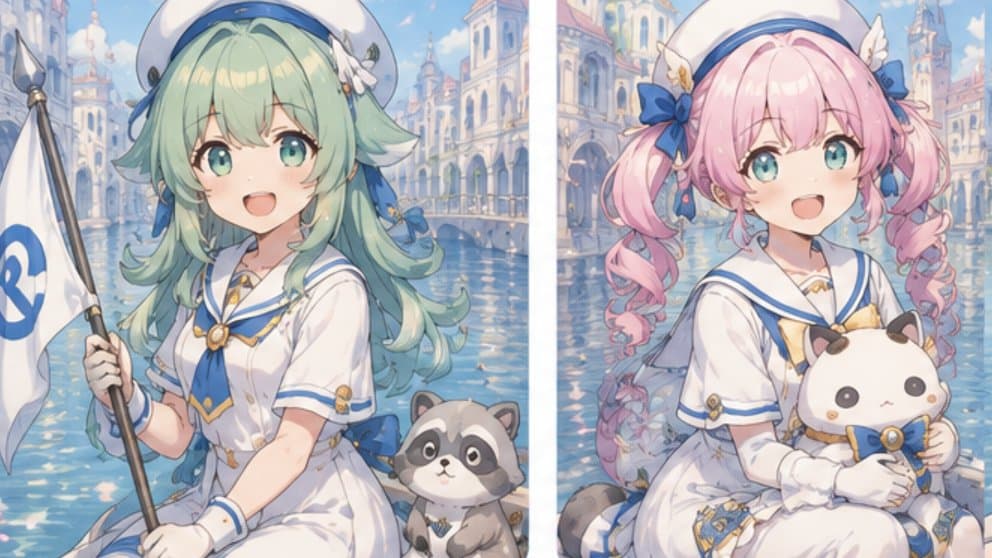
Goal: Create a side-by-side anime color-variation test illustration of the same cute sailor-girl character concept in an ARIA-inspired canal city setting. Canvas: Wide horizontal 16:9 image split into exactly 2 equal vertical panels with a thin white divider in the center. Soft pastel lighting, dreamy waterfront atmosphere, high-detail anime illustration. Layout: Left panel shows one character seated or kneeling near the canal, facing slightly toward the viewer, holding a tall white gondola-style flagpole on the far left. Right panel shows a second variation of the character in a similar pose, holding a plush mascot. Both faces are intentionally obscured by opaque square censor blocks. Subject details: Use exactly 2 sailor-girl variants. Variant 1 on the left has {argument name="left hair color" default="mint green"} long wavy hair, a white sailor beret with blue trim, a small white flower hair accessory, a white short-sleeved sailor dress with blue and gold trim, white gloves, gold brooch details, and a blue ribbon at the waist. She holds a white flag with a blue curved emblem, and a small raccoon-like mascot sits beside her. Variant 2 on the right has {argument name="right hair color" default="pink"} twin-drill pigtails with large blue bows, a matching white sailor beret with blue trim and a tiny wing-like accessory, a white sailor dress with blue and gold trim, white gloves, and gold ornaments. She hugs a round white-and-brown cat-like plush mascot wearing a blue bow and gold medallion. Counted visible elements: exactly 2 vertical panels; exactly 2 main girls; exactly 2 opaque square face-cover blocks; exactly 2 mascots, one raccoon-like animal in the left panel and one cat-like plush in the right panel; exactly 1 tall white flag in the left panel; exactly 1 central white divider. Background: A romantic Venetian/Aqua-style canal city with pale cream and blue buildings, arched bridges, waterfront colonnades, shimmering turquoise water, reflections, distant towers, soft blue sky, and tiny birds. Keep the background continuous in mood but separated by the panel divider. Visual style: Polished Japanese anime key visual, pastel palette, soft bloom, delicate line art, glossy eyes mostly hidden by the censor blocks, ornate sailor uniform details, cute fantasy maritime aesthetic, high resolution, gentle bokeh and watercolor-like atmospheric depth. Constraints: Keep both face-obscuring squares clearly visible and opaque, left block in muted beige-gray and right block in pale dusty pink. Do not add readable text except the simple blue emblem on the flag. Avoid photorealism, avoid extra characters, avoid more panels, avoid logos or watermarks.
Choose the primary action to open PicX Studio with the available template settings. Review the model and format, personalize the creative direction, and generate when ready.
Yes. You can change the subject, setting, lighting, mood, format, and available model controls before creating your image.
This template is free to open and customize. Generation usage is shown in PicX Studio before you create.
Start with GPT Image 2, which is the model associated with this template. You can compare another compatible model for a different finish.
© 2026 PicX Studio. All rights reserved.

Follow a topic to a crawlable collection of related PicX Studio templates.
43,474 public templates available. Verified via the PicX Studio public templates API; refreshed hourly.








![Layered Paper Cut Illustration Template — Layered paper-cut illustration of [Subject], built with overlapping shapes in soft [Color One] and [Color Two], handcr](/_next/image?url=https%3A%2F%2Fcdn.picxstudio.com%2Fuploads%2F05_602c0848-52b7-4625-9ba2-2bd029e859d5.jpg&w=828&q=100)



![Minimalist Flat Vector Travel Poster — Premium minimalist flat-vector travel poster for {argument name="city name" default="[CITY_NAME]"}, 3:4 vertical format.](https://cms-assets.youmind.com/media/1787917359711_3ug846_HQX205cbMAA6F6S-300x400.jpg)





























![Hyper-Realistic Summer Vacation Photo Prompt with Extreme Figure — - [ ] UHD photos taken on a smartphone with a high-end mobile CMOS sensor, 9:16 vertical form](https://pbs.twimg.com/media/HAtmNn4aMAAqKIX.jpg)