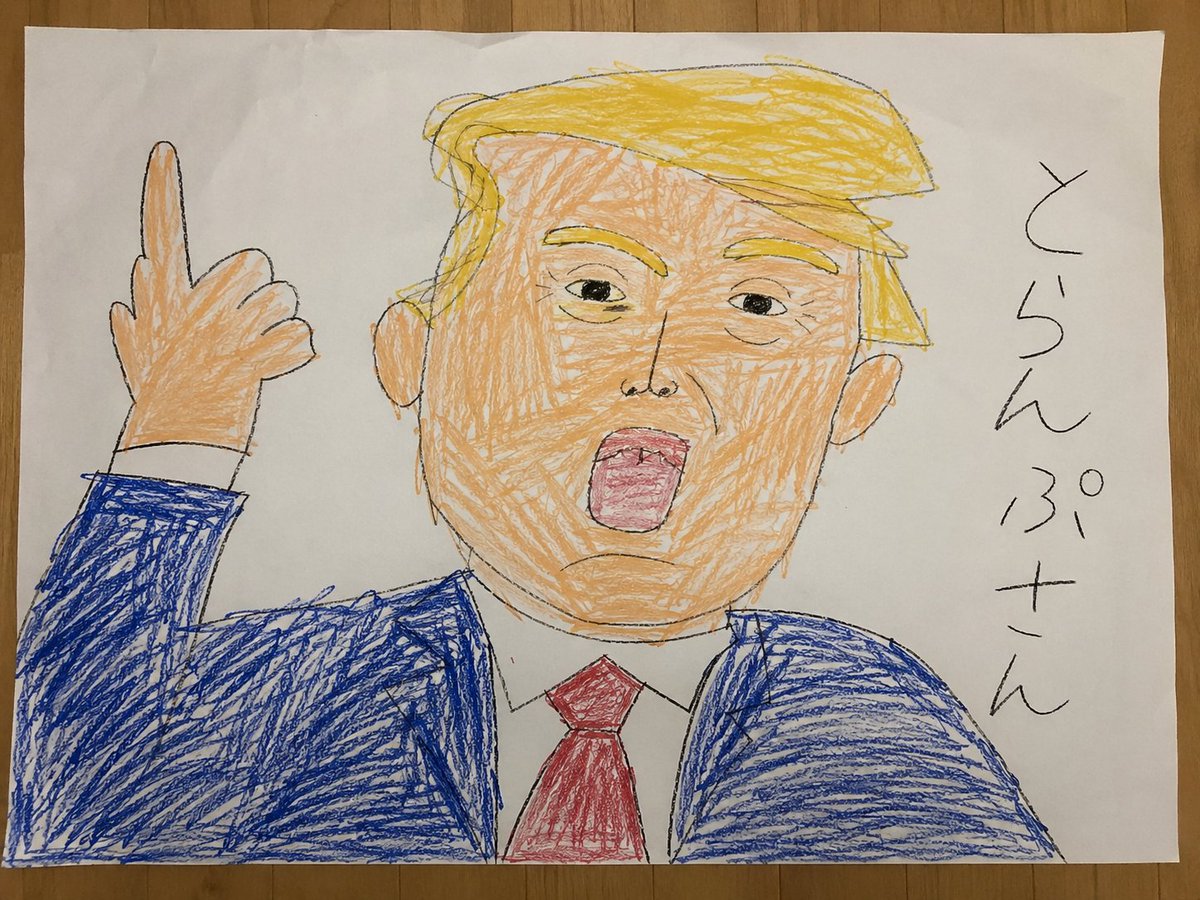
How do I use the Childlike Crayon Portrait on Paper template?
Choose the primary action to open PicX Studio with the available template settings. Review the model and format, personalize the creative direction, and generate when ready.
This prompt generates a realistic photo of a messy children's crayon drawing on paper, useful for recreating handmade naive artwork with a humorous school-project feel. (free to use) — Free AI image template on PicX Studio.
A realistic overhead photo of a childlike crayon drawing on a slightly wrinkled white sheet of paper placed on a wooden tabletop. The drawing shows a simple portrait of {argument name="character" default="Donald Trump"} in a naive elementary-school style, with messy yellow crayon hair, peach-colored skin, large ears, a blue suit jacket, white shirt collar, and a red necktie. The face is front-facing and fills most of the page, with one raised hand on the left side of the paper making a rude gesture with the middle finger extended. The linework is uneven black pencil or crayon outline, and the coloring is rough, scribbly, and intentionally clumsy, with visible childlike strokes that go outside the lines. On the right side of the page, there is vertical handwritten Japanese text in black that reads {argument name="side text" default="とらんぷさん"}. The composition is a candid smartphone snapshot, not a clean scan, showing the entire sheet of paper, slight perspective distortion, soft indoor lighting, and the texture of the wooden surface around the page. Emphasize the authentic handmade crayon texture, awkward proportions, and convincing “bad but charming” children’s artwork aesthetic.
Use Childlike Crayon Portrait on Paper to plan an AI image around gpt-image-2 generation, themes such as en and gpt-image-2. Match the preview's composition first, then personalize the subject, setting, and mood for your own project.
Use the primary action to load the template settings in PicX Studio.
Adjust the subject and creative details for your destination.
Create the image, compare the result with the preview, and refine one variable at a time.
A continuous mix — similar concepts first, woven with same-model prompts and fresh picks from the catalog.
Choose the primary action to open PicX Studio with the available template settings. Review the model and format, personalize the creative direction, and generate when ready.
Yes. You can change the subject, setting, lighting, mood, format, and available model controls before creating your image.
This template is free to open and customize. Generation usage is shown in PicX Studio before you create.
Start with gpt-image-2, which is the model associated with this template. You can compare another compatible model for a different finish.
Follow a topic to a crawlable collection of related PicX Studio templates.
39,157 public templates available. Verified via the PicX Studio public templates API; refreshed hourly.
A continuous mix — similar concepts first, woven with same-model prompts and fresh picks from the catalog.