How do I use the Neon Snapchat Influencer Portrait template?
Choose the primary action to open PicX Studio with the available template settings. Review the model and format, personalize the creative direction, and generate when ready.
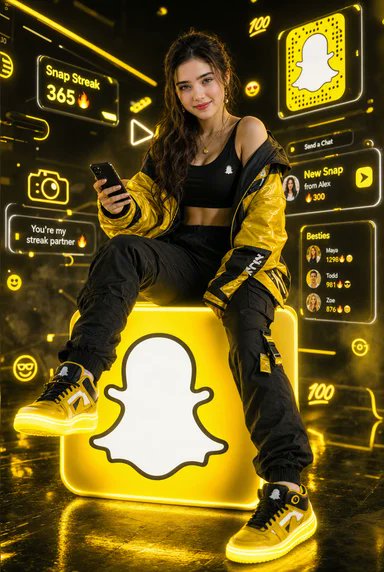
A cinematic hyper-realistic portrait prompt for creating a stylish influencer seated on a glowing Snapchat-logo cube in a futuristic yellow neon environment. (free to use) — Free AI image template on PicX Studio.
Goal: Create a hyper-realistic cinematic vertical portrait of {argument name="character description" default="a trendy young female influencer"} sitting confidently on a giant glowing yellow cube featuring a large white Snapchat ghost logo on the front. Canvas: Vertical 2:3 composition, full-body fashion portrait, low camera angle, glossy black reflective floor, dark futuristic studio filled with yellow neon haze and volumetric light. The subject is centered, seated with one knee raised, legs relaxed, looking toward the viewer, holding a smartphone in one hand. Subject details: The woman has long flowing wavy dark hair, soft glam makeup, a playful luxury streetwear influencer vibe, and an intentionally blurred/obscured face for anonymity. She wears {argument name="outfit" default="a black crop top, oversized shiny yellow-and-black jacket slipping off one shoulder, loose black cargo pants with straps, and yellow-black high-top sneakers"}. Add small jewelry such as a delicate necklace. Make the shoes and jacket visually prominent with crisp fabric texture, sneaker details, and glossy highlights. Main object: The cube is bright Snapchat yellow with rounded corners, glowing edges, and a large centered white ghost logo outlined in black on its front face. The cube casts yellow light upward onto the subject and downward onto the wet reflective floor. Background interface elements: Surround the subject with exactly 12 glowing Snapchat-themed AR hologram elements in yellow and white neon: 1) top-left small circular menu icon, 2) left panel reading “Snap Streak 365 🔥”, 3) left-center outlined camera icon, 4) left-middle speech bubble reading “You’re my streak partner”, 5) lower-left smiley face icon, 6) upper-center “100” icon, 7) center-left triangular play icon, 8) upper-right large square Snapcode-style panel with a white ghost, 9) small smiley icon below the upper-right area, 10) right panel reading “Send a Chat”, 11) right notification card reading “New Snap from Alex 300”, 12) right friends card titled “Besties” with three tiny avatar rows labeled Maya, Todd, and Zoe with streak numbers and fire emojis. Add an extra neon “100” mark near the lower right as part of the ambient background glow, but keep the 12 main UI elements clear and readable. Lighting and style: Hyper-realistic cinematic photography, luxury social-media aesthetic, high contrast black-and-yellow palette, cyberpunk Snapchat atmosphere, rim lighting around hair and jacket, glowing dust particles, shallow depth of field, ultra-detailed textures, reflective wet floor, dramatic neon bloom, crisp subject and cube. Text customization: Use {argument name="brand app theme" default="Snapchat"} visual language, with {argument name="primary neon color" default="yellow"} as the dominant glow and {argument name="streak number" default="365"} in the Snap Streak panel. Constraints: Do not add extra people. Keep the ghost logo large and recognizable on the cube. Avoid watermarks, signatures, distorted hands, unreadable main text, or excessive clutter over the subject.
Use Neon Snapchat Influencer Portrait to plan an AI image around gpt-image-2 generation, themes such as en and gpt-image-2. Match the preview's composition first, then personalize the subject, setting, and mood for your own project.
Use the primary action to load the template settings in PicX Studio.
Adjust the subject and creative details for your destination.
Create the image, compare the result with the preview, and refine one variable at a time.
A continuous mix — similar concepts first, woven with same-model prompts and fresh picks from the catalog.
Choose the primary action to open PicX Studio with the available template settings. Review the model and format, personalize the creative direction, and generate when ready.
Yes. You can change the subject, setting, lighting, mood, format, and available model controls before creating your image.
This template is free to open and customize. Generation usage is shown in PicX Studio before you create.
Start with gpt-image-2, which is the model associated with this template. You can compare another compatible model for a different finish.
Follow a topic to a crawlable collection of related PicX Studio templates.
39,157 public templates available. Verified via the PicX Studio public templates API; refreshed hourly.
A continuous mix — similar concepts first, woven with same-model prompts and fresh picks from the catalog.