How do I use the Cinematic Golden-Hour Western Fashion template?
Choose the primary action to open PicX Studio with the available template settings. Review the model and format, personalize the creative direction, and generate when ready.
A detailed fashion portrait prompt for a glamorous cowgirl aesthetic in a countryside setting with sunset lighting. Change the subject, setting, or lighting one variable at a time.
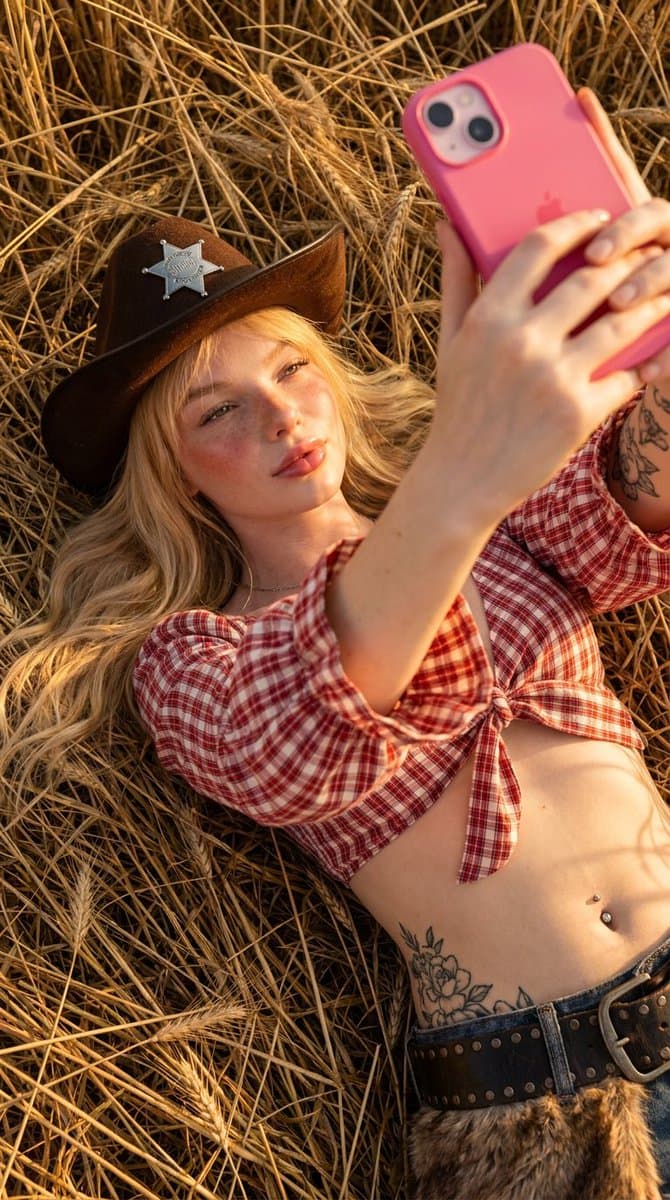
A cinematic golden-hour fashion portrait of a {argument name="subject" default="glamorous young blonde woman taking a selfie in a sunlit countryside field filled with tall dry golden grass"}. She has long wavy platinum blonde hair, soft freckles, glowing skin, and a playful expression while winking and making a kissy face toward her {argument name="prop" default="bright pink smartphone"} held high in one hand. She wears a {argument name="outfit" default="black western cowboy hat with a metallic sheriff-style badge on the front, a red-and-white gingham plaid crop top tied at the waist with flared sleeves, black high-waisted leather shorts with soft fur trim, and black fishnet tights"}. A jeweled belly button piercing and subtle arm tattoos are visible, adding edgy detail to the western glam aesthetic. Warm sunset lighting creates soft cinematic highlights and golden rim light around her hair and body. The background features blurred countryside scenery with shallow depth of field, creating a dreamy luxury editorial atmosphere. Photorealistic skin texture, realistic hair movement, cinematic color grading, warm earthy tones, influencer selfie pose, Vogue-inspired western fashion campaign, ultra realistic, high detail, lifestyle fashion photography, soft sensual mood, luxury cowgirl aesthetic, 85mm lens look, high resolution.
Choose the primary action to open PicX Studio with the available template settings. Review the model and format, personalize the creative direction, and generate when ready.
Yes. You can change the subject, setting, lighting, mood, format, and available model controls before creating your image.
This template is free to open and customize. Generation usage is shown in PicX Studio before you create.
Start with GPT Image 2, which is the model associated with this template. You can compare another compatible model for a different finish.
© 2026 PicX Studio. All rights reserved.

Follow a topic to a crawlable collection of related PicX Studio templates.
43,474 public templates available. Verified via the PicX Studio public templates API; refreshed hourly.

















![Minimalist Flat Vector Travel Poster — Premium minimalist flat-vector travel poster for {argument name="city name" default="[CITY_NAME]"}, 3:4 vertical format.](https://cms-assets.youmind.com/media/1787917359711_3ug846_HQX205cbMAA6F6S-300x400.jpg)