How do I use the Rainy Night City Crossing template?
Choose the primary action to open PicX Studio with the available template settings. Review the model and format, personalize the creative direction, and generate when ready.
A moody cinematic street photo of a lone pedestrian with an umbrella crossing a neon-lit rainy city road, ideal for urban atmosphere and noir-style visuals. Change the subject, setting, or lighting one variable at a time.
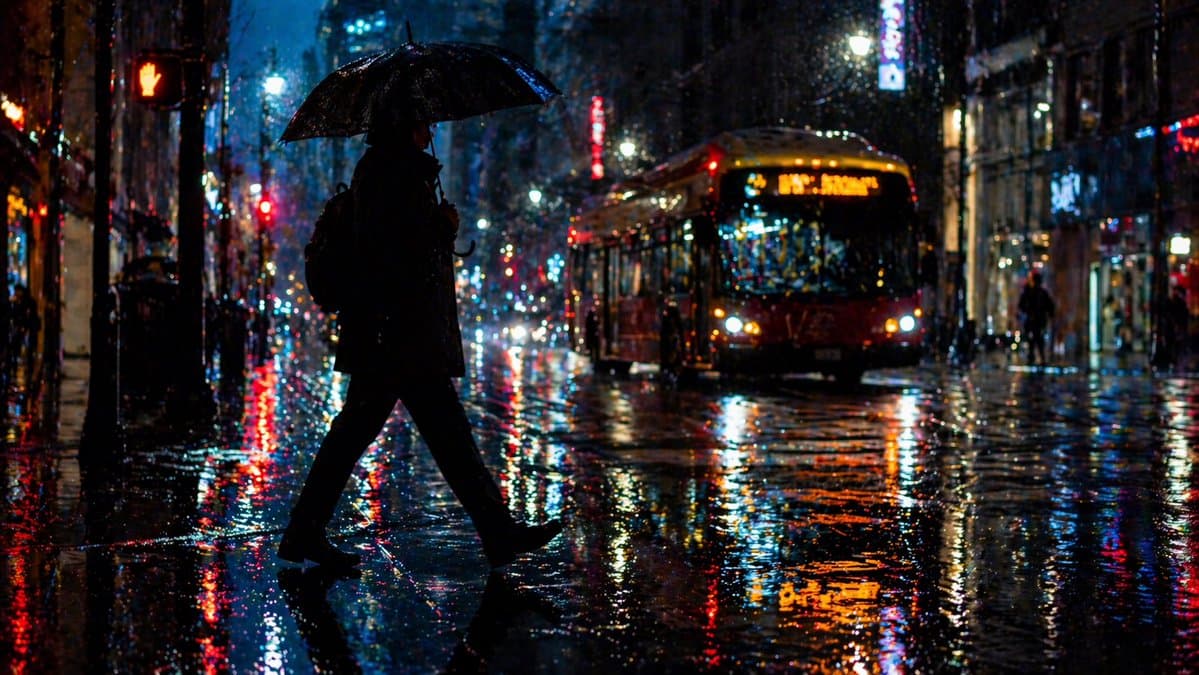
A cinematic urban night street scene in heavy rain, viewed from a low street-level angle. In the foreground, 1 solitary pedestrian appears as a nearly black silhouette crossing left to right, mid-stride, holding 1 open umbrella overhead and wearing a dark coat with a backpack. The person’s face is obscured by shadow and backlighting. In the midground on the right, 1 city bus approaches with bright warm headlights and an amber LED route display, slightly blurred by rain and motion. On the far left, 1 pedestrian crossing signal glows red with a raised hand icon. The street is soaked with large reflective puddles, creating intense mirrored streaks of red, blue, orange, and white neon and traffic lights across the asphalt. Tall buildings line both sides of the street as a dense downtown corridor, with scattered illuminated signs and windows fading into a deep blue-black rainy atmosphere. Emphasize glossy wet pavement, sparkling raindrops, bokeh light scatter, strong contrast, dramatic backlighting, moody noir mood, realistic photography, shallow depth of field, and vibrant over-saturated reflections. Use a widescreen composition, with the silhouetted walker centered-left and the bus positioned mid-right.
Choose the primary action to open PicX Studio with the available template settings. Review the model and format, personalize the creative direction, and generate when ready.
Yes. You can change the subject, setting, lighting, mood, format, and available model controls before creating your image.
This template is free to open and customize. Generation usage is shown in PicX Studio before you create.
Start with GPT Image 2, which is the model associated with this template. You can compare another compatible model for a different finish.
© 2026 PicX Studio. All rights reserved.

Follow a topic to a crawlable collection of related PicX Studio templates.
43,474 public templates available. Verified via the PicX Studio public templates API; refreshed hourly.














![Minimalist Flat Vector Travel Poster — Premium minimalist flat-vector travel poster for {argument name="city name" default="[CITY_NAME]"}, 3:4 vertical format.](https://cms-assets.youmind.com/media/1787917359711_3ug846_HQX205cbMAA6F6S-300x400.jpg)




































![Summer Beach Portrait with Coconut — [인물의 포즈 및 표정]
하얀 모래사장 위에 쪼그려 앉아 한 손으로 커다란 {argument name="음료" default="초록색 생코코넛"}을 들고 빨대로 음료를 마시는 듯한 포즈를 취하고 있습니다. 카메라를 정면](https://cms-assets.youmind.com/media/1780822692209_n7bzi0_HKAfK4XagAAVDJx.jpg)
![Wide-angle landscape prompt of a dirt road — [Subject]: A winding, sun-baked dirt road stretching endlessly towards the horizon, marked by faint tire tracks and](https://pbs.twimg.com/media/HDhxulzasAAeqDy.jpg)


