How do I use the Crimson Veil in Red Flower Field template?
Choose the primary action to open PicX Studio with the available template settings. Review the model and format, personalize the creative direction, and generate when ready.
A cinematic fashion portrait of a woman in translucent crimson fabric dancing through a red flower field at sunset. Change the subject, setting, or lighting one variable at a time.
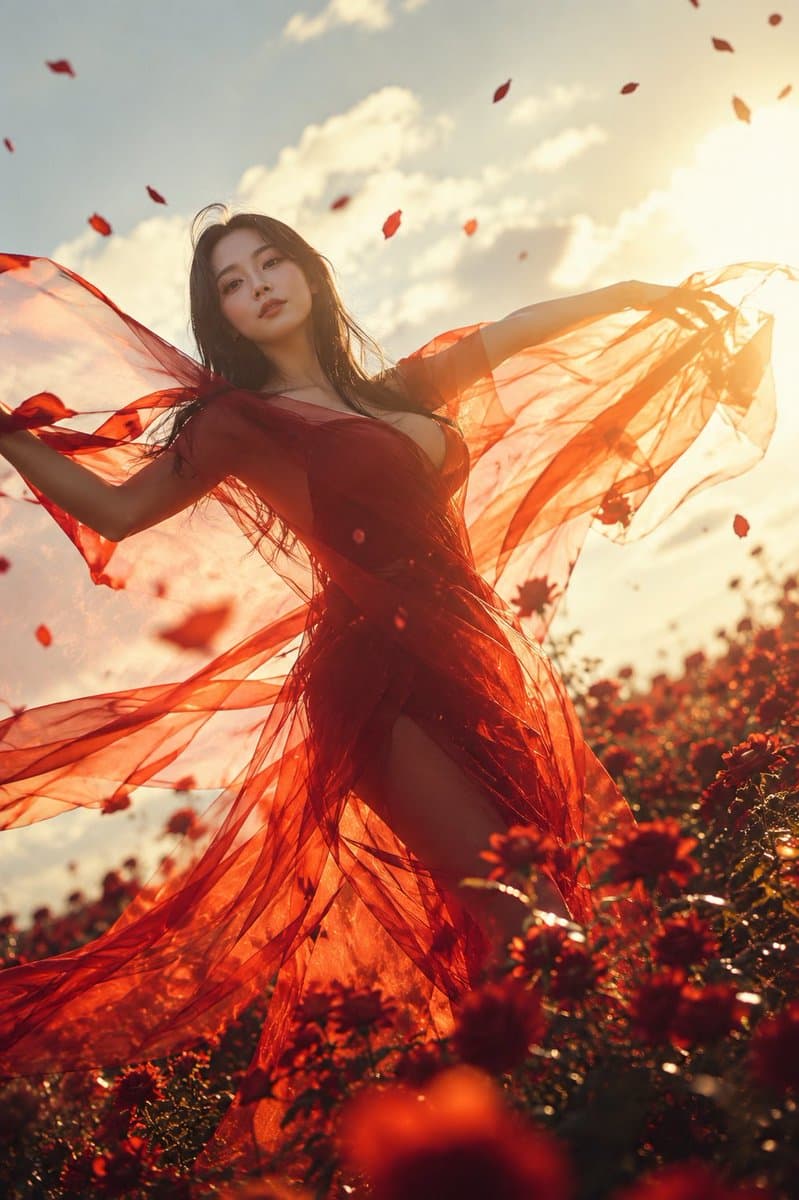
Create a cinematic vertical portrait photograph of {argument name="character name" default="a young woman"} standing in a field of deep red flowers at golden hour, viewed from a low angle with the camera looking upward. She has long windblown dark brown hair and wears a flowing sheer crimson-red dress with translucent gauze fabric, a plunging neckline, and a high slit, the fabric spreading dramatically from both outstretched arms like wings. Add a flat opaque square censor block over the center of her face in a warm brown skin-tone color. Surround her with exactly 18 visible airborne red petals scattered across the sky and foreground. The background should show a warm sun near the upper right edge, soft white clouds, intense amber backlighting, lens flare, glowing rim light through the transparent red fabric, and a lush field of red blossoms with foreground flowers blurred by shallow depth of field. The mood is passionate but quiet and poetic, with wind movement, radiant sunset haze, rich reds and oranges, natural film grain, high dynamic range, and fashion-editorial realism. Use {argument name="dress color" default="crimson red"}, {argument name="flower field" default="deep red flowers"}, {argument name="lighting mood" default="golden hour backlight"}, and {argument name="censor block color" default="warm brown"}.
Choose the primary action to open PicX Studio with the available template settings. Review the model and format, personalize the creative direction, and generate when ready.
Yes. You can change the subject, setting, lighting, mood, format, and available model controls before creating your image.
This template is free to open and customize. Generation usage is shown in PicX Studio before you create.
Start with GPT Image 2, which is the model associated with this template. You can compare another compatible model for a different finish.
© 2026 PicX Studio. All rights reserved.

Follow a topic to a crawlable collection of related PicX Studio templates.
43,474 public templates available. Verified via the PicX Studio public templates API; refreshed hourly.













![Minimalist Flat Vector Travel Poster — Premium minimalist flat-vector travel poster for {argument name="city name" default="[CITY_NAME]"}, 3:4 vertical format.](https://cms-assets.youmind.com/media/1787917359711_3ug846_HQX205cbMAA6F6S-300x400.jpg)





















![Vintage Travel Posters by Nano Banana 2 — Vintage illustrated travel poster of [COUNTRY], aged parchment background texture, ornate gold baroque decorative bord](/_next/image?url=https%3A%2F%2Fcdn.picxstudio.com%2Fuploads%2Fvintage_poster_54cea1be-2a96-40ae-bb2d-1fa2cdcbccc6.jpg&w=828&q=100)







![Expressionist Sketch Art Poster — EXPRESSIONIST SKETCH PORTRAIT
Subject name: {argument name="subject name" default="[Enter Name Here]"}
Create a 4:5 vertical p](https://cms-assets.youmind.com/media/1778662241596_soniuh_HIGTdXRbQAA_GaX.jpg)