How do I use the Punk Goth Cosplay Fashion Diptych template?
Choose the primary action to open PicX Studio with the available template settings. Review the model and format, personalize the creative direction, and generate when ready.
Generates a two-panel 2.5D urban fashion editorial of an anonymized punk-goth cosplay model for AI lady outfit and style comparison visuals. Change the subject, setting, or lighting one variable at a time.
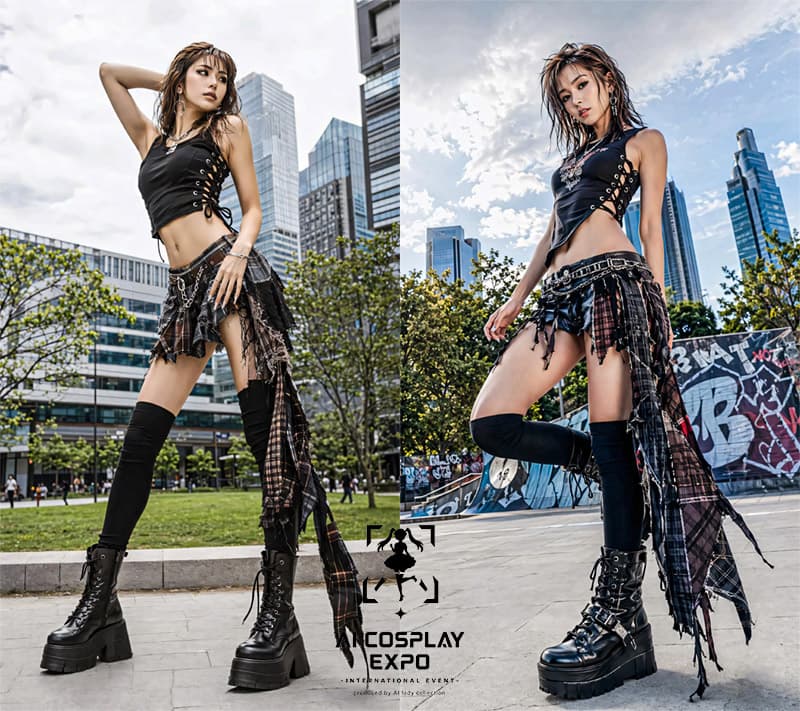
Goal: Create a high-resolution 2.5D realistic fashion cosplay generator image featuring {argument name="character name" default="AI Lady"}, presented as a side-by-side comparison diptych of the same stylish woman in an urban outdoor setting. Canvas: Landscape 4:3 image, split vertically into exactly 2 equal panels with no border: left panel and right panel. Use sharp, glossy, semi-realistic 2.5D rendering with photographic lighting, detailed fabric texture, and a polished AI-fashion editorial look. Subject: The same tall, slim young adult woman appears once in each panel, exactly 2 full-body poses total. Her face is intentionally anonymized with a smooth rectangular blur/mosaic patch. She has wet-looking tousled medium-length {argument name="hair color" default="brown hair"} with small braids and strands, an athletic slim waist, long legs, and confident punk-goth styling. Outfit details: Use exactly 7 main visible outfit elements: 1 black sleeveless cropped lace-up top with side grommets and cords, 1 layered asymmetrical torn plaid mini skirt, 1 long trailing plaid sash panel hanging from the skirt, 1 chain belt with multiple silver chains, 1 pair of black thigh-high socks, 1 pair of chunky black lace-up platform boots, and 1 silver necklace/choker set. Add small bracelets and rings only as subtle accessories. Left panel pose: Full-body low-angle fashion shot in a city plaza. The model stands with one hand behind her head and the other hand resting near her hip, legs apart, showing the boots and asymmetrical skirt. Background includes modern glass skyscrapers, a public square, green trees, grass, pedestrians in the distance, and a cloudy bright sky. Right panel pose: Full-body low-angle shot of the same model in a skate-park-like urban plaza. She stands with one leg bent and lifted back, arms relaxed, body angled to emphasize the lace-up crop top and trailing torn plaid fabric. Background includes high-rise buildings, trees, blue sky with dramatic clouds, and a graffiti wall. Branding and text: Place a black event-logo graphic centered near the bottom across the split, overlapping both panels. The logo contains exactly 3 text lines: the large line "COSPLAY", the large line "EXPO", and a small subtitle line "INTERNATIONAL EVENT". Above the text, include a small black emblem resembling a stylized dancing girl silhouette framed by corner brackets, plus a tiny diamond mark below it. Visual style: Fashion editorial meets cosplay street photography, crisp realistic city details, saturated but natural colors, strong contrast on black clothing, glossy boot highlights, dynamic wide-angle perspective, full-body composition, no extra characters in the foreground. Constraints: Keep exactly 2 panels and exactly 2 versions of the same model. Do not add extra text beyond the logo wording. Keep the face blurred/anonymized. Emphasize {argument name="fashion style" default="punk goth street cosplay"}, tall slim GPT-image-like proportions, highly detailed fabric frays, chains, laces, and platform boots.
Choose the primary action to open PicX Studio with the available template settings. Review the model and format, personalize the creative direction, and generate when ready.
Yes. You can change the subject, setting, lighting, mood, format, and available model controls before creating your image.
This template is free to open and customize. Generation usage is shown in PicX Studio before you create.
Start with GPT Image 2, which is the model associated with this template. You can compare another compatible model for a different finish.
© 2026 PicX Studio. All rights reserved.

Follow a topic to a crawlable collection of related PicX Studio templates.
43,474 public templates available. Verified via the PicX Studio public templates API; refreshed hourly.













![Minimalist Flat Vector Travel Poster — Premium minimalist flat-vector travel poster for {argument name="city name" default="[CITY_NAME]"}, 3:4 vertical format.](https://cms-assets.youmind.com/media/1787917359711_3ug846_HQX205cbMAA6F6S-300x400.jpg)






















![Cinematic Automotive Triptych Portrait Prompt — Transform this image [UPLOAD YOUR IMAGE] into a 64K DSLR shot resolution of a ultra-hyperrealistic gritty, cinem](https://pbs.twimg.com/media/G_5QzO3aYAAnfxY.jpg)

![Instagram Feed Generation Prompt (Aesthetic Cohesion Test) — Create a 9-image Instagram feed for this product in [the same aesthetic]. Use different locations,](https://pbs.twimg.com/media/HCHGfWAXcAAtwmD.jpg)

![Fighting Game Blueprint Poster — Create a fighting game character sheet poster using the {argument name="subject" default="[tag your mage]"} Maintain and preser](https://cms-assets.youmind.com/media/1779096597989_duqi1x_HIfL38Zb0AA9lIY.jpg)