How do I use the Japanese Seaside Photobook Cover template?
Choose the primary action to open PicX Studio with the available template settings. Review the model and format, personalize the creative direction, and generate when ready.
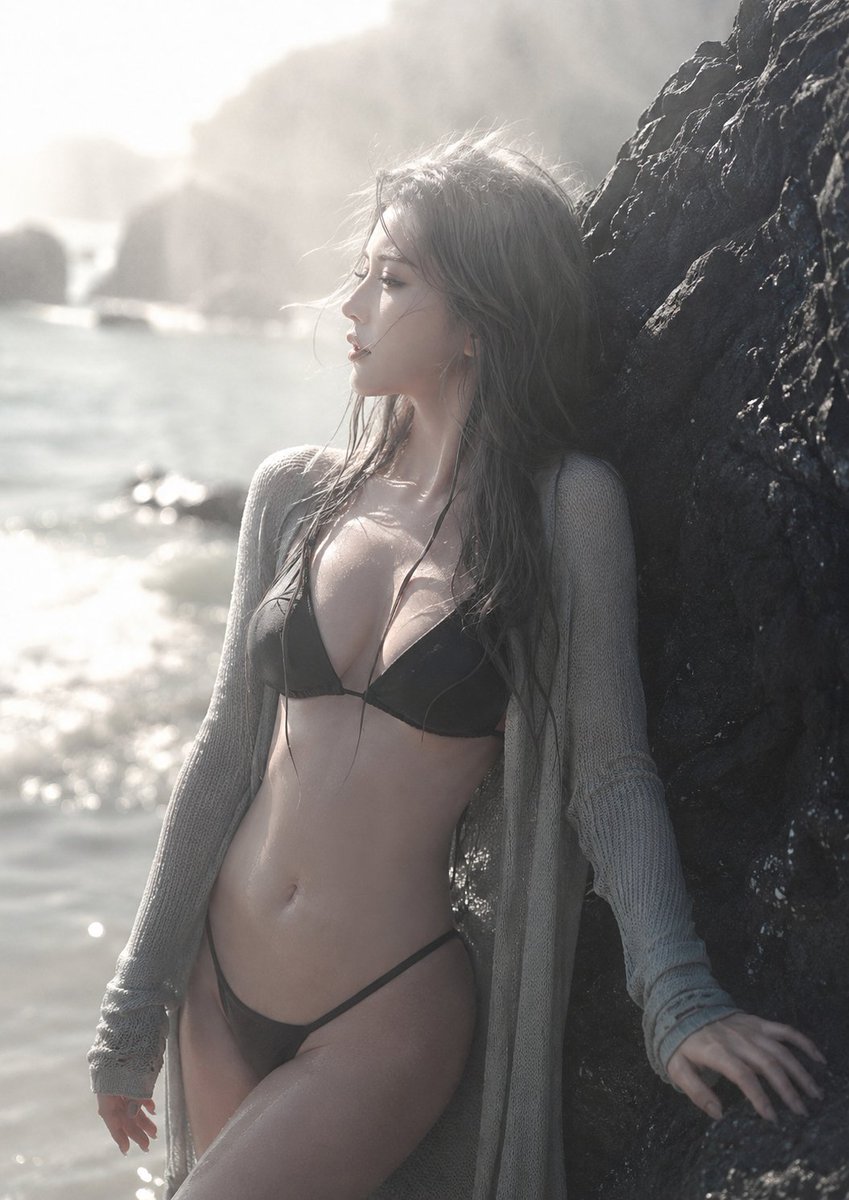
A highly detailed prompt for generating a Japanese-style seaside photography book cover, featuring a specific subject, posture, and iPhone photography aesthetic. (free to use) — Free AI image template on PicX Studio.
【主体】 {argument name="人物" default="20岁左右成年东亚女性"},夏日海滨日系摄影书封面写真 【核心姿势】 - 女性站在一块巨大的黑色海滨岩石旁 - 身体以柔和侧面轮廓呈现,优雅地向一侧微微倾斜 - 一侧肩膀略微靠近镜头,形成自然的身体层次 - 一只手轻轻触碰岩石,另一只手自然放松下垂 - 她望向远处大海,而不是看向镜头 - 表情平静、遥远、克制,像被海风吹拂时的安静瞬间 - 长而湿润的灰色蓬松头发自然垂落,发丝被海风轻轻吹散 - 穿{argument name="服装" default="黑色比基尼,外搭浅灰色针织外套"},针织面料微湿、纹理清晰,带有细小发光水滴 - 整体姿态优雅、自然、非色情化,保持真实人体比例与写实解剖结构 【环境】 夏日海滨,强烈阳光下的黑色礁石、闪烁海面、远处模糊岩石与轻柔海雾。背景简洁干净,带有褪色的灰白色调和宁静怀旧感。 【构图要求】 竖屏3:4,极简干净构图,日系摄影书封面感。画面自然呈现:女性侧面轮廓、湿润灰色长发、浅灰针织外套、黑色比基尼、黑色海滨岩石、发光水滴、闪烁海面与柔雾背景。 视觉层次:女性侧脸与发丝 → 肩部与针织外套纹理 → 触碰岩石的手 → 黑色礁石 → 远处高光海面。 画面保留适度留白,适合封面排版,不要过度拥挤或刻意摆拍。 【相机/技术参数】 {argument name="相机" default="iPhone 17 Pro Max 手机摄影质感"},真实智能手机抓拍,轻微广角自然透视,手机HDR处理,浅景深,主体清晰、背景柔和虚化。高分辨率,真实皮肤纹理,保留自然毛孔、湿发细节、针织纹理与水滴反光,不要过度磨皮。 【氛围/光线】 主光源(夏日的左侧逆光),梦幻高调光线,略微过曝,辅助光源(水面反射光),保留面部与服装细节。柔和高光晕染,轻微薄雾,低饱和灰白色调,细腻胶片颗粒感。整体氛围宁静、怀旧、空灵,像一段诗意的夏日海边记忆。 【风格】 真实感日系海滨写真,摄影书封面美学,写实、柔和、电影感、精致、自然、优雅,不露骨,不商业棚拍。
Use Japanese Seaside Photobook Cover to plan an AI image around gpt-image-2 generation, themes such as zh and gpt-image-2. Match the preview's composition first, then personalize the subject, setting, and mood for your own project.
Use the primary action to load the template settings in PicX Studio.
Adjust the subject and creative details for your destination.
Create the image, compare the result with the preview, and refine one variable at a time.
A continuous mix — similar concepts first, woven with same-model prompts and fresh picks from the catalog.
Choose the primary action to open PicX Studio with the available template settings. Review the model and format, personalize the creative direction, and generate when ready.
Yes. You can change the subject, setting, lighting, mood, format, and available model controls before creating your image.
This template is free to open and customize. Generation usage is shown in PicX Studio before you create.
Start with gpt-image-2, which is the model associated with this template. You can compare another compatible model for a different finish.
A continuous mix — similar concepts first, woven with same-model prompts and fresh picks from the catalog.
Follow a topic to a crawlable collection of related PicX Studio templates.
28,404 public templates available. Verified via the PicX Studio public templates API; refreshed hourly.