Nine-Panel Character Production Meme
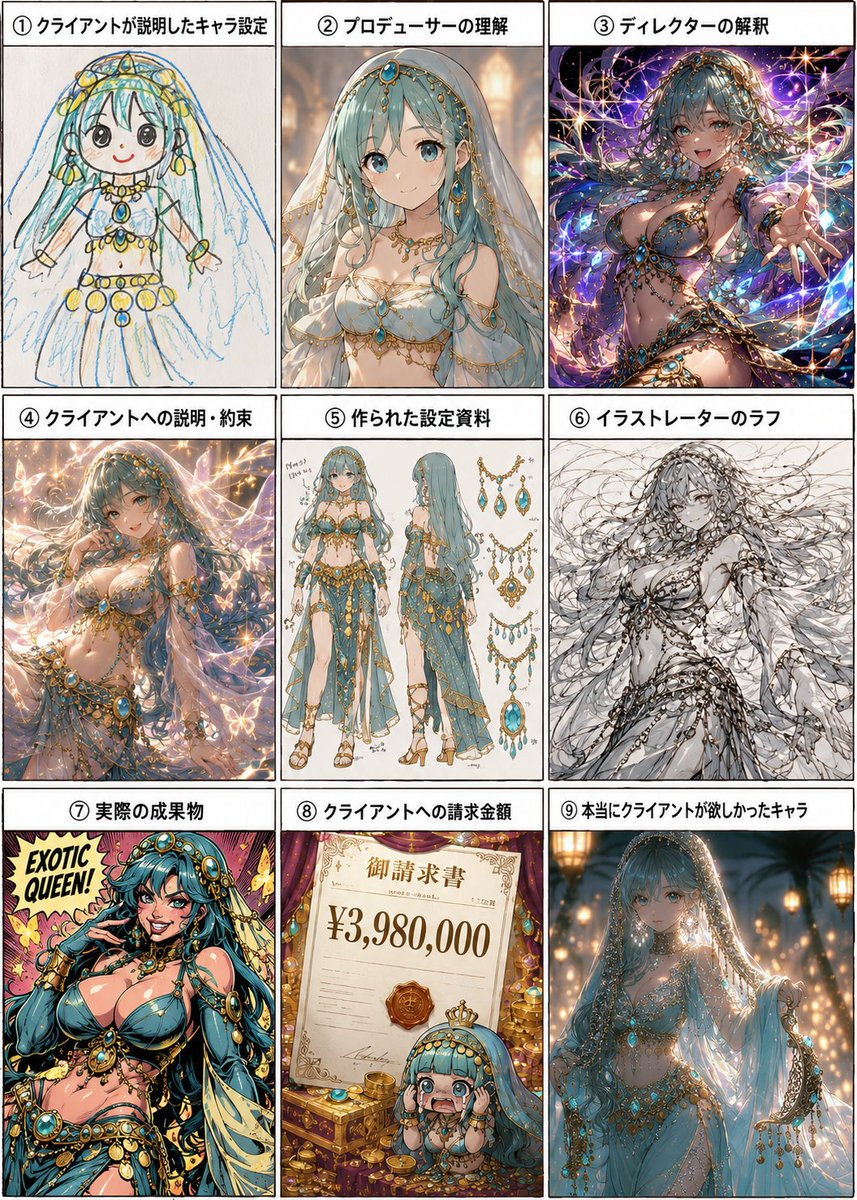
Goal: Create a 3×3 Japanese meme-style process chart showing how an original character request mutates through a production pipeline, using the same turquoise-haired fantasy belly dancer/queen character across all panels. Make it humorous, polished, and information-dense, like a comparison sheet or comic grid.
Canvas: Vertical 3:4 image with nine equal rectangular panels separated by thick black borders. Each panel has a white title strip at the top with bold black Japanese text and a circled number. Use a clean manga/illustration presentation with consistent margins.
Panel count and labels: Include exactly 9 panels, arranged left to right, top to bottom:
1. 「① クライアントが説明したキャラ設定」 — a childlike crayon sketch of the character, simple round face, long aqua hair, veil, gold jewelry, white dress, blue gem ornaments, uneven hand-drawn lines on paper.
2. 「② プロデューサーの理解」 — a refined but still relatively modest anime concept portrait of the turquoise-haired veiled dancer in a white-and-gold jeweled outfit, warm indoor lighting.
3. 「③ ディレクターの解釈」 — an exaggerated glamorous fantasy illustration with dramatic pose, sparkling purple cosmic background, lots of gold chains and turquoise gems, more sensual and overproduced.
4. 「④ クライアントへの説明・約束」 — a beautiful polished sales-pitch version, elegant magical lighting, butterflies or glowing particles, romantic pastel sparkle atmosphere, ornate jewelry and flowing veil.
5. 「⑤ 作られた設定資料」 — a professional character design sheet with exactly 2 full-body views of the character, front and back/side, plus multiple accessory diagrams of necklaces, chains, earrings, and turquoise-gold ornaments on a white background with small sketch notes.
6. 「⑥ イラストレーターのラフ」 — a monochrome rough pencil sketch of the character, energetic loose linework, long flowing hair and veil, jewelry indicated with scribbly detail, unfinished but dynamic.
7. 「⑦ 実際の成果物」 — make this an illustrated comic-book poster, not a 3D figure: bold saturated colors, thick ink outlines, pop-art halftone texture, the character transformed into a flashy “EXOTIC QUEEN!” cover-style pin-up with large turquoise hair, gold coins and jewelry, yellow-pink background, text reading “EXOTIC QUEEN!” in the upper left.
8. 「⑧ クライアントへの請求金額」 — a lavish invoice scene with a parchment invoice reading 「御請求書」 and the large price “¥3,980,000”, gold coins, gems, a royal seal, and a tiny chibi version of the turquoise-haired character near the bottom.
9. 「⑨ 本当にクライアントが欲しかったキャラ」 — the final desired character: elegant, mysterious, modestly sensual veiled fantasy queen in soft blue fabric, glowing lanterns, warm bokeh, delicate turquoise gems and gold chains, graceful pose and cinematic atmosphere.
Character details: The recurring character is {argument name="character concept" default="a turquoise-haired veiled exotic fantasy queen with gold jewelry and blue gemstones"}. She has very long aqua/turquoise hair, a translucent veil, ornate gold headpieces, turquoise gemstone accessories, layered necklaces, armlets, waist chains, and flowing pale blue or white fabric. Keep the same overall identity across all panels while changing the art style and interpretation per panel.
Text customization: Use the Japanese title labels exactly as listed. The invoice amount should be {argument name="invoice amount" default="¥3,980,000"}. The pop-art poster phrase should be {argument name="poster phrase" default="EXOTIC QUEEN!"}.
Visual style: High-resolution anime illustration collage, humorous production-process infographic, crisp panel borders, varied rendering styles per panel: crayon sketch, polished anime, fantasy splash art, design sheet, rough pencil, pop-art comic, invoice prop scene, and cinematic final concept art. Add abundant sparkle, gold, turquoise, and ornate decorative motifs.
Constraints: Use exactly 9 panels and exactly the 9 listed panel labels. Keep each panel visually distinct. Make panel 7 clearly a flat illustration/comic poster rather than a figurine or 3D object. Do not add extra panels, extra captions, watermarks, or logos.




![Pop Art Superhero Explosion Poster — [Subject] bursting forth in a Pop Art Powerhouse explosion of vibrant colors and bold outlines. Use a Ben-Day dot pattern a](https://images.meigen.ai/tweets/2075580941272019292/0.jpg)





![Minimalist Flat Vector Travel Poster — Premium minimalist flat-vector travel poster for {argument name="city name" default="[CITY_NAME]"}, 3:4 vertical format.](https://cms-assets.youmind.com/media/1787917359711_3ug846_HQX205cbMAA6F6S-300x400.jpg)