How do I use the PhonePe Split Billing Party Ad template?
Choose the primary action to open PicX Studio with the available template settings. Review the model and format, personalize the creative direction, and generate when ready.
A purple neon fintech social ad showing a party bill-splitting feature with a foreground phone UI and instant payment confirmations. Change the subject, setting, or lighting one variable at a time.
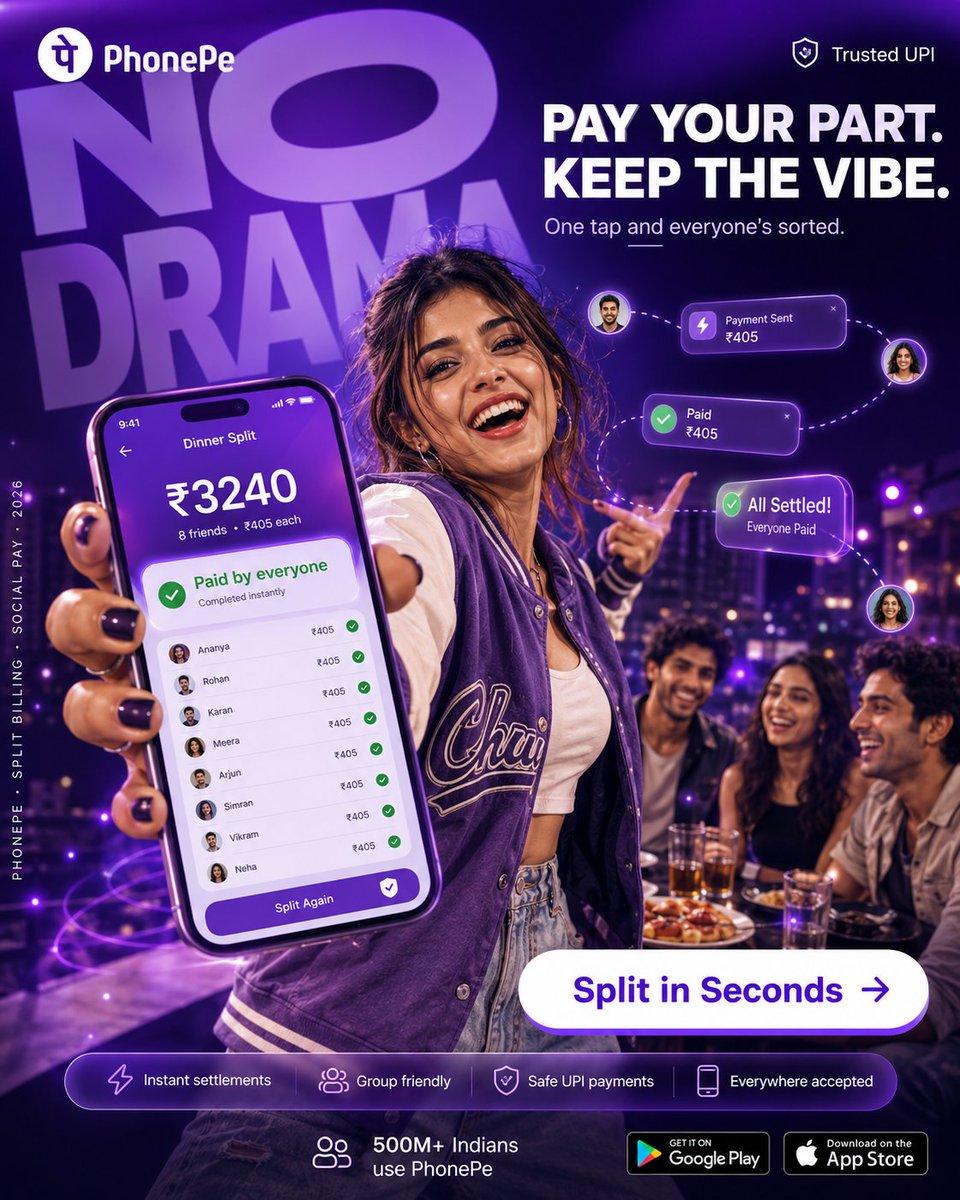
Goal: Create a polished vertical social media advertisement for {argument name="brand name" default="PhonePe"}, promoting instant group bill splitting for UPI payments with a bold party/nightlife energy. Canvas: Square 1:1 digital ad, high-resolution, deep purple and neon violet color palette, glossy fintech campaign style, dramatic depth of field. Background is a rooftop restaurant or lounge at night with city lights, purple bokeh, and a group of friends at a dinner table. Layout: Top left show the PhonePe logo mark and wordmark in white. Top right show a small shield icon with the text "Trusted UPI". Behind the subject, place huge oversized semi-transparent purple typography reading "NO DRAMA" tilted slightly and filling the upper-left background. On the upper-right, place the main headline in bold white uppercase: "PAY YOUR PART. KEEP THE VIBE." with the subheading below: "One tap and everyone’s sorted." Add a short decorative underline under the subheading. Main subject: A young woman in the foreground stands confidently at a party table, wearing a purple varsity jacket over a white crop top and light denim jeans, with black nail polish. She holds a large smartphone close to the camera in her left hand, making it the dominant foreground object, while pointing playfully with her other hand. Her face should be covered by a flat rectangular anonymization block in a natural skin-tone brown, and the visible faces of three seated friends in the background should also be covered by similar rectangular skin-tone blocks. Keep the pose, outfit, and lighting stylish and youthful. Phone screen: Show a purple PhonePe-style bill split interface titled "Dinner Split". At the top display the time "9:41". Large amount: "₹3240". Under it: "8 friends • ₹405 each". A green success card reads "Paid by everyone" and "Completed instantly". Below it, show exactly 8 itemized friend rows, each with a tiny circular avatar, name, amount "₹405", and a green checkmark: 1) Ananya, 2) Rohan, 3) Karan, 4) Meera, 5) Arjun, 6) Simran, 7) Vikram, 8) Neha. At the bottom of the screen, add a purple rounded button labeled "Split Again" with a white shield/check icon. Floating UI elements: Add exactly 3 glowing purple transaction cards connected by dotted curved lines and small circular avatar bubbles: 1) "Payment Sent ₹405" with a lightning icon, 2) "Paid ₹405" with a green check icon, 3) "All Settled! Everyone Paid" with a green check icon. Make them hover around the subject’s pointing hand on the right side. Call to action: Near the lower-right center, place a large white pill-shaped button with purple text "Split in Seconds" and a right arrow icon. Bottom information bar: Add one translucent rounded purple strip containing exactly 4 feature capsules/icons from left to right: 1) lightning icon with "Instant settlements", 2) group icon with "Group friendly", 3) shield icon with "Safe UPI payments", 4) phone icon with "Everywhere accepted". Beneath or beside it show a small group icon with "500M+ Indians use PhonePe". At the bottom right, include exactly 2 app store badges: "GET IT ON Google Play" and "Download on the App Store". Side text: Along the left edge, add small vertical white text reading "PHONEPE • SPLIT BILLING • SOCIAL PAY • 2026". Visual style: Premium hyper-realistic advertising composite, cinematic purple rim lighting, glossy UI overlays, neon glow, energetic nightlife mood, sharp foreground phone, blurred background friends and city lights, crisp readable typography. Constraints: Use the exact visible counts: 8 friend rows on the phone, 3 floating payment cards, 4 bottom feature items, 2 store badges, and 4 anonymized face blocks total. Avoid extra logos, extra payment cards, or extra feature pills.
Choose the primary action to open PicX Studio with the available template settings. Review the model and format, personalize the creative direction, and generate when ready.
Yes. You can change the subject, setting, lighting, mood, format, and available model controls before creating your image.
This template is free to open and customize. Generation usage is shown in PicX Studio before you create.
Start with GPT Image 2, which is the model associated with this template. You can compare another compatible model for a different finish.
© 2026 PicX Studio. All rights reserved.

Follow a topic to a crawlable collection of related PicX Studio templates.
43,474 public templates available. Verified via the PicX Studio public templates API; refreshed hourly.




![Blueprint Split Reality Archetype Prompt — A [subject] split vertically down the center. Left half as a technical blueprint. Right half as a 3D render. The seam](/_next/image?url=https%3A%2F%2Fcdn.picxstudio.com%2Fuploads%2Fmeigen_24ef9cf28a0c_7844b725-4555-4a31-b247-59dcc1626cdd.jpg&w=828&q=100)






![Minimalist Flat Vector Travel Poster — Premium minimalist flat-vector travel poster for {argument name="city name" default="[CITY_NAME]"}, 3:4 vertical format.](https://cms-assets.youmind.com/media/1787917359711_3ug846_HQX205cbMAA6F6S-300x400.jpg)