How do I use the Cyberpunk Web3 AI Profile Poster template?
Choose the primary action to open PicX Studio with the available template settings. Review the model and format, personalize the creative direction, and generate when ready.
A futuristic personal-branding poster showing a Web3 and AI persona with holographic stats panels, ideal for social media intros, profile banners, or techno-entrepreneur self-promotion. Change the subject, setting, or lighting one variable at a time.
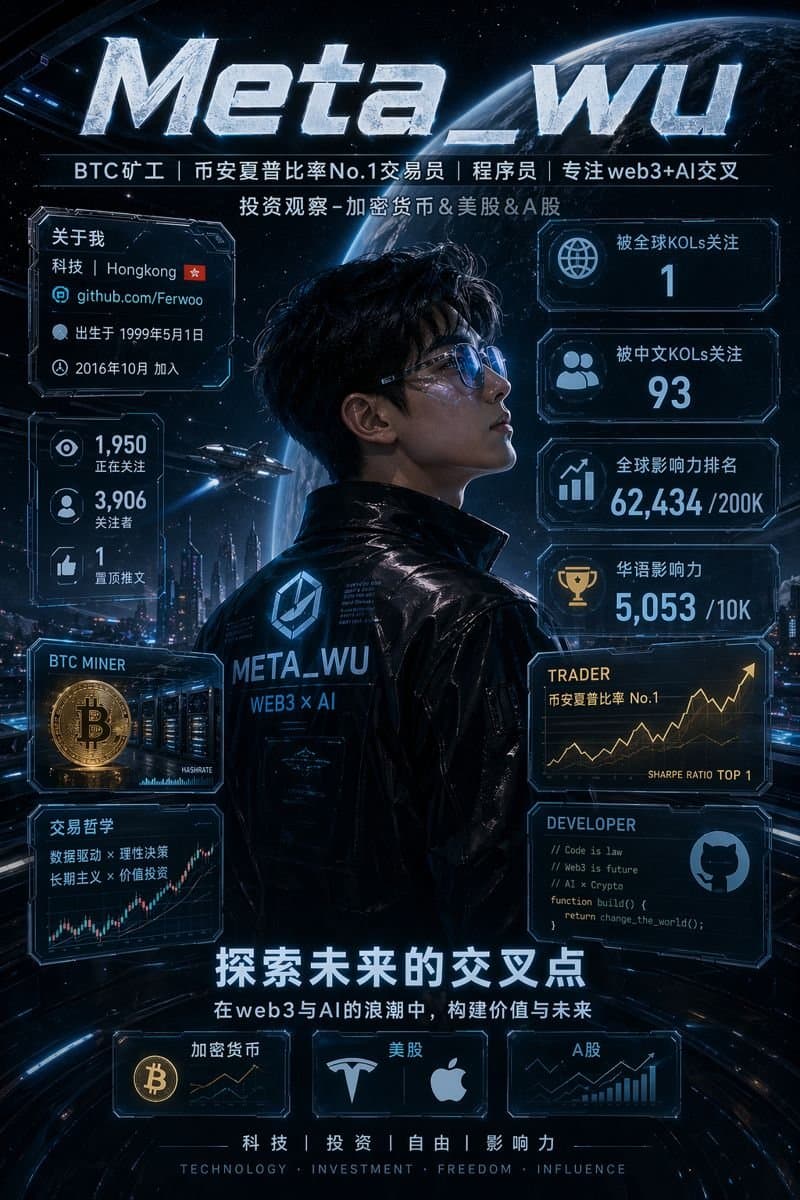
A cinematic vertical sci-fi personal brand poster in a dark blue cyberpunk style, designed like a futuristic profile infographic for {argument name="profile name" default="Meta_wu"}. The composition centers on a young Asian man shown from the back and in partial side profile, standing confidently in a glossy black futuristic jacket with luminous blue accents and the text “META_WU” and “WEB3 × AI” printed on the back. His face is intentionally obscured by a rectangular blur block. Behind him is a dramatic outer-space scene with a large glowing Earth filling the upper background, dense stars, a futuristic megacity skyline at night, neon road light trails, and 1 small flying spaceship near the left-middle area. At the very top, place a huge metallic ice-textured title reading “{argument name="main title" default="Meta_wu"}” in bold beveled silver letters with blue rim light. Directly below it, add 2 centered lines of Chinese text: the first line is a role tagline reading “BTC矿工|币安夏普比率No.1交易员|程序员|专注web3+AI交叉”, and the second line reads “投资观察-加密货币&美股&A股”. Surround the character with glowing holographic HUD panels in transparent dark glass with cyan neon borders. On the left side, create 4 stacked panels: panel 1 is an “关于我” card containing 4 lines of profile info, “科技|Hongkong 🇭🇰”, “github.com/Ferwoo”, “出生于 1999年5月1日”, and “2016年10月 加入”; panel 2 is a social stats card with 3 large metrics, “1,950 正在关注”, “3,906 关注者”, and “1 置顶推文”; panel 3 is a “BTC MINER” card showing 1 large gold Bitcoin coin and a server-mining rack scene; panel 4 is a “交易哲学” card with 3 lines of text, “数据驱动 × 理性决策”, “长期主义 × 价值投资”, and a glowing upward candlestick chart. On the right side, create 6 stacked panels: panel 1 shows a globe icon and “被全球KOLs关注 1”; panel 2 shows a group icon and “被中文KOLs关注 93”; panel 3 shows a chart icon and “全球影响力排名 62,434 /200K”; panel 4 shows a trophy icon and “华语影响力 5,053 /10K”; panel 5 is a “TRADER” card with subtitle “币安夏普比率 No.1” and a golden rising line graph, plus the small text “SHARPE RATIO TOP 1”; panel 6 is a “DEVELOPER” card with code-like text lines “// Code is law”, “// Web3 is future”, “// AI x Crypto”, “function build() {”, “return change_the_world();”, “}” and a GitHub-style icon. In the lower center, add a bold Chinese slogan in large glowing white text: “{argument name="slogan text" default="探索未来的交叉点"}”. Beneath it, add a smaller subtitle line: “在web3与AI的浪潮中,构建价值与未来”. At the bottom, include 3 rectangular category cards aligned horizontally: card 1 labeled “加密货币” with a Bitcoin icon and tiny market chart; card 2 labeled “美股” with Tesla and Apple logos; card 3 labeled “A股” with a rising bar-and-line market graph. At the very bottom center, place 4 Chinese keywords separated by vertical bars, “科技|投资|自由|影响力”, and below them the English words “TECHNOLOGY · INVESTMENT · FREEDOM · INFLUENCE”. Use a high-contrast blue-and-silver color scheme with subtle gold accents, ultra-detailed sci-fi UI, crisp and accurate typography, volumetric glow, reflective surfaces, dramatic rim lighting, premium poster design, clean layout symmetry, sharp focus, and a polished high-end GPT-image-2 futuristic promotional aesthetic.
Choose the primary action to open PicX Studio with the available template settings. Review the model and format, personalize the creative direction, and generate when ready.
Yes. You can change the subject, setting, lighting, mood, format, and available model controls before creating your image.
This template is free to open and customize. Generation usage is shown in PicX Studio before you create.
Start with GPT Image 2, which is the model associated with this template. You can compare another compatible model for a different finish.
© 2026 PicX Studio. All rights reserved.

Follow a topic to a crawlable collection of related PicX Studio templates.
43,474 public templates available. Verified via the PicX Studio public templates API; refreshed hourly.



![vertical-football-star-campaign-poster — Create a vertical 9:16 high-resolution football star campaign poster.
Player: [Player Name]
Player concept: [football](/_next/image?url=https%3A%2F%2Fcdn.picxstudio.com%2Fuploads%2Fmeigen_996a192156cb_45d1d198-bb81-4272-be3f-df0eda9f0a74.jpg&w=828&q=100)





![Cartoon TV Show Poster Pack — A bold Cartoon Network-style promotional poster for [SHOW], featuring the main characters in a flat 2D illustrated style with thic](/_next/image?url=https%3A%2F%2Fcdn.picxstudio.com%2Fuploads%2Fimg0_107064d3-b797-488a-a32e-d75dea9d3b4c.jpg&w=828&q=100)



![clean-minimalist-player-editorial-poster — A professional sports graphic design poster of [Player Name], designed in a clean, modern, and minimalist editorial s](/_next/image?url=https%3A%2F%2Fcdn.picxstudio.com%2Fuploads%2Fmeigen_5524a0a10196_94b81982-ef58-45e9-8d49-9b017a7f26cb.jpg&w=828&q=100)
![campaign-smoke-national-symbols-world-cup — A hyper-realistic cinematic campaign poster for [Country]. Thick [Color One] and [Color Two] smoke e…](/_next/image?url=https%3A%2F%2Fcdn.picxstudio.com%2Fuploads%2Fmeigen_ce5bae0e0712_50be07ac-9537-419b-9c47-694fe49ef3d8.jpg&w=828&q=100)

![Japan Travel Brochure Poster — Create a vertical vintage travel-brochure infographic poster titled “[COUNTRY/DESTINATION]: [TAGLINE]”, using a warm parchment-pa](/_next/image?url=https%3A%2F%2Fcdn.picxstudio.com%2Fuploads%2Fp0_982bf820-bb34-4c43-8a6d-42d799d7282b.jpg&w=828&q=100)









![Minimalist Flat Vector Travel Poster — Premium minimalist flat-vector travel poster for {argument name="city name" default="[CITY_NAME]"}, 3:4 vertical format.](https://cms-assets.youmind.com/media/1787917359711_3ug846_HQX205cbMAA6F6S-300x400.jpg)

































![Sequential Motion Sports Poster — sports poster [16:9] capturing a {argument name="equipment" default="sport equipment"} shattering through sequential time-free](https://cms-assets.youmind.com/media/1780307040388_g9clwj_HJZYWgwXUAYrHF2.jpg)