How do I use the Leafa Flying Above a Golden Sky City template?
Choose the primary action to open PicX Studio with the available template settings. Review the model and format, personalize the creative direction, and generate when ready.
This prompt generates a cinematic anime fantasy illustration of an elf-like fairy heroine flying over a vast sunlit cloud city, ideal for SAO-inspired character art and dramatic wallpaper images. Change the subject, setting, or lighting one variable at a time.
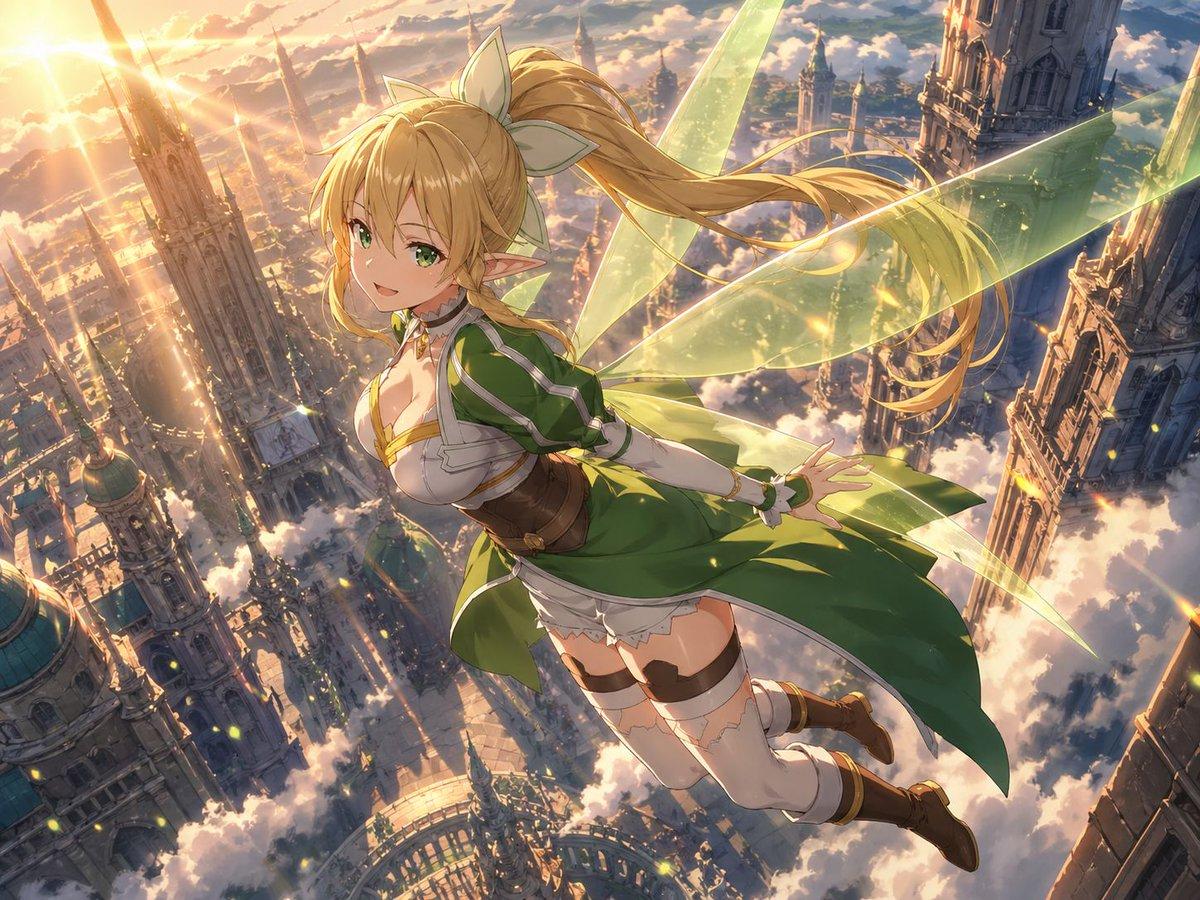
A breathtaking high-fantasy anime illustration of {argument name="character name" default="Leafa"} soaring high above a vast floating city of ornate gothic towers and cathedral spires rising through a sea of glowing clouds at sunset. The scene is viewed from a dramatic aerial angle, with the character centered slightly right of frame, flying diagonally forward over the city while looking back over her shoulder. She has long {argument name="hair color" default="golden blonde"} hair tied in a very high ponytail with a large pale bow, pointed elf ears, a slim curvy build, and translucent yellow-green fairy wings made of luminous crystalline light. She wears a green and white fantasy outfit with gold trim: a short green dress or tunic, white armored chest detailing, a brown corset-like waist belt, white detached sleeves or fitted arm coverings, white thigh-high stockings with lace tops and dark garter straps, and brown knee-high boots. Her skirt, ribbons, ponytail, and wings stream backward in the wind to emphasize speed and altitude. The background is an immense sunlit aerial kingdom with countless detailed towers, domes, bridges, and castle-like structures piercing the clouds, rendered with intricate architecture and atmospheric depth. Warm golden sunlight pours in from the upper left, creating lens flare, rim light, sparkling dust motes, and glowing highlights across the wings and city. Use highly detailed anime painting, cinematic composition, dynamic foreshortening, soft volumetric clouds, radiant fantasy lighting, vibrant green-and-gold palette, epic adventurous mood, and polished gpt-image-2 quality.
Choose the primary action to open PicX Studio with the available template settings. Review the model and format, personalize the creative direction, and generate when ready.
Yes. You can change the subject, setting, lighting, mood, format, and available model controls before creating your image.
This template is free to open and customize. Generation usage is shown in PicX Studio before you create.
Start with GPT Image 2, which is the model associated with this template. You can compare another compatible model for a different finish.
© 2026 PicX Studio. All rights reserved.

Follow a topic to a crawlable collection of related PicX Studio templates.
43,474 public templates available. Verified via the PicX Studio public templates API; refreshed hourly.












![Minimalist Flat Vector Travel Poster — Premium minimalist flat-vector travel poster for {argument name="city name" default="[CITY_NAME]"}, 3:4 vertical format.](https://cms-assets.youmind.com/media/1787917359711_3ug846_HQX205cbMAA6F6S-300x400.jpg)




















![Technical Cutaway Infographic Poster — Create a premium technical infographic poster of
[{argument name="subject" default="CAR NAME"}], featuring a giant centr](https://cms-assets.youmind.com/media/1777280755258_0q0fls_HG0g1BcakAA5TNe.jpg)