How do I use the Millennium Gyaru Cafe Selfie template?
Choose the primary action to open PicX Studio with the available template settings. Review the model and format, personalize the creative direction, and generate when ready.
A photorealistic gyaru street selfie with pink cafe scenery, rhinestone fashion details, privacy-censored face, and cute purikura-style sticker overlays. Change the subject, setting, or lighting one variable at a time.
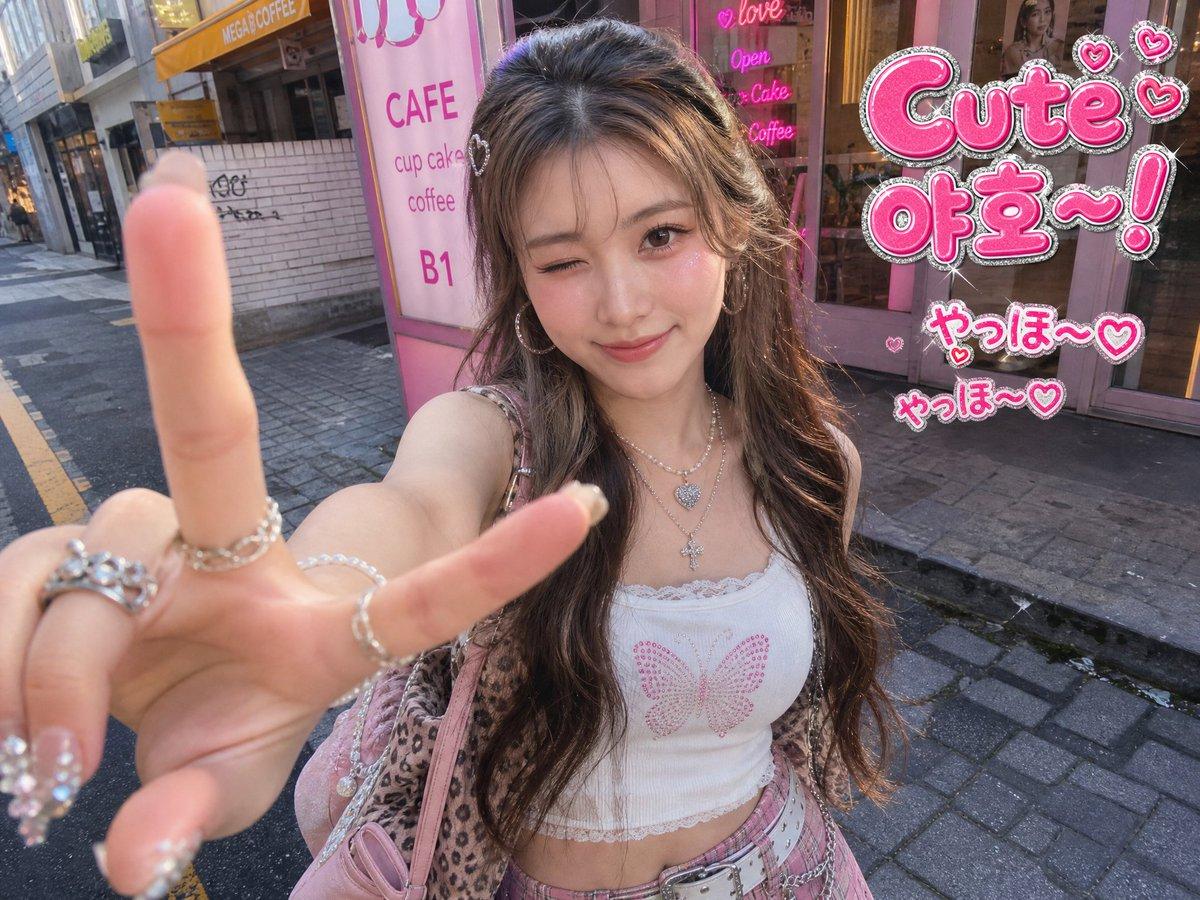
Create a photorealistic wide-angle smartphone selfie in a millennium gyaru / Japanese-Korean cute street fashion aesthetic. A young woman, {argument name="character name" default="anonymous gyaru girl"}, stands on a city sidewalk in front of a pink cafe storefront, holding the camera close with her left hand making a large peace sign in the extreme foreground. Her face is intentionally covered by a plain opaque square privacy censor in muted brown. She has long wavy {argument name="hair color" default="dark brown hair with subtle highlights"}, glossy layered styling, a tiny heart hair clip, and a soft glamorous look. Outfit: white cropped lace-trim camisole with a pink rhinestone butterfly on the chest, layered silver necklaces with heart and cross pendants, many silver rings, sparkly rhinestone nail art, a pink plaid mini skirt with a white belt and chain, a leopard-print cardigan, and a pink shoulder bag. Background: urban side street with paving stones, road markings, buildings, and a cute pink cafe entrance with glass doors; visible storefront text includes exactly six background text elements: “CAFE”, “cup cake”, “coffee”, “B1”, “MEGA COFFEE”, and a pink neon-style sign reading “love / Open / Cake / Coffee”. Add bright sticker decorations in the upper-right and right side: exactly three main sticker text groups, 1 large glossy hot-pink bubble sticker reading {argument name="main sticker text" default="Cute 야호~!"} with silver glitter outline and three heart icons, 1 smaller sticker reading {argument name="small sticker text one" default="やっほ〜♡"}, and 1 smaller sticker reading {argument name="small sticker text two" default="やっほ〜♡"}. Add tiny sparkle effects and small pink heart doodles around the stickers. Use casual flash-free daylight, slight lens distortion from the close phone camera, shallow perspective, high-detail skin, jewelry, nails, and fabric textures, playful overdecorated 2000s purikura energy, pink and silver color palette, realistic photo base with cute digital sticker overlays.
Choose the primary action to open PicX Studio with the available template settings. Review the model and format, personalize the creative direction, and generate when ready.
Yes. You can change the subject, setting, lighting, mood, format, and available model controls before creating your image.
This template is free to open and customize. Generation usage is shown in PicX Studio before you create.
Start with GPT Image 2, which is the model associated with this template. You can compare another compatible model for a different finish.
© 2026 PicX Studio. All rights reserved.

Follow a topic to a crawlable collection of related PicX Studio templates.
43,474 public templates available. Verified via the PicX Studio public templates API; refreshed hourly.












![Trendy Cafe Drink Promo Poster — Create a trendy 3:2 square promotional poster for "[PRODUCT NAME]" using the uploaded product image or generate a premium reali](/_next/image?url=https%3A%2F%2Fcdn.picxstudio.com%2Fuploads%2F0_908138d6-c2ce-479f-b50d-890fcdc0a491.jpg&w=828&q=100)




![Minimalist Flat Vector Travel Poster — Premium minimalist flat-vector travel poster for {argument name="city name" default="[CITY_NAME]"}, 3:4 vertical format.](https://cms-assets.youmind.com/media/1787917359711_3ug846_HQX205cbMAA6F6S-300x400.jpg)