How do I use the Editorial Bridal Portrait with Fascinator template?
Choose the primary action to open PicX Studio with the available template settings. Review the model and format, personalize the creative direction, and generate when ready.
This prompt generates a refined studio fashion portrait of a reclining woman in a white embellished dress and fascinator, ideal for bridal editorial or couture beauty imagery. Change the subject, setting, or lighting one variable at a time.
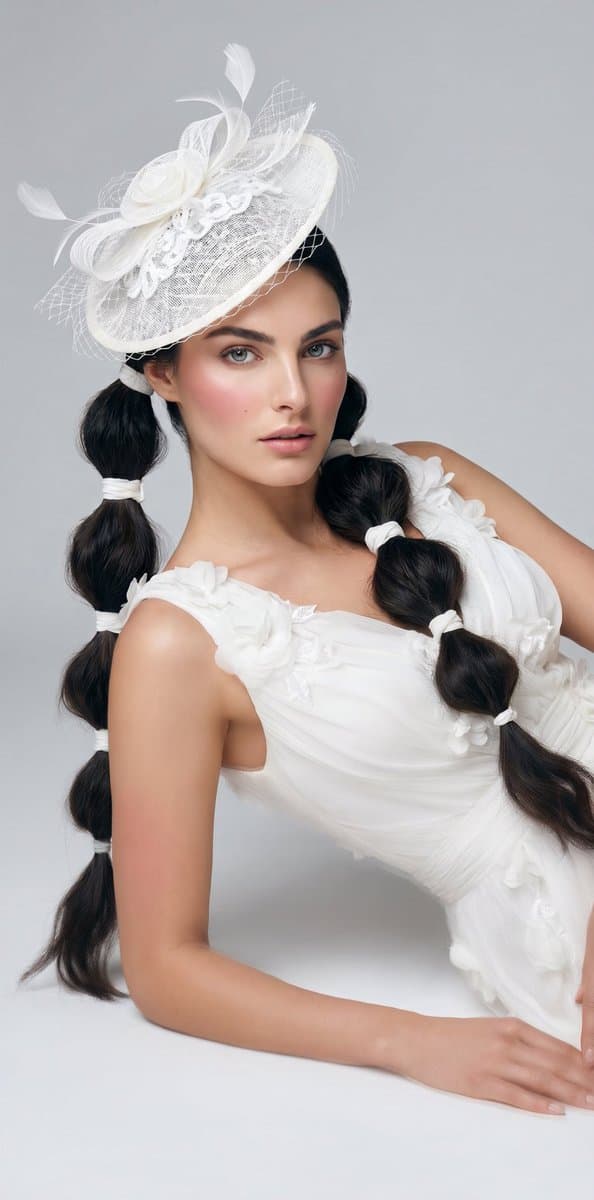
A high-fashion studio portrait of a young woman reclining sideways on the floor against a seamless light gray background, cropped from about the hat down to the hands, with the face intentionally obscured by a soft rectangular blur. She wears an elegant white dress with sheer ruched fabric, sculpted floral appliqués along both shoulder straps and the bodice, and a fitted, ethereal silhouette. Her hair is {argument name="hair color" default="dark brown to black"} and styled in 2 long bubble braids, one on each side, each tied off with multiple white bands creating rounded segments. She wears a dramatic white fascinator hat tilted to one side, made of layered mesh, netting, ribbon loops, lace trim, and several airy feather sprays. Pose her leaning on one forearm with the other hand extended near the lower edge of the frame, torso angled diagonally for a refined editorial composition. Use soft diffused studio lighting, smooth skin tones, minimal shadows, luxury bridal-fashion styling, monochrome white wardrobe accents, and a clean polished magazine aesthetic.
Choose the primary action to open PicX Studio with the available template settings. Review the model and format, personalize the creative direction, and generate when ready.
Yes. You can change the subject, setting, lighting, mood, format, and available model controls before creating your image.
This template is free to open and customize. Generation usage is shown in PicX Studio before you create.
Start with GPT Image 2, which is the model associated with this template. You can compare another compatible model for a different finish.
© 2026 PicX Studio. All rights reserved.

Follow a topic to a crawlable collection of related PicX Studio templates.
43,474 public templates available. Verified via the PicX Studio public templates API; refreshed hourly.







![118-google-nano-banana-pro-skincare-product- — A professional skincare shot of a [product container] with [cap/lid], labeled [brand, product, descriptor, volume](/_next/image?url=https%3A%2F%2Fcdn.picxstudio.com%2Fuploads%2Fpost118_img0_332898b8-29ea-42a9-87ab-9ed746a3f944.jpg&w=828&q=100)












![69-untitled — FORMAT: 15s / 145 BPM / 14 SHOTS
SUBJECT: @[image1]
WARDROBE: Clean modern outfit
ENVIRONMENT: Street / indoor transitions
MOOD: Discovery → contr](/_next/image?url=https%3A%2F%2Fcdn.picxstudio.com%2Fuploads%2Fpost69_img0_d45faecf-38c3-4bcb-81a4-f6eb1cf42bb2.jpg&w=828&q=100)




![Minimalist Flat Vector Travel Poster — Premium minimalist flat-vector travel poster for {argument name="city name" default="[CITY_NAME]"}, 3:4 vertical format.](https://cms-assets.youmind.com/media/1787917359711_3ug846_HQX205cbMAA6F6S-300x400.jpg)
































![Hyper-Realistic 3D Chess Set for Rivalry Themes — Input Variable: [{argument name="rivalry theme" default="INSERT RIVALRY HERE"}] (e.g., Marvel vs.…](https://pbs.twimg.com/media/HEs2s6MakAAe1c8.jpg)