How do I use the Antique Desert Radio Telescope Array template?
Choose the primary action to open PicX Studio with the available template settings. Review the model and format, personalize the creative direction, and generate when ready.
Generates a sepia wet-plate style archival scene of radio telescopes stretching across a desert beside railroad tracks. Change the subject, setting, or lighting one variable at a time.
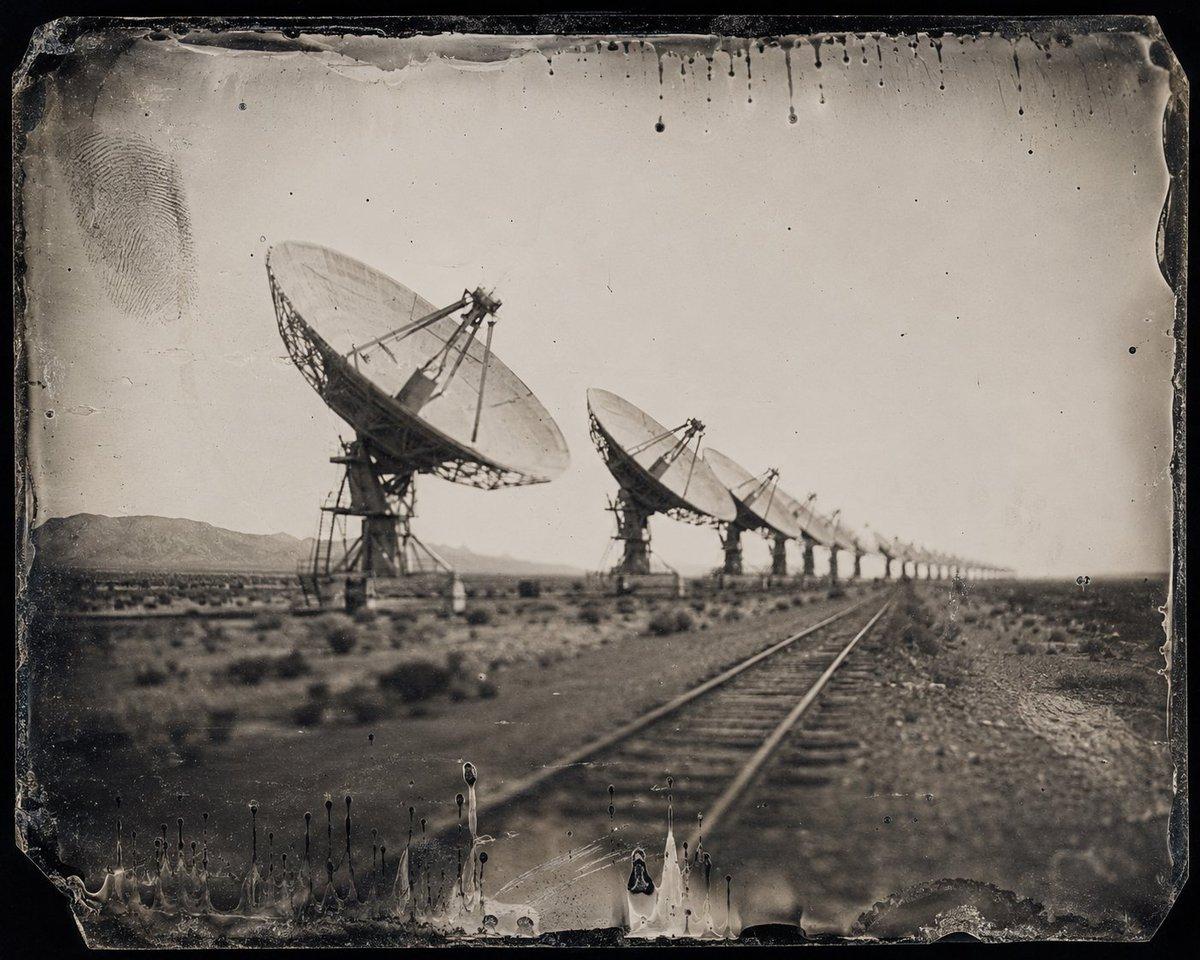
Create an antique black-and-white wet plate collodion photograph of {argument name="subject" default="a desert radio telescope array"} in a vast arid landscape. Show exactly 14 parabolic satellite dishes receding diagonally from the left foreground toward the far right horizon, with the nearest dish very large and sharply dominant, the next 5 medium dishes clearly visible, and the remaining 8 fading into atmospheric haze and shallow-focus blur. Place exactly 2 parallel railroad rails running from the lower center foreground into the distance beside the telescope line, converging toward the horizon. The setting is a flat scrub desert with low bushes, dusty ground, distant low mountains on the left, and a pale empty sky. Use a sepia-toned monochrome palette, soft vintage lens blur, strong vignetting, uneven exposure, scratches, dust specks, chemical stains, blackened edges, chipped glass-plate corners, liquid drip marks along the top and bottom borders, and a visible fingerprint smudge in the upper left. The image should feel like an eerie archival scientific expedition photograph from {argument name="era" default="the late 19th century"}, despite the futuristic radio telescopes. No modern color, no people, no readable text, no clean digital finish.
Choose the primary action to open PicX Studio with the available template settings. Review the model and format, personalize the creative direction, and generate when ready.
Yes. You can change the subject, setting, lighting, mood, format, and available model controls before creating your image.
This template is free to open and customize. Generation usage is shown in PicX Studio before you create.
Start with GPT Image 2, which is the model associated with this template. You can compare another compatible model for a different finish.
© 2026 PicX Studio. All rights reserved.

Follow a topic to a crawlable collection of related PicX Studio templates.
43,474 public templates available. Verified via the PicX Studio public templates API; refreshed hourly.







![15th-Century Antique Portolan Chart — Antique portolan chart of {argument name="地区" default="[REGION]"}, 15th-century style. Aged vellum, red/black/gold rhumb l](https://cms-assets.youmind.com/media/1779612391728_i4xu5q_HI91edCaQAAoQLk.jpg)




![Minimalist Flat Vector Travel Poster — Premium minimalist flat-vector travel poster for {argument name="city name" default="[CITY_NAME]"}, 3:4 vertical format.](https://cms-assets.youmind.com/media/1787917359711_3ug846_HQX205cbMAA6F6S-300x400.jpg)



















![Black and White Brand Marketing Photography — [ADD BRAND] black and white marketing
photography with no marketing text](https://pbs.twimg.com/media/G82ht13WkAAzpOz.jpg)







![Expressive Portrait with Abstract Expressionism Style — Vibrant expressive portrait of {argument name="subject name" default="[NAME]"} looking upwards with wond](https://pbs.twimg.com/media/G-UF0NBasAQ8fSr.jpg)




![Tilt-Shift Travel Map Diorama — Create a highly detailed cinematic miniature tilt-shift travel scene of {argument name="city name" default="[CITY NAME]"} featur](https://cms-assets.youmind.com/media/1780650726076_8ed6wa_HJ736bEW8AAft9a.jpg)