How do I use the Found-Footage Office Horror Snapshot template?
Choose the primary action to open PicX Studio with the available template settings. Review the model and format, personalize the creative direction, and generate when ready.
This prompt generates a realistic flash-photo horror scene of two women in a dark security office with a sinister rabbit animatronic lurking in the doorway, ideal for analog-style thriller or mascot-horror imagery. Change the subject, setting, or lighting one variable at a time.
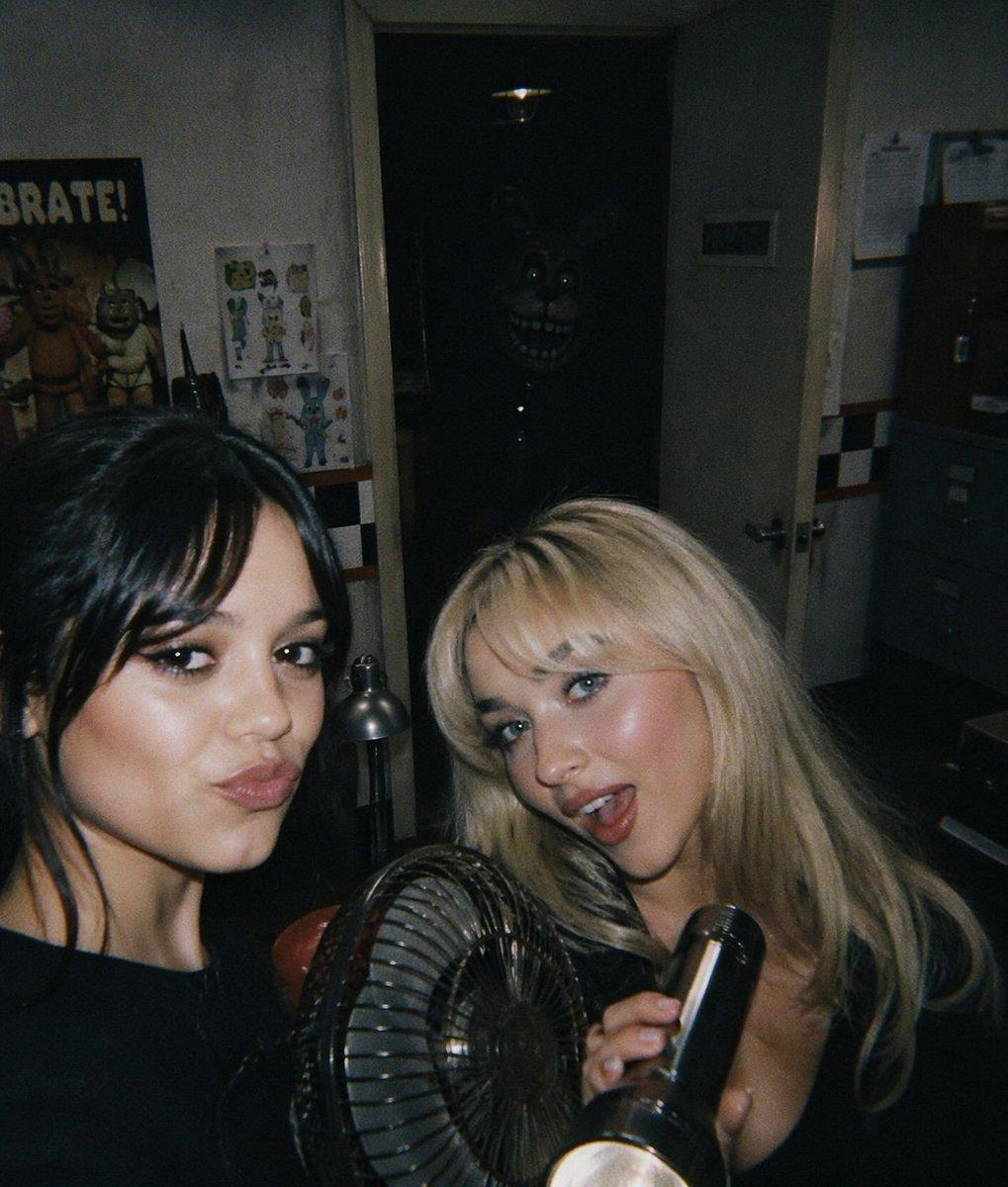
A gritty found-footage horror photo taken inside a dim, cramped security office at night, shot with a direct on-camera flash and slight film grain. In the foreground are exactly 2 young women, both partially cropped by the frame and both with their faces heavily blurred into rectangular smudges for privacy. The woman on the left has long dark hair and wears a black top, turned slightly away from camera. The woman on the right has long platinum blonde hair, a low-cut black top, and is holding a black flashlight angled upward in her right hand. Between them in the lower center foreground is 1 small black metal desk fan with visible circular grill. The background reveals a narrow open doorway centered in the image, leading into almost complete darkness. Standing deep inside that doorway is a terrifying rabbit animatronic silhouette with glowing eyes, long upright ears, a huge toothy grin, and faintly visible metallic body details, barely illuminated so it emerges from the shadows. The office walls are off-white and worn, with a black-and-white checker stripe and a thin red stripe running horizontally across the room. On the left wall is 1 colorful “CELEBRATE!” poster featuring animatronic characters, plus 1 smaller character drawing sheet pinned nearby, and 1 black walkie-talkie standing upright on a surface. Near the doorway is 1 silver desk lamp. On the right side are 2 sheets of paper clipped to the wall and a gray filing cabinet in shadow. The door is ajar with the handle visible. Composition should feel like a candid party snapshot turning into a horror scene, with harsh flash-lit foreground subjects, deep black shadows, analog noise, muted colors, unsettling realism, and the hidden monster in the center background as the main scare.
Choose the primary action to open PicX Studio with the available template settings. Review the model and format, personalize the creative direction, and generate when ready.
Yes. You can change the subject, setting, lighting, mood, format, and available model controls before creating your image.
This template is free to open and customize. Generation usage is shown in PicX Studio before you create.
Start with GPT Image 2, which is the model associated with this template. You can compare another compatible model for a different finish.
© 2026 PicX Studio. All rights reserved.

Follow a topic to a crawlable collection of related PicX Studio templates.
43,474 public templates available. Verified via the PicX Studio public templates API; refreshed hourly.















![Minimalist Flat Vector Travel Poster — Premium minimalist flat-vector travel poster for {argument name="city name" default="[CITY_NAME]"}, 3:4 vertical format.](https://cms-assets.youmind.com/media/1787917359711_3ug846_HQX205cbMAA6F6S-300x400.jpg)