How do I use the Photoreal Sailor Jupiter Cosplay template?
Choose the primary action to open PicX Studio with the available template settings. Review the model and format, personalize the creative direction, and generate when ready.
A realistic vertical cosplay portrait of a Japanese woman dressed as Sailor Jupiter posing in front of a sunny park fountain. Change the subject, setting, or lighting one variable at a time.
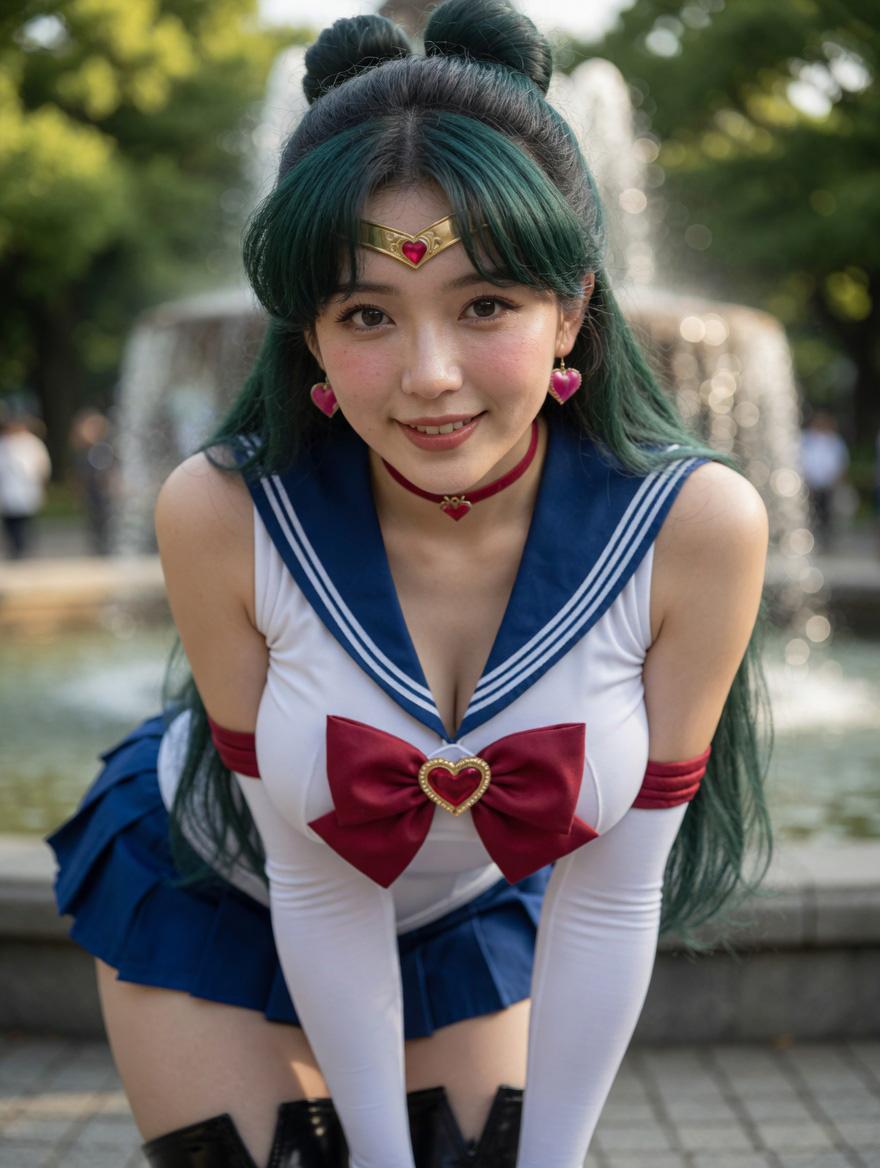
Create a photorealistic 2.5D cosplay portrait of an adult Japanese woman dressed as Sailor Jupiter from Sailor Moon, posed outdoors in front of a park fountain. She is centered in a close medium shot, leaning forward toward the camera with her hands low and out of frame, shoulders slightly inward, creating a dynamic convention-style cosplay pose. She has long dark teal-green hair with black roots, styled in two high rounded buns with loose long hair flowing over her shoulders, and visible pink heart-shaped earrings. Her outfit is a white sleeveless sailor leotard with a deep navy sailor collar trimmed by two white stripes, a large burgundy bow on the chest with a gold heart brooch at the center, a matching burgundy choker with a tiny gold heart charm, burgundy upper-arm bands, long white opera gloves, a short pleated navy skirt, and glossy black thigh-high boots partly visible at the bottom. Use natural Japanese facial features for {argument name="character ethnicity" default="Japanese"}; keep the face attractive and realistic. The background is a sunny urban park with green trees, a large fountain spraying water behind her, soft circular bokeh highlights, and shallow depth of field. Lighting should be warm natural daylight with gentle rim light on hair and shoulders, realistic skin texture, detailed fabric seams, polished accessory highlights, DSLR portrait look, 85mm lens, f/1.8, high-resolution vertical 4:5 composition. No text, no watermark, no extra characters, no anime drawing style; make it look like a real cosplay photoshoot of {argument name="character name" default="Sailor Jupiter"} with {argument name="hair color" default="dark teal-green"} hair and a {argument name="chest bow color" default="burgundy"} bow.
Choose the primary action to open PicX Studio with the available template settings. Review the model and format, personalize the creative direction, and generate when ready.
Yes. You can change the subject, setting, lighting, mood, format, and available model controls before creating your image.
This template is free to open and customize. Generation usage is shown in PicX Studio before you create.
Start with GPT Image 2, which is the model associated with this template. You can compare another compatible model for a different finish.
© 2026 PicX Studio. All rights reserved.

Follow a topic to a crawlable collection of related PicX Studio templates.
43,474 public templates available. Verified via the PicX Studio public templates API; refreshed hourly.













![Samurai Cosplay Landmark Portrait Generator — 【入力項目】\n役柄:{argument name="役柄" default="侍"}\n鎧の主色:{argument name="鎧の主色" default="赤"}\n武器:[刀 / 薙刀 / 弓 / 武器なし]\n場所:{](https://cms-assets.youmind.com/media/1781945754797_1igmbg_HLJWlumbwAAIvMm-300x300.jpg)


![Minimalist Flat Vector Travel Poster — Premium minimalist flat-vector travel poster for {argument name="city name" default="[CITY_NAME]"}, 3:4 vertical format.](https://cms-assets.youmind.com/media/1787917359711_3ug846_HQX205cbMAA6F6S-300x400.jpg)





























![Ink Wash Double Exposure Poster — [Main Subject]
A large, highly recognizable silhouette of {argument name="subject" default="a figure"} (head, face outline, or](https://cms-assets.youmind.com/media/1780217243143_8netu1_HJfEkXNb0AE5NTC.jpg)