How do I use the Night Train Racing HUD Scene template?
Choose the primary action to open PicX Studio with the available template settings. Review the model and format, personalize the creative direction, and generate when ready.
This prompt generates a realistic cinematic image of two Japanese trains racing through a nighttime city with a stylized arcade-style speed and control interface, ideal for game concept art or dramatic transport visuals. Change the subject, setting, or lighting one variable at a time.
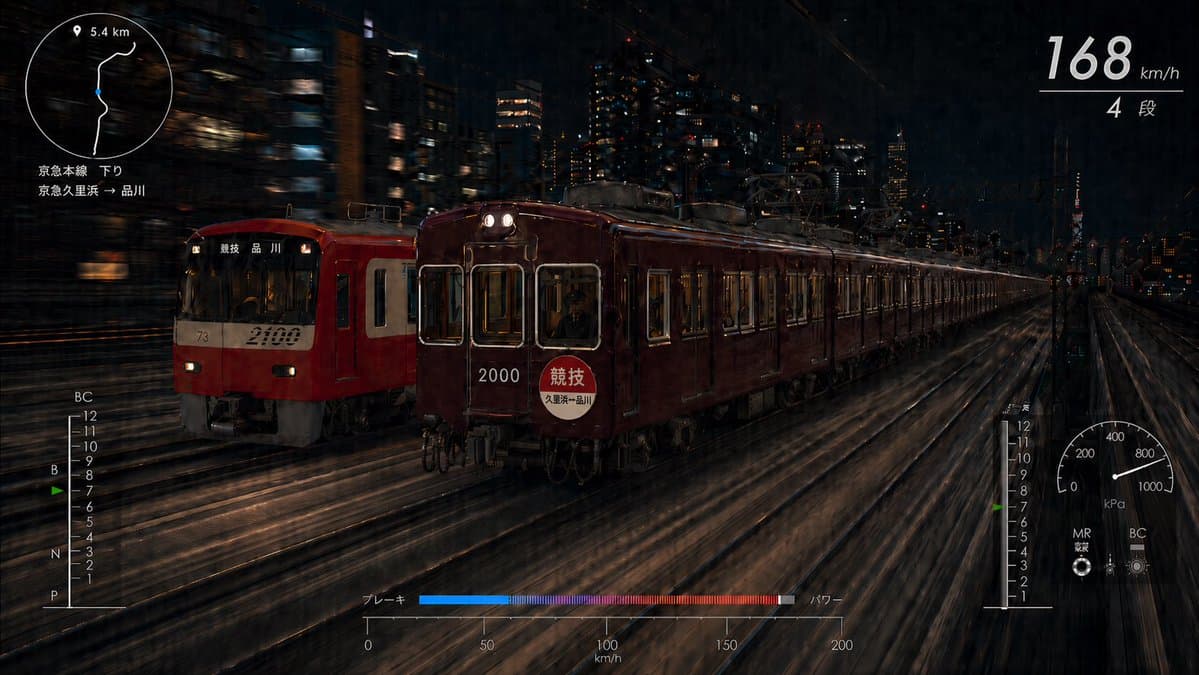
A cinematic night action scene inspired by arcade street-racing game HUD design, showing 2 Japanese commuter trains racing side by side on elevated urban tracks through a dense city at night. The viewpoint is low and slightly ahead of the trains, angled three-quarters toward their front-left sides, with dramatic motion blur streaking the rails, buildings, and overhead wires to emphasize extreme speed. The left train is a modern bright red commuter train with a cream front panel, route display reading 品川, and the number 2100 on the front. The right train is a deep maroon classic-style commuter train with warm interior lighting, twin headlights, the number 2000 on the front, and a circular headmark reading 競技 with smaller text 久里浜→品川. The maroon train is slightly ahead. The setting is a dark metropolitan skyline with illuminated office windows, railway catenary structures, and a distant Tokyo Tower visible on the right side of the horizon. Use a moody, high-contrast palette of black, charcoal, deep reds, amber window light, and metallic reflections, with a glossy, realistic photographic look. Overlay a sleek white racing-game interface directly on the image. Include exactly 5 UI components: 1) top-left circular mini-map with a location pin icon, a simple route line, and the text 5.4 km; below it, two lines of Japanese text reading 京急本線 下り and 京急久里浜→品川. 2) top-right speed display showing large numerals 168, smaller km/h, a thin horizontal divider, and below that 4 段. 3) bottom-left vertical control meter labeled BC at the top, with markings 12 through 1 descending, letters B, N, and P on the left side, and a small green indicator near 7. 4) bottom-center horizontal bar meter labeled ブレーキ on the left and パワー on the right, with a blue-to-magenta-to-red gradient fill and a 0 to 200 km/h scale beneath. 5) bottom-right circular pressure-style gauge labeled kPa with markings 0, 200, 400, 800, 1000 and small labels MR and BC beneath, plus a matching vertical numeric scale beside it. Keep the HUD minimal, thin-lined, elegant, and semi-transparent, integrated like a futuristic train racing dashboard. Ultra-detailed, dynamic, realistic, dramatic long-exposure energy, no people in foreground, no extra panels or split layout.
Choose the primary action to open PicX Studio with the available template settings. Review the model and format, personalize the creative direction, and generate when ready.
Yes. You can change the subject, setting, lighting, mood, format, and available model controls before creating your image.
This template is free to open and customize. Generation usage is shown in PicX Studio before you create.
Start with GPT Image 2, which is the model associated with this template. You can compare another compatible model for a different finish.
© 2026 PicX Studio. All rights reserved.

Follow a topic to a crawlable collection of related PicX Studio templates.
43,474 public templates available. Verified via the PicX Studio public templates API; refreshed hourly.


















![Minimalist Flat Vector Travel Poster — Premium minimalist flat-vector travel poster for {argument name="city name" default="[CITY_NAME]"}, 3:4 vertical format.](https://cms-assets.youmind.com/media/1787917359711_3ug846_HQX205cbMAA6F6S-300x400.jpg)