How do I use the Moonlit Transparency Check Card template?
Choose the primary action to open PicX Studio with the available template settings. Review the model and format, personalize the creative direction, and generate when ready.
Generates a crystalline anime fantasy diagnostic card with Japanese transparency score UI and an ethereal moon princess character. Change the subject, setting, or lighting one variable at a time.
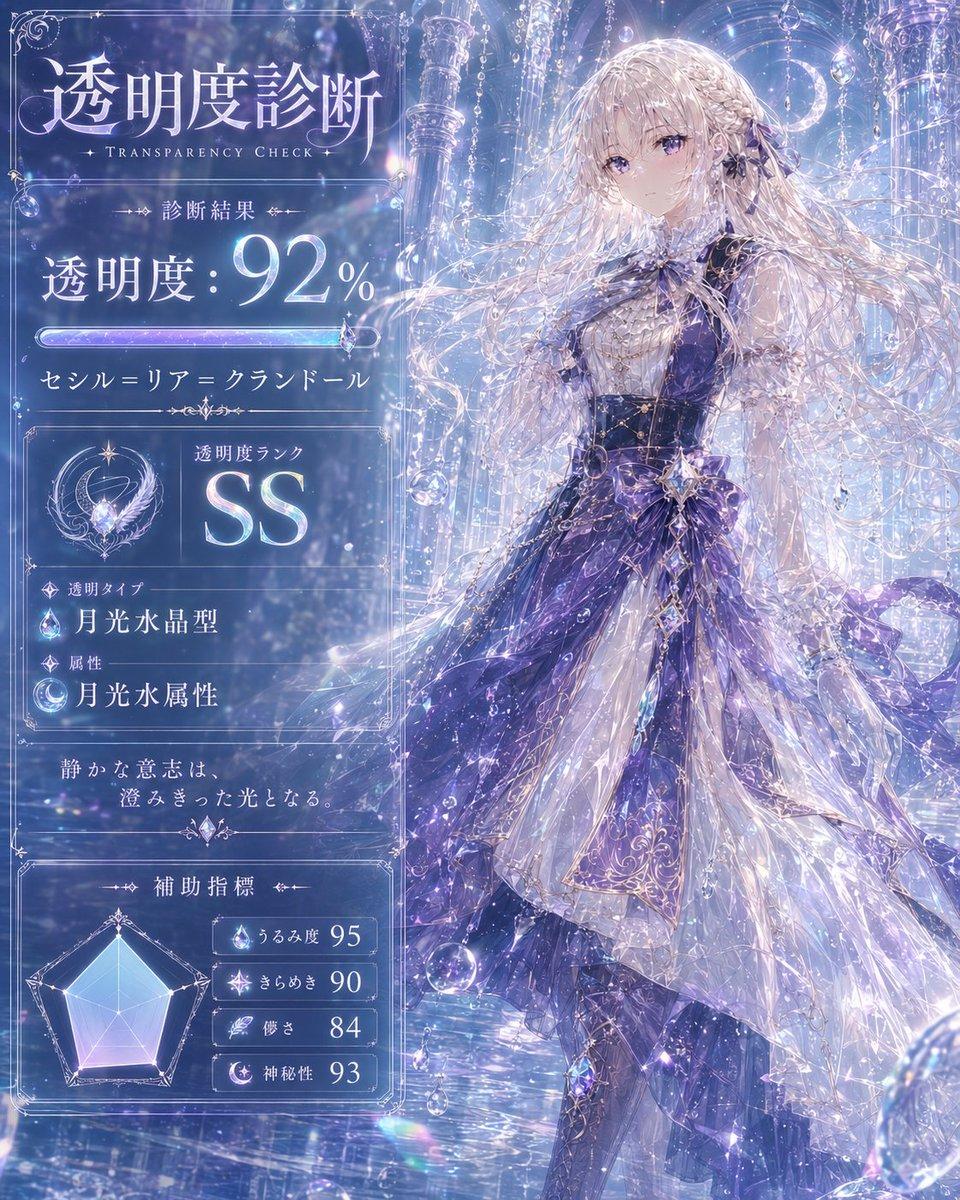
Goal: Create an ornate fantasy “Transparency Check” diagnostic card featuring an ethereal moonlit princess character and a Japanese results UI. Canvas: Square 1:1 image, 1024×1024 style, luminous blue-violet palette, high-detail anime fantasy illustration mixed with elegant magical infographic design. The composition is split vertically: the left 40% is a translucent glass results panel, and the right 60% shows the full-body character standing in a crystal palace. Main subject: On the right, depict a delicate female fantasy character with extremely long flowing silver-white hair, pale skin, and a graceful posture. Her face is covered by a plain muted pink-beige square censor block. She wears an elaborate layered dress in white, silver, lavender, and deep violet with a dark corset bodice, star-shaped ornaments, gemstone chains, lace, translucent veils, and sparkling crystal embroidery. Her skirt is voluminous and semi-transparent with moon-and-star motifs, flowing fabric ribbons, and glittering highlights. Surround her with hanging crystals, glass bubbles, moonlight, refractions, and a grand icy palace background with columns, arches, chandeliers, and circular celestial architecture. Left diagnostic panel: Use a transparent frosted-glass rectangular panel with thin ornate silver borders, filigree corners, tiny star accents, and glowing divider lines. All text should look like elegant Japanese fantasy typography, mostly white with pale lavender and cyan glow. Text content: At the top, large Japanese title text: 「透明度診断」 with small English subtitle “TRANSPARENCY CHECK”. Below it, a small label: 「診断結果」. The main score line reads 「透明度:{argument name="transparency score" default="92"}%」 with the number very large and glowing. Under the score, add a horizontal iridescent progress bar filled nearly to the end, with a small crystal marker on the right. Beneath the bar, show the character name: 「{argument name="character name" default="セシル=リア=クラランドール"}」. Rank card: Include exactly 1 rank section with a circular crescent-moon crystal emblem on the left and the label 「透明度ランク」 above a huge glowing rank value 「{argument name="rank" default="SS"}」 on the right. Type and attribute section: Include exactly 2 labeled rows with small icons. Row 1 label 「透明タイプ」 and value 「{argument name="transparency type" default="月光水晶型"}」 with a crystal droplet icon. Row 2 label 「属性」 and value 「{argument name="attribute" default="月光水属性"}」 with a crescent moon water icon. Quote section: Add a centered poetic line in Japanese: 「静かな意志は、澄みきった光となる。」 with small ornamental flourishes above and below. Auxiliary indicators: At the bottom of the panel, create exactly 4 auxiliary metric rows next to a pale blue-purple radar chart. The radar chart has a pentagonal web with a softly glowing filled polygon. The 4 rows must be: 「うるみ度 95」 with a water droplet icon, 「きらめき 90」 with a sparkle icon, 「儚さ 84」 with a feather icon, and 「神秘性 93」 with a crescent icon. Visual style: Ultra-detailed, luminous, crystalline, dreamy, transparent materials, moonlight, prismatic reflections, soft bokeh, floating bubbles, tiny stars, silver filigree, high fantasy anime art, elegant UI overlay, cool blue lavender lighting, magical atmosphere. Constraints: Keep the exact visible structure and counts: 1 title area, 1 score area, 1 progress bar, 1 name line, 1 rank card, 2 type/attribute rows, 1 quote, 1 radar chart, and 4 auxiliary metric rows. Do not add extra characters, logos, watermarks, or modern objects. Preserve the face-covering square over the character’s face.
Choose the primary action to open PicX Studio with the available template settings. Review the model and format, personalize the creative direction, and generate when ready.
Yes. You can change the subject, setting, lighting, mood, format, and available model controls before creating your image.
This template is free to open and customize. Generation usage is shown in PicX Studio before you create.
Start with GPT Image 2, which is the model associated with this template. You can compare another compatible model for a different finish.
© 2026 PicX Studio. All rights reserved.

Follow a topic to a crawlable collection of related PicX Studio templates.
43,474 public templates available. Verified via the PicX Studio public templates API; refreshed hourly.









![Minimalist Flat Vector Travel Poster — Premium minimalist flat-vector travel poster for {argument name="city name" default="[CITY_NAME]"}, 3:4 vertical format.](https://cms-assets.youmind.com/media/1787917359711_3ug846_HQX205cbMAA6F6S-300x400.jpg)